- Unstructured data extraction is the process of extracting usable, structured information from formats that weren't designed to be machine-readable.
- Unstructured data extraction applies across industries wherever documents drive workflows.
- Unstructured data extraction is the process of identifying, reading, and converting relevant information from these formats into structured outputs
Most enterprise data never gets used. Not because it's irrelevant, but because it's locked inside formats that systems can't read, such as scanned PDFs, email chains, handwritten notes, call transcripts, contracts, and claim forms. According to Gartner, 80% of enterprise data is unstructured. That's the majority of what organizations produce every day, sitting largely untouched.
Unstructured data extraction is how organizations change that. It's the process of extracting usable, structured information from formats that weren't designed to be machine-readable. When done well, it turns a pile of documents into a clean data stream that feeds analytics, automation, and decision-making.
This guide covers what unstructured data extraction is, why it matters, how it works, and what it takes to do it at scale.
What Is Unstructured Data Extraction?
Unstructured data is any information that doesn't fit neatly into rows and columns. It includes documents, images, audio files, video, social media posts, emails, and more. Unlike structured data stored in a database, unstructured data has no predefined format or schema.
Unstructured data extraction is the process of identifying, reading, and converting relevant information from these formats into structured outputs. That might mean pulling policy numbers from insurance certificates, invoice field mapping, or capturing patient details from clinical notes.
The extraction process typically involves a combination of Optical Character Recognition (OCR), Natural Language Processing (NLP), and AI-based classification to locate, interpret, and validate the right fields from the right documents.
Unstructured vs Semi-Structured vs Structured Data
Not all data is the same, and understanding the difference shapes how you approach extraction.
The practical difference matters for teams choosing tools. Structured and semi-structured data can often be handled with ETL pipelines and API connectors. Unstructured data requires OCR, NLP, and AI to interpret content before any transformation can happen.
Why Unstructured Data Extraction Matters?
The volume problem is real. Unstructured data represents an estimated 80 to 90 percent of all new enterprise data and is growing three times faster than structured data. Organizations that can't extract value from it are effectively ignoring the bulk of what they produce and receive.
But volume is only part of the issue. The data inside unstructured documents is often the most operationally critical. A contract contains the terms that govern a business relationship. A claim form contains the details that determine a payout. A medical record contains the history that shapes a treatment plan. When this information stays locked in a document, processes stall.
The business case for extraction is straightforward: when you can read your documents automatically, you can act on them faster, with fewer errors, and at a fraction of the cost.
Where Unstructured Data Extraction Is Used?
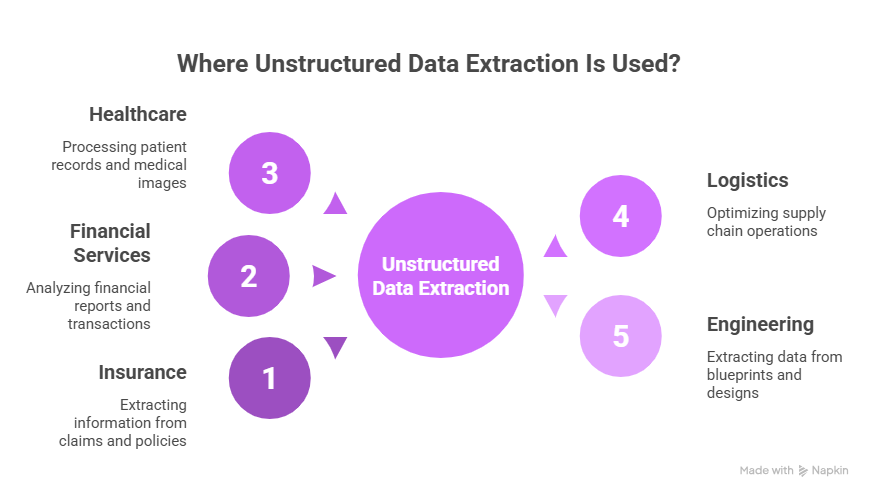
Unstructured data extraction applies across industries wherever documents drive workflows.
Insurance
Insurance operations rely heavily on documents like applications, certificates of insurance, claims forms, and policy files. These documents contain critical structured data hidden within unstructured formats. Unstructured data extraction enables faster underwriting, automates claims intake, and improves risk assessment accuracy by eliminating manual data entry.
Financial Services
Banks and financial institutions process loan applications, bank statements, tax records, and regulatory filings daily. Extracting data from these documents reduces manual review time, speeds up credit decisioning, and strengthens audit trails, ensuring compliance without slowing down operations.
Healthcare
Healthcare providers manage clinical notes, lab reports, referral documents, and patient intake forms. Unstructured data extraction converts this information into usable formats for EHR systems, streamlines billing workflows, and reduces the administrative load on clinical staff, allowing them to focus more on patient care.
Logistics and Supply Chain
Logistics teams handle purchase orders, invoices, bills of lading, and shipping manifests across multiple formats. Automated extraction minimizes errors, accelerates document processing, and prevents delays in shipments and payments, improving overall supply chain efficiency.
Engineering and Manufacturing
Unlike other industries, engineering teams work extensively with technical drawings, CAD files, material datasheets, and compliance certificates. Unstructured data extraction helps capture part numbers, tolerances, material specifications, and revision histories, feeding procurement systems, quality control, and compliance processes without manual intervention.
Across industries, wherever teams manually review documents, unstructured data extraction provides a faster and more scalable alternative. It reduces dependency on human input, improves accuracy, and enables organizations to process higher volumes without increasing operational costs.
How Unstructured Data Extraction Works?
Modern extraction pipelines follow a consistent set of stages.
Step 1: Document Ingestion
Documents arrive via email, APIs, portals, or file uploads in formats like PDF, TIFF, JPEG, DOCX, or XML. The system ingests them and routes each one to the appropriate extraction workflow based on document type. High-volume pipelines handle thousands of documents simultaneously, with intake queues that prevent bottlenecks even during peak submission periods. Getting this routing right reduces processing time downstream.
Step 2: Pre-Processing and Image Enhancement
Before extraction begins, the system prepares the document for reading. This includes de-skewing scanned pages, removing background noise, sharpening contrast, and separating handwritten content from printed text. Documents that arrive as low-resolution scans or as photographed pages go through additional enhancement. Quality at this stage directly affects extraction accuracy across every subsequent step in the pipeline.
Step 3: OCR and Text Recognition
Optical Character Recognition converts visual content into machine-readable text. Modern OCR engines handle printed, typewritten, and handwritten text across a range of fonts, sizes, and page orientations. For complex layouts with tables, checkboxes, multi-column formats, or overlapping fields, AI-enhanced OCR handles structure recognition alongside text, preserving the spatial relationships that give context to individual values.
Step 4: Field Identification and Classification
The system identifies the document type and locates where target fields are likely to appear. A trained model that has processed thousands of invoices knows how to find the vendor name in the header, line items in a table, and totals near the bottom. This classification step is what separates AI-driven extraction from brittle template-matching systems that fail when layouts shift.
Step 5: Data Extraction and Validation
The system pulls the target fields and cross-checks them against predefined rules or reference data. A date outside a valid range, a policy number that doesn't match the expected format, or a subtotal that doesn't reconcile with line items will each trigger a review flag. Validation happens automatically, so only genuine exceptions reach human reviewers rather than every document.
Step 6: Export to Downstream Systems
Validated data exports to ERP, CRM, claims management, or other systems via API, flat file, or direct database write. Field mapping handles the translation between the extraction output format and the schema each target system expects. The source document is typically stored alongside the extracted record, creating an audit trail that links every data point back to its origin.
Challenges of Unstructured Data Extraction
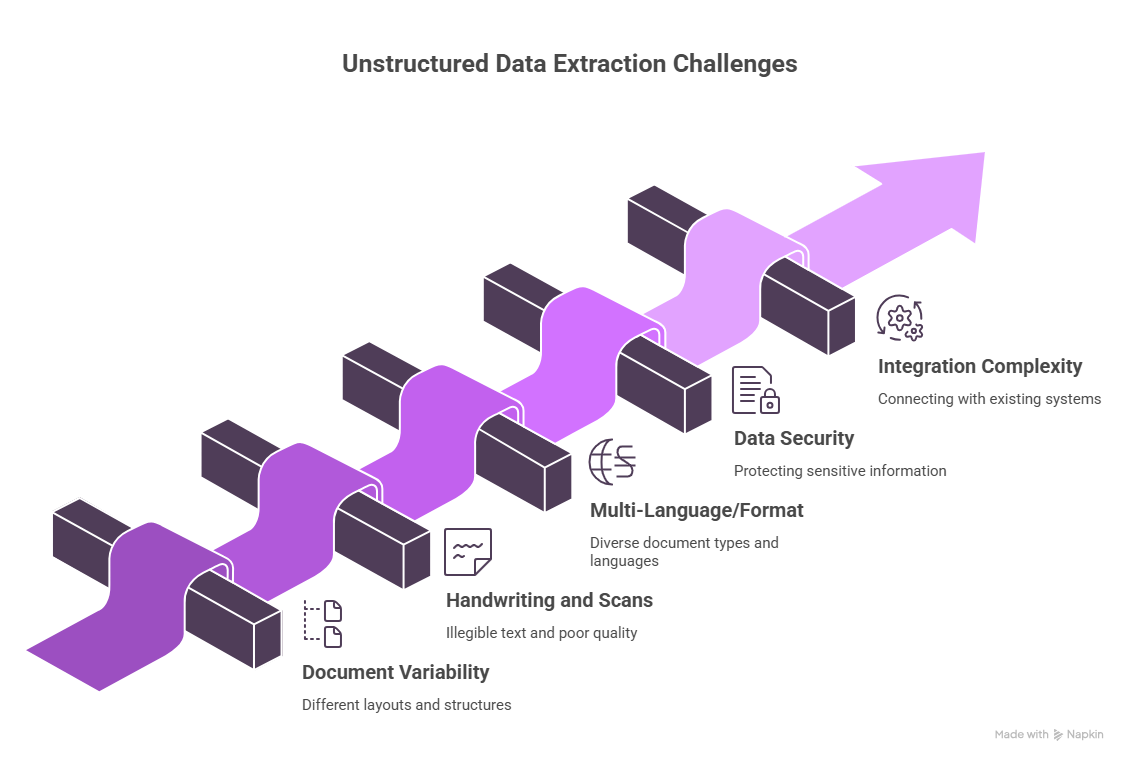
Getting extraction right is harder than it looks. Based on a Market Pulse Survey, 71% of enterprises find managing and protecting unstructured data challenging. The extraction problem is a big part of why.
Document Variability
No two vendors format their invoices the same way. No two insurers lay out their certificates identically. Rule-based extraction systems that work well for one template break as soon as the format changes. Models that understand document semantics, rather than just layout, are the only ones that hold up. This is the core reason enterprises graduate from template-based tools to AI-driven platforms.
Handwriting and Low-Quality Scans
Scanned documents introduce noise that OCR engines struggle with: skewed pages, ink bleed, faded text, and overlapping characters. Handwritten fields compound this further, since pen strokes vary between writers and characters often share space. AI-trained models use surrounding context to interpret ambiguous characters, but accuracy still degrades with poor scan quality. Document capture standards at the point of intake reduce this problem significantly.
Multi-Language and Multi-Format Documents
Global organizations receive documents in multiple languages, scripts, and regional formats. A single shipment file might combine forms in English, Spanish, and Mandarin. Date formats, numeric separators, and address structures differ by country. Extraction systems need multilingual models built in, not added as afterthoughts, or field-level errors multiply across every cross-border workflow that touches those documents.
Data Security and Compliance
Documents often contain PII, financial account details, and protected health information. Every point in the extraction pipeline where data is read, processed, stored, or transmitted is a potential compliance exposure. Systems must meet GDPR, HIPAA, SOC 2, or industry-specific requirements depending on the vertical. Access controls, encryption at rest and in transit, and detailed audit logging are baseline requirements, not optional add-ons.
Integration Complexity
Extracted data is only valuable when it lands in the right system in the right format. Connecting extraction outputs to existing ERP, claims, or analytics platforms requires field mapping, schema translation, and error handling for rejected records. Legacy systems often lack modern APIs, which forces custom middleware. Mismatched data types and undocumented field constraints are the most common sources of post-extraction failures.
How to Automate Unstructured Data Extraction?
Automation is the only way to operate at enterprise scale. Manual extraction creates bottlenecks, introduces errors, and cannot keep pace with document volumes that grow year over year.
Intelligent Document Processing (IDP) is the category of technology designed specifically for this problem. IDP platforms combine OCR, NLP, and machine learning to extract, classify, and validate data from documents without requiring a fixed template for every variation.
The key difference between IDP and older rule-based systems is how they handle change. Rule-based systems need manual updates every time a document format shifts. IDP systems learn from examples and generalize to new layouts, which means they get more accurate over time without constant reconfiguration.
A well-designed automation workflow handles document intake, extraction, validation, exception flagging, and export without human involvement for the majority of documents. Human reviewers handle only the cases that fall outside confidence thresholds.
Benefits of Automated Unstructured Data Extraction
Organizations that implement automated extraction tend to see the same improvements show up, regardless of industry.
Faster Processing Cycles
Documents that once required hours of manual entry are processed in seconds. Extraction pipelines run continuously, which means submissions received overnight are ready in the morning without anyone working through the queue. For time-sensitive workflows like claims intake or loan approvals, faster processing directly affects customer experience. The speed advantage compounds as document volumes grow.
Lower Operational Costs
Reducing manual data entry cuts headcount requirements for high-volume document processing. Teams that previously dedicated staff to re-keying data can redirect that capacity toward exception handling, quality review, or higher-value work. Cost savings are most visible in operations that process thousands of documents monthly, where even a modest reduction in per-document handling time adds up quickly.
Fewer Errors
Trained extraction models applied consistently across identical document types produce fewer errors than human operators working under time pressure. Fatigue, distraction, and inconsistent interpretation don't affect automated systems. Automated validation catches discrepancies before extracted data enters downstream systems, reducing the volume of corrections and rework that manual processes generate downstream in the workflow.
Better Compliance Posture
Automated processing creates consistent, auditable records of every extraction decision. Each field pulled from a document is logged with a timestamp, confidence score, and source reference. Every exception is documented and resolved through a traceable review process. For industries subject to audit, this level of record-keeping is often a requirement. Manual processes rarely produce equivalent documentation without significant additional effort.
Scalability
Automated systems handle volume spikes without adding staff or extending processing windows. A document surge during open enrollment, quarter-end, or a claims event no longer creates a backlog. The same infrastructure that processes five hundred documents a day can process five thousand without reconfiguration. Growth in document volume stops being an operational problem and becomes something the system absorbs on its own.
How Infrrd Helps With Unstructured Data Extraction?
Infrrd is an Intelligent Document Processing platform built to handle high-volume, high-variability document extraction for enterprise teams. Infrrd enables enterprise teams to move from fragmented, manual document handling to a unified, intelligent extraction workflow. It combines AI-driven extraction with validation, review, and integration capabilities, ensuring that unstructured data is not just captured but transformed into reliable, decision-ready information across business systems.
AI-Trained Extraction Models
Infrrd uses pre-trained models for common document types across insurance, financial services, and logistics. These models handle variability across templates without requiring rule-based configuration for each variation. Teams can deploy extraction workflows for new document types without starting from scratch.
Handwriting and Complex Layout Support
Infrrd's OCR handles handwritten fields alongside printed text, which is a common requirement in insurance and mortgage workflows. Complex layouts with tables, nested fields, and multi-page structures are processed with the same accuracy as simpler documents.
Confidence-Based Human-in-the-Loop Review
Every extraction output includes a confidence score. Documents that fall below a defined threshold are routed for human review. This means straight-through processing for the majority of documents, with targeted human involvement only where it adds value.
Integration-Ready Output
Infrrd exports extracted data in structured formats ready to load into existing systems. Pre-built connectors for common platforms reduce integration timelines, and API-first architecture supports custom integration paths for specialized workflows.
Summary
At a certain document volume, manual unstructured data extraction stops being slow and starts being impossible. The volume of documents that enterprises generate and receive continues to grow, and the information inside those documents drives real business decisions. Waiting for manual processing means delays, errors, and missed opportunities.
The organizations getting ahead are the ones implementing unstructured data extraction automation. The extraction infrastructure to support this already exists, and the cost of not building it grows every quarter as documents pile up unread.
FAQs about Unstructured Data Extraction
What is unstructured data extraction?
Unstructured data extraction is the process of pulling specific, usable information out of documents and other unstructured formats like PDFs, images, and emails, and converting it into structured data that can feed into systems or workflows.
What are examples of unstructured data?
Unstructured data includes PDF documents, scanned forms, emails, clinical notes, contracts, images, audio files, and social media content. Any data that doesn't fit into a predefined database schema counts as unstructured.
Why is unstructured data hard to extract?
Documents vary in format, layout, and quality. Scanned pages introduce noise. Handwriting adds complexity. Multi-page, multi-language, and mixed-format documents require systems that understand context, not just fixed field positions.
What technology is used for unstructured data extraction?
Most modern extraction systems combine OCR for text recognition, NLP for semantic understanding, and machine learning models for classification and field identification. This combination is what defines Intelligent Document Processing platforms.
How accurate is automated unstructured data extraction?
Accuracy depends on document quality, model training, and the complexity of the extraction task. Well-trained IDP systems typically operate above 90% accuracy for standard document types, with confidence scoring to flag lower-certainty outputs for review.
What is the difference between structured and unstructured data extraction?
Structured data extraction pulls values from databases or files with defined schemas, like CSV or XML. Unstructured data extraction deals with documents that have no consistent format, requiring AI to interpret layout and content.
How does unstructured data extraction help with compliance?
Automated extraction creates consistent, auditable records of how data was captured and processed. This supports regulatory requirements in industries like healthcare and financial services, where data provenance and accuracy must be documented.
Can unstructured data extraction handle handwritten documents?
Yes. Modern IDP platforms include AI-enhanced OCR capable of reading handwritten text. Accuracy varies with handwriting quality, but confidence scoring ensures that low-certainty handwritten fields are flagged for human review rather than passed through with errors.
What industries benefit most from unstructured data extraction?
Insurance, healthcare, financial services, and logistics see the most direct impact, since these sectors rely on high volumes of documents to drive operational decisions. Any industry where documents are received and manually reviewed can benefit.
How do I choose an unstructured data extraction solution?
Look for a platform that handles your document types out of the box, supports variability without template-by-template configuration, integrates with your existing systems, and provides confidence scoring for exception management. Implementation timeline and ongoing model improvement should factor into the evaluation as well.