- OCR in insurance handles the intake of new submissions, the extraction of data from claim forms, the reading of medical records, and the parsing of third-party reports.
- OCR delivers the most impact in workflows that handle large volumes of documents and require quick turnaround.
- OCR shifts insurance document handling from a labour-intensive bottleneck into a structured, automated input layer.
Insurance companies process huge volumes of paperwork from claims forms, underwriting submissions, policy documents, and loss runs. The paperwork never stops. And for years, the only way to get data off those pages was to have someone type it in manually.
That is changing. Optical Character Recognition (OCR) has moved from a back-office curiosity to a core infrastructure layer for insurers who want to move faster without sacrificing accuracy. OCR in insurance is not just about digitizing documents. It turns paper into usable, actionable data at a scale that manual teams simply cannot match.
This guide covers what OCR is, how it works inside insurance workflows, where it creates the most value, and what teams need to know before adopting it.
What Is OCR in Insurance?
Optical Character Recognition (OCR) is a technology that reads printed or handwritten text from images and converts it into machine-readable data. When a claims adjuster scans a handwritten form or an underwriter receives a faxed loss run, OCR reads the content and extracts it into structured fields, with no human typing a single character.
In an insurance context, OCR sits at the entry point of almost every document-heavy workflow. It handles the intake of new submissions, the extraction of data from claim forms, the reading of medical records, and the parsing of third-party reports.
Modern OCR for insurance goes beyond basic character recognition. Today's systems combine traditional OCR with AI, including natural language processing and machine learning, to handle low-quality scans, varied layouts, and handwritten notes that would have stumped older tools.
Traditional OCR vs. AI-Powered IDP: What's Actually Different?
Not all OCR works the same way, and the distinction matters more in insurance than in most industries because so few insurance documents follow one fixed layout.
Template-based OCR was built for documents that don't change. It works by mapping fixed zones on a page, for example, “policy number sits in the top-right box.” The moment a carrier updates a form or a broker submits a slightly different layout, the template breaks and needs to be manually reconfigured.
AI/IDP-based extraction does not depend on a fixed template. It uses machine learning and natural language processing to understand what a field represents based on context, labels, and surrounding text, so it can read a loss run it has never seen before without a human rebuilding a template first.
For a single, unchanging form, template OCR can still be the simpler and cheaper option. Insurance rarely works that way, which is why IDP is now the default for claims and underwriting document sets rather than a single form type.
Why Document Processing Is a Bottleneck in Insurance?
Insurance runs on documents. Every policy begins with a submission. Every claim generates paperwork. Every renewal requires documents to be reviewed again. The volume is often significant.
Underwriting teams may review as many as 70 documents for a single case, and in some situations, those files can exceed 600 pages. That work often falls on skilled professionals who should be focused on evaluating risk, not sorting attachments or searching for information.
When document processing is handled manually, problems build quickly. Data entered by hand can introduce errors. Files move slowly from one team to another. Reviewers spend valuable time re-entering information that already exists in the documents. This does not add real underwriting judgment or claims expertise. It simply adds administrative work to every case.
A simple way to think about it is this: the road ahead may be open, but progress slows because every file has to stop at the same manual checkpoint before moving forward. OCR helps remove that checkpoint by turning document content into usable digital data faster.
How OCR Works in Insurance Workflows?
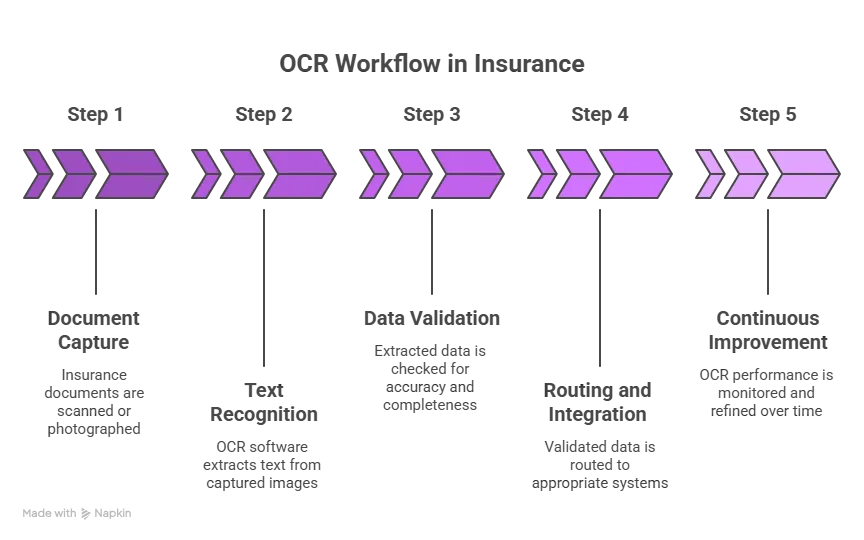
OCR in insurance workflows converts data from documents like claims, policies, and forms into structured, usable information. This allows teams to process documents faster, reduce manual effort, and move cases through underwriting and claims workflows more efficiently.
Step 1: Document Capture
Documents enter the system through multiple channels: email attachments, scanned uploads, portal submissions, and even fax. OCR systems receive these files and prepare them for extraction. This includes image enhancement, deskewing, and handling multi-page documents as a single logical unit.
Step 2: Text Recognition and Extraction
The OCR engine reads the document and identifies text regions: headers, field labels, values, tables, and signatures. For structured forms, it maps fields to known templates. For unstructured documents like medical notes or correspondence, the engine uses AI to infer context and extract relevant data points.
Step 3: Data Validation
Extracted data is checked against expected formats, lookup tables, and business rules. A date field should contain a date. A policy number should match known patterns. Confidence scores flag uncertain extractions for human review rather than passing bad data downstream.
Step 4: Routing and Integration
Once validated, the extracted data moves into downstream systems: the claims management platform, the underwriting workbench, or the policy admin system. The original document is indexed and stored for audit access.
Here's what that looks like on a single document. A First Notice of Loss (FNOL) form arrives by email. OCR extracts the policy number, date of loss, claimant name, loss location, and a short loss description. Validation checks confirm the policy number matches an active policy and the date of loss falls within the coverage period.
The system then pushes that structured data into the claims management platform through an API call, creating a new claim record and routing it to an adjuster queue based on loss type and estimated severity. The original FNOL document is attached to that claim record for reference. In most cases, this entire sequence takes minutes rather than the hours a manual intake process would need, except when fields are flagged for review and routed to a human before the claim record is finalized.
Step 5: Continuous Improvement
Modern OCR systems learn from corrections. When a reviewer catches a misread field, that feedback trains the model to perform better on similar documents in future runs. Over time, accuracy improves without any additional configuration effort.
What Makes Insurance Documents Difficult for OCR?
Insurance document sets are harder for OCR than most back-office paperwork because so few documents in a single workflow share a format. A few document classes account for most of the difficulty.
ACORD Forms and Broker Submissions
ACORD forms are standardized on paper, but in practice, brokers fill them out differently, attach supplementary pages inconsistently, and submit scanned or re-typed versions that drift from the original layout. OCR built for “the ACORD form” alone can miss the variations that show up in real submissions.
Loss Runs
Loss runs have no shared format across carriers. Column order, terminology, and even how a “closed” claim is labeled differ from one issuer to the next, so a system trained on one carrier's loss run format may not directly generalize to another's.
Medical Records and Bills
Medical documentation combines dense tables, medical codes, and clinical shorthand, often with a mix of typed and handwritten content on the same page. Extracting the right figures requires understanding what a code or line item means, not just reading the characters.
Handwritten Adjuster Notes and Field Reports
Adjuster notes, inspection forms, and field reports are frequently handwritten, sometimes on top of a printed template. Handwriting recognition accuracy here depends heavily on legibility and is generally lower than accuracy on typed or printed text.
Scanned, Faxed, and Multi-Generation Copies
Older claims and legacy policy files often exist only as faxes or scans of scans. Skew, low contrast, and compression artifacts degrade OCR accuracy in ways that have nothing to do with the extraction model itself, they're a source-image problem the OCR engine has to correct for before it can even read the text.
Signatures, Stamps, and Overlapping Marks
Insurance documents are full of stamps, signatures, and handwritten annotations that overlap printed fields. These marks can obscure the underlying text or get misread as characters, which is why signature and stamp zones typically need separate handling from the rest of the page.
Where OCR Creates the Most Value in Insurance?
OCR delivers the most impact in workflows that handle large volumes of documents and require quick turnaround. These are the areas where manual processing slows operations and automation creates immediate efficiency gains.
Claims Processing
Claims is the highest-volume, highest-stakes document environment in insurance. Every claim generates intake forms, adjuster notes, medical bills, repair estimates, and correspondence. OCR can extract relevant fields from each document type and populate the claims system automatically.
The efficiency gains here are substantial. OCR implementations have led to 30% faster claims processing in enterprise insurance environments. For high-volume carriers processing thousands of claims per month, that improvement compounds quickly.
At the system level, the contrast is even sharper. Real-world insurance claims implementations have shown that manual document processing that once took around 10 minutes per record can drop to under 2 seconds when automated, a roughly 300-fold efficiency improvement.
Underwriting Submissions
Underwriting teams receive submissions in dozens of formats: spreadsheets, PDFs, scanned applications, and broker emails. OCR extracts the data from each format and normalizes it into the underwriting system, so the underwriter can spend time on risk assessment rather than document preparation.
Given that underwriters may review up to 70 documents per case, eliminating manual extraction from even half of those creates meaningful capacity.
Policy Administration
Renewals, endorsements, and cancellations all generate document traffic. OCR reads incoming forms, identifies the relevant policy, and routes data to the correct record. Changes that once required a clerk to read, interpret, and type can be handled programmatically, with human oversight reserved for exceptions.
Compliance and Audit
Regulators expect insurers to maintain accurate records of every transaction. OCR creates a structured, searchable data layer from what would otherwise be a pile of scanned images. Audit teams can query specific fields across thousands of documents rather than reading each one manually.
What Manual Processing Actually Looks Like on Insurance Documents
Loss Runs With No Common Format
Every carrier issues loss runs in its own layout. A reviewer moving between five prior carriers' loss runs has to relearn where the claim count, incurred amount, and status columns sit each time. That relearning is where transposed figures and missed rows creep in.
Medical Bills and Itemized Statements
Claims involving injury include itemized bills with CPT and ICD codes packed into dense tables. A reviewer keying these by hand has to cross-reference codes against the claim type, which slows intake and is where line-item errors are most common.
Multi-Page Broker Submissions
A single underwriting submission can bundle an application, loss history, financial statements, and supplementary questionnaires into one packet, sometimes with pages out of order. Reviewers spend real time just figuring out where one document ends and the next begins before they can extract anything.
Faxed and Rescanned Documents
A meaningful share of claims and underwriting documents still arrive as faxes or rescans of rescans. Skewed pages, low contrast, and clipped margins make manual reading slower and more error-prone, and the same issues carry over into OCR if the system isn't built to handle degraded images.
Benefits of OCR in Insurance
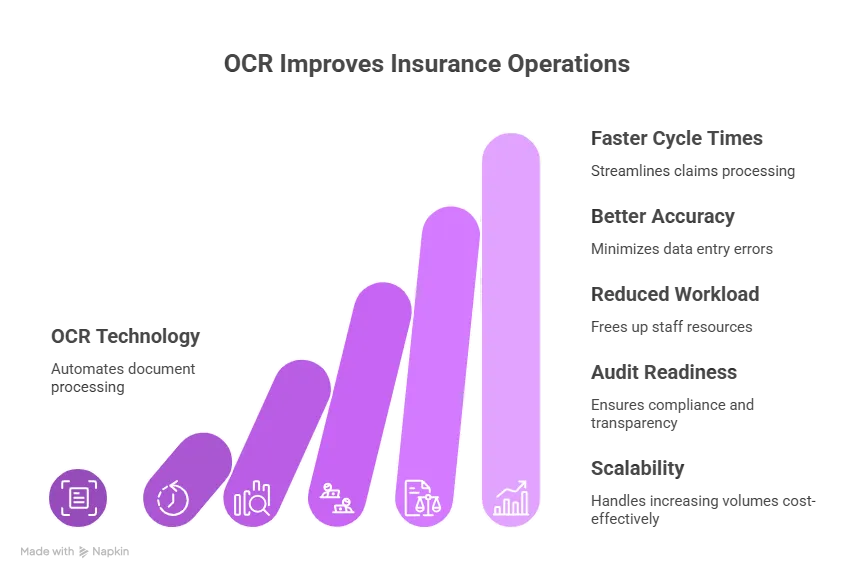
OCR shifts insurance document handling from a labour-intensive bottleneck into a structured, automated input layer. Teams process more documents with fewer errors, and the data that reaches downstream systems is reliable enough to act on without a second round of manual checks.
Faster Cycle Times
Machine-speed document processing shortens every workflow it touches. Claims close in less time, submissions move to quoting faster, and renewals no longer wait in a manual review queue. Speed compounds across the volume.
Better Data Accuracy
OCR paired with validation logic catches errors before they reach the core system. Mismatched field formats, out-of-range values, and low-confidence reads get flagged for review rather than silently passed through. Downstream data quality improves as a direct result.
Reduced Non-Core Workload
Sorting, re-entering, and filing documents pulls skilled staff away from work that needs their judgment. OCR handles that intake layer automatically, freeing underwriters, adjusters, and analysts to focus on decision-making rather than data prep.
Audit Readiness
Every document processed through OCR produces a structured, indexed record. When regulators or internal audit teams need to trace a decision or verify a transaction, the data is searchable and retrievable without digging through scanned image archives.
Scalability Without Proportional Cost
Automated processing does not slow down when volume spikes. A renewal surge or a catastrophic event that would overwhelm a manual team running through the OCR pipeline at the same speed, regardless of intake volume. Cost does not scale with load the way staffing does.
How Should You Evaluate OCR Accuracy?
“High accuracy” is a marketing phrase until it's tied to a measurement. A more useful evaluation looks at several figures together rather than one headline number.
Field-level accuracy vs. document-level accuracy. A system can read 95% of individual fields correctly while getting far fewer documents fully correct end to end, since one wrong field breaks the whole document. Ask which figure a vendor is quoting.
Accuracy by document type, not an overall average. A single blended accuracy number hides the fact that typed claim forms and handwritten adjuster notes perform very differently. Break the number out by document class before trusting it.
Straight-through processing rate. This measures the share of documents that clear validation with no human review needed, arguably the metric that matters most for operational impact, since it reflects real reviewer time saved.
Precision and recall on the fields that carry risk. A wrong policy number or claim amount matters more than a wrong internal reference code. Accuracy on high-consequence fields deserves more scrutiny than an aggregate score.
Performance on your own documents. Vendor benchmarks are typically run on clean, representative samples. The only evaluation that predicts real performance is a test run against a sample of your team's actual, messy document backlog.
Where OCR Still Falls Short
OCR has real limits, and pretending otherwise sets teams up for a rough rollout. Knowing where it struggles is what makes a human-in-the-loop step necessary rather than optional.
- Source quality sets the ceiling. No extraction model can read text that isn't legibly captured. A degraded fax or an angled photo produces unreliable output regardless of the engine behind it.
- Dense tables and multi-column schedules. Loss run schedules, payroll breakdowns, and itemized medical bills pack values into tight structures where misaligned columns can attach the right number to the wrong field, often invisibly.
- Handwriting remains inconsistent. Accuracy varies with legibility, writing style, and document condition, so expect a range on handwritten fields rather than one fixed number.
- Novel or rare layouts. A format the system has rarely seen, a new broker's template, for instance, can produce lower-confidence extractions until enough examples or corrections come in.
- Errors that pass validation but are still wrong. A correctly formatted date pulled from the wrong field will clear format checks. These semantic errors: right format, wrong meaning; are the hardest to catch automatically, which is why spot-checking against ground truth still matters.
How Infrrd Automates OCR-Driven Document Processing in Insurance?
Infrrd is an Intelligent Document Processing platform built for the document complexity that insurance teams deal with every day. Its OCR and AI extraction layer is designed to handle the variation that generic tools struggle with: non-standard layouts, mixed handwriting and print, low-resolution scans, and multi-type document packets.
Handling Unstructured Insurance Documents
Insurance documents do not follow a single template, which is why understanding how to choose the right insurance automation vendor becomes essential for scalable operations. Loss runs vary by carrier. Medical records follow hospital-specific formats. Broker submissions arrive in formats that change every quarter. Infrrd's models are trained on insurance-specific document types and can extract data accurately even when the layout does not match a known template.
Continuous Learning from Reviewer Corrections
When Infrrd's extraction is corrected by a reviewer, the correction feeds back into the model. Accuracy improves over time on the specific document types that matter most to the team, without manual retraining cycles or IT involvement.
Integration with Core Insurance Systems
Extracted data moves directly into claims management platforms, policy admin systems, and underwriting workbenches. Infrrd connects to existing technology stacks rather than requiring teams to build data pipelines from scratch.
Human-in-the-Loop for Low-Confidence Extractions
Not every document can be read with high confidence. Infrrd flags low-confidence extractions and routes them for human review rather than passing uncertain data downstream. The result is a system where automation handles the clear cases, and humans handle the edge cases, without either side creating unnecessary rework for the other.
Summary
OCR in insurance is not a feature. It is infrastructure. The document volumes that insurance operations deal with, whether claims files, underwriting submissions, policy records, or compliance documentation, cannot be managed at scale through manual effort alone.
Insurers who have automated document intake and data extraction are processing faster, making fewer data errors, and freeing their teams to spend time on the work that actually requires expertise. The gap between those operations and the ones still relying on manual re-entry is widening. Getting OCR right is less a competitive advantage now and more a prerequisite for staying competitive at all.
FAQs about OCR in Insurance
What is OCR in insurance?
OCR in insurance refers to technology that reads text from paper or digital documents and converts it into structured data. Insurers use it to automate the extraction of information from claims forms, policy documents, underwriting submissions, and other document types.
How does OCR improve claims processing?
OCR removes the need for manual data entry from claims documents. Data is extracted automatically and populated into the claims system, which reduces processing time, cuts input errors, and allows adjusters to focus on assessment rather than administration.
What types of documents can OCR handle in insurance?
OCR systems built for insurance can process claims intake forms, loss runs, medical records, broker submissions, policy applications, endorsement requests, and correspondence. Modern systems also handle handwritten content and non-standard layouts.
Is OCR accurate enough for insurance document processing?
Modern AI-enhanced OCR achieves high accuracy on standard insurance document types. Systems with confidence scoring and human-in-the-loop review for exceptions can maintain accuracy at production scale. Accuracy also improves over time as the model learns from corrections.
What is the difference between OCR and Intelligent Document Processing?
OCR is the core technology that reads text from images. Intelligent Document Processing (IDP) combines OCR with AI, including natural language processing and machine learning, to understand context, extract meaning, and handle unstructured documents. IDP is the broader capability; OCR is a component within it.
How long does it take to implement OCR for insurance document workflows?
Implementation timelines vary by system complexity and integration requirements. Pre-built insurance-specific models can reduce configuration time significantly. Most enterprise implementations involve an initial model training phase, integration with core systems, and a validation period before full deployment.
Can OCR handle handwritten insurance forms?
Yes. Modern OCR systems use handwriting recognition as a distinct capability from printed text recognition. Performance varies by handwriting quality and document type, but AI-trained models handle a much wider range of handwriting than older rule-based OCR tools.
Does OCR reduce compliance risk in insurance?
OCR creates structured, searchable data records from documents that would otherwise exist only as scanned images. This makes audit preparation faster, supports data lineage tracking, and reduces the risk of records being lost or misclassified.
What should insurance teams look for in an OCR solution?
Key evaluation criteria include accuracy on insurance-specific document types, confidence scoring for exception handling, integration capabilities with existing platforms, support for unstructured document formats, and a feedback loop that allows the model to improve over time.