- OCR in insurance handles the intake of new submissions, the extraction of data from claim forms, the reading of medical records, and the parsing of third-party reports.
- OCR delivers the most impact in workflows that handle large volumes of documents and require quick turnaround.
- OCR shifts insurance document handling from a labour-intensive bottleneck into a structured, automated input layer.
Insurance companies process huge volumes of paperwork from claims forms, underwriting submissions, policy documents, and loss runs. The paperwork never stops. And for years, the only way to get data off those pages was to have someone type it in manually.
That is changing. Optical Character Recognition (OCR) has moved from a back-office curiosity to a core infrastructure layer for insurers who want to move faster without sacrificing accuracy. OCR in insurance is not just about digitizing documents. It turns paper into usable, actionable data at a scale that manual teams simply cannot match.
This guide covers what OCR is, how it works inside insurance workflows, where it creates the most value, and what teams need to know before adopting it.
What Is OCR in Insurance?
Optical Character Recognition (OCR) is a technology that reads printed or handwritten text from images and converts it into machine-readable data. When a claims adjuster scans a handwritten form or an underwriter receives a faxed loss run, OCR reads the content and extracts it into structured fields, with no human typing a single character.
In an insurance context, OCR sits at the entry point of almost every document-heavy workflow. It handles the intake of new submissions, the extraction of data from claim forms, the reading of medical records, and the parsing of third-party reports.
Modern OCR for insurance goes beyond basic character recognition. Today's systems combine traditional OCR with AI, including natural language processing and machine learning, to handle low-quality scans, varied layouts, and handwritten notes that would have stumped older tools.
Why Document Processing Is a Bottleneck in Insurance?
Insurance runs on documents. Every policy begins with a submission. Every claim generates paperwork. Every renewal requires documents to be reviewed again. The volume is often significant.
Underwriting teams may review as many as 70 documents for a single case, and in some situations, those files can exceed 600 pages. That work often falls on skilled professionals who should be focused on evaluating risk, not sorting attachments or searching for information.
When document processing is handled manually, problems build quickly. Data entered by hand can introduce errors. Files move slowly from one team to another. Reviewers spend valuable time re-entering information that already exists in the documents. This does not add real underwriting judgment or claims expertise. It simply adds administrative work to every case.
A simple way to think about it is this: the road ahead may be open, but progress slows because every file has to stop at the same manual checkpoint before moving forward. OCR helps remove that checkpoint by turning document content into usable digital data faster.
How OCR Works in Insurance Workflows?
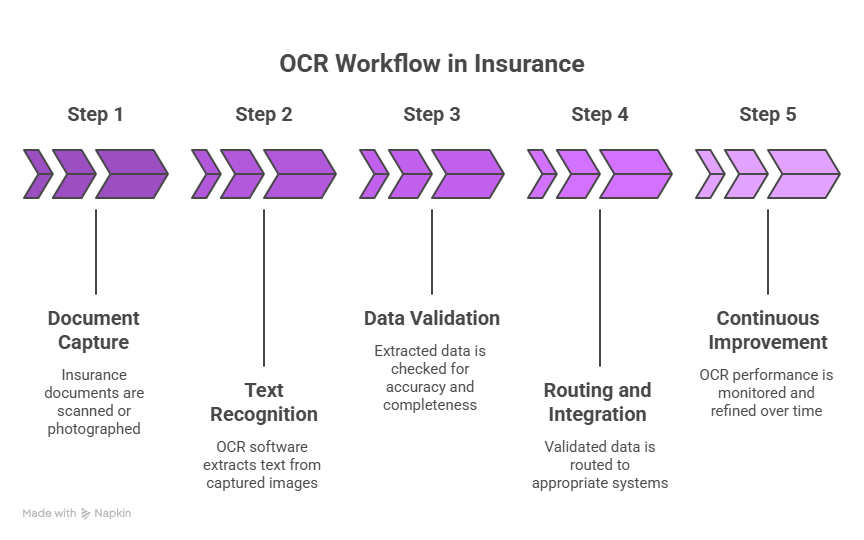
OCR in insurance workflows converts data from documents like claims, policies, and forms into structured, usable information. This allows teams to process documents faster, reduce manual effort, and move cases through underwriting and claims workflows more efficiently.
Step 1: Document Capture
Documents enter the system through multiple channels: email attachments, scanned uploads, portal submissions, and even fax. OCR systems receive these files and prepare them for extraction. This includes image enhancement, deskewing, and handling multi-page documents as a single logical unit.
Step 2: Text Recognition and Extraction
The OCR engine reads the document and identifies text regions: headers, field labels, values, tables, and signatures. For structured forms, it maps fields to known templates. For unstructured documents like medical notes or correspondence, the engine uses AI to infer context and extract relevant data points.
Step 3: Data Validation
Extracted data is checked against expected formats, lookup tables, and business rules. A date field should contain a date. A policy number should match known patterns. Confidence scores flag uncertain extractions for human review rather than passing bad data downstream.
Step 4: Routing and Integration
Once validated, the extracted data moves into downstream systems: the claims management platform, the underwriting workbench, or the policy admin system. The original document is indexed and stored for audit access. No manual re-entry required.
Step 5: Continuous Improvement
Modern OCR systems learn from corrections. When a reviewer catches a misread field, that feedback trains the model to perform better on similar documents in future runs. Over time, accuracy improves without any additional configuration effort.
Where OCR Creates the Most Value in Insurance?
OCR delivers the most impact in workflows that handle large volumes of documents and require quick turnaround. These are the areas where manual processing slows operations and automation creates immediate efficiency gains.
Claims Processing
Claims is the highest-volume, highest-stakes document environment in insurance. Every claim generates intake forms, adjuster notes, medical bills, repair estimates, and correspondence. OCR can extract relevant fields from each document type and populate the claims system automatically.
The efficiency gains here are substantial. OCR implementations have led to 30% faster claims processing in enterprise insurance environments. For high-volume carriers processing thousands of claims per month, that improvement compounds quickly.
At the system level, the contrast is even sharper. Real-world insurance claims implementations have shown that manual document processing that once took around 10 minutes per record can drop to under 2 seconds when automated, a roughly 300-fold efficiency improvement.
Underwriting Submissions
Underwriting teams receive submissions in dozens of formats: spreadsheets, PDFs, scanned applications, and broker emails. OCR extracts the data from each format and normalizes it into the underwriting system, so the underwriter can spend time on risk assessment rather than document preparation.
Given that underwriters may review up to 70 documents per case, eliminating manual extraction from even half of those creates meaningful capacity.
Policy Administration
Renewals, endorsements, and cancellations all generate document traffic. OCR reads incoming forms, identifies the relevant policy, and routes data to the correct record. Changes that once required a clerk to read, interpret, and type can be handled programmatically, with human oversight reserved for exceptions.
Compliance and Audit
Regulators expect insurers to maintain accurate records of every transaction. OCR creates a structured, searchable data layer from what would otherwise be a pile of scanned images. Audit teams can query specific fields across thousands of documents rather than reading each one manually.
Challenges of Manual Document Processing in Insurance
Manual document processing introduces friction across insurance workflows, especially as volume and complexity increase. Over time, these inefficiencies compound and affect accuracy, speed, and operational scalability.
High Error Rates
Manual data entry is prone to mistakes at every touchpoint. A misread digit on a loss run, a transposed date on a claims form, or a missed field on a submission can trigger a chain of downstream problems, from incorrect reserves to compliance exposure.
Processing Delays
When document intake depends on human effort, processing speed is directly tied to staffing capacity. During high-volume periods like catastrophe events or renewal cycles, inbound volume outpaces team bandwidth. The backlog builds, claimants wait longer, and brokers start following up for status updates.
Inconsistent Data Quality
Two reviewers reading the same document will not always extract the same information. One may catch a figure buried in a table; another may skip it entirely. That inconsistency in reading does not stay on the page. It moves into the policy admin system, the claims platform, and every report drawn from them.
Scalability Constraints
Scaling a manual operation requires hiring, onboarding, and retaining staff at a pace with volume. That takes time and money, and there is no guarantee the added headcount keeps up with peak demand. OCR-based processing scales without those constraints.
Benefits of OCR in Insurance
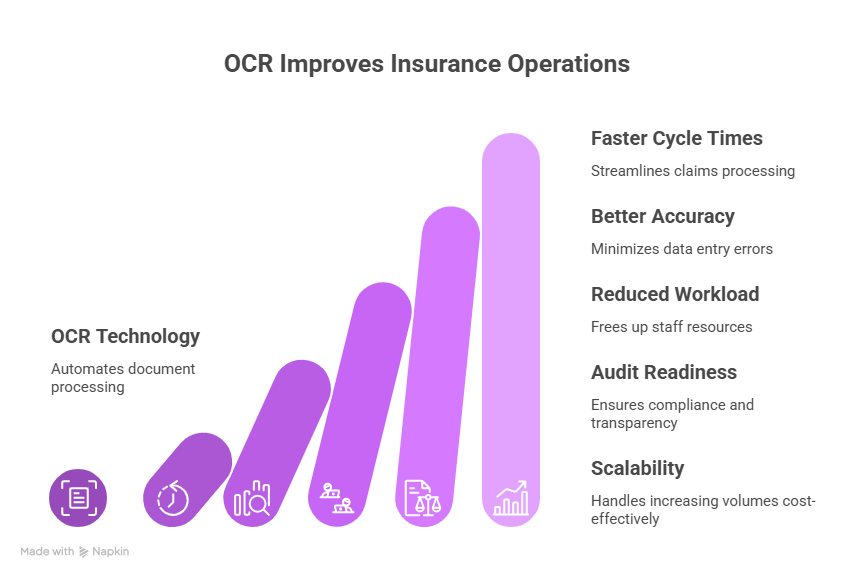
OCR shifts insurance document handling from a labour-intensive bottleneck into a structured, automated input layer. Teams process more documents with fewer errors, and the data that reaches downstream systems is reliable enough to act on without a second round of manual checks.
Faster Cycle Times
Machine-speed document processing shortens every workflow it touches. Claims close in less time, submissions move to quoting faster, and renewals no longer wait in a manual review queue. Speed compounds across the volume.
Better Data Accuracy
OCR paired with validation logic catches errors before they reach the core system. Mismatched field formats, out-of-range values, and low-confidence reads get flagged for review rather than silently passed through. Downstream data quality improves as a direct result.
Reduced Non-Core Workload
Sorting, re-entering, and filing documents pulls skilled staff away from work that needs their judgment. OCR handles that intake layer automatically, freeing underwriters, adjusters, and analysts to focus on decision-making rather than data prep.
Audit Readiness
Every document processed through OCR produces a structured, indexed record. When regulators or internal audit teams need to trace a decision or verify a transaction, the data is searchable and retrievable without digging through scanned image archives.
Scalability Without Proportional Cost
Automated processing does not slow down when volume spikes. A renewal surge or a catastrophic event that would overwhelm a manual team running through the OCR pipeline at the same speed, regardless of intake volume. Cost does not scale with load the way staffing does.
How Infrrd Automates OCR-Driven Document Processing in Insurance?
Infrrd is an Intelligent Document Processing platform built for the document complexity that insurance teams deal with every day. Its OCR and AI extraction layer is designed to handle the variation that generic tools struggle with: non-standard layouts, mixed handwriting and print, low-resolution scans, and multi-type document packets.
Handling Unstructured Insurance Documents
Insurance documents do not follow a single template. Loss runs vary by carrier. Medical records follow hospital-specific formats. Broker submissions arrive in formats that change every quarter. Infrrd's models are trained on insurance-specific document types and can extract data accurately even when the layout does not match a known template.
Continuous Learning from Reviewer Corrections
When Infrrd's extraction is corrected by a reviewer, the correction feeds back into the model. Accuracy improves over time on the specific document types that matter most to the team, without manual retraining cycles or IT involvement.
Integration with Core Insurance Systems
Extracted data moves directly into claims management platforms, policy admin systems, and underwriting workbenches. Infrrd connects to existing technology stacks rather than requiring teams to build data pipelines from scratch.
Human-in-the-Loop for Low-Confidence Extractions
Not every document can be read with high confidence. Infrrd flags low-confidence extractions and routes them for human review rather than passing uncertain data downstream. The result is a system where automation handles the clear cases, and humans handle the edge cases, without either side creating unnecessary rework for the other.
Summary
OCR in insurance is not a feature. It is infrastructure. The document volumes that insurance operations deal with, whether claims files, underwriting submissions, policy records, or compliance documentation, cannot be managed at scale through manual effort alone.
Insurers who have automated document intake and data extraction are processing faster, making fewer data errors, and freeing their teams to spend time on the work that actually requires expertise. The gap between those operations and the ones still relying on manual re-entry is widening. Getting OCR right is less a competitive advantage now and more a prerequisite for staying competitive at all.
FAQs about OCR in Insurance
What is OCR in insurance?
OCR in insurance refers to technology that reads text from paper or digital documents and converts it into structured data. Insurers use it to automate the extraction of information from claims forms, policy documents, underwriting submissions, and other document types.
How does OCR improve claims processing?
OCR removes the need for manual data entry from claims documents. Data is extracted automatically and populated into the claims system, which reduces processing time, cuts input errors, and allows adjusters to focus on assessment rather than administration.
What types of documents can OCR handle in insurance?
OCR systems built for insurance can process claims intake forms, loss runs, medical records, broker submissions, policy applications, endorsement requests, and correspondence. Modern systems also handle handwritten content and non-standard layouts.
Is OCR accurate enough for insurance document processing?
Modern AI-enhanced OCR achieves high accuracy on standard insurance document types. Systems with confidence scoring and human-in-the-loop review for exceptions can maintain accuracy at production scale. Accuracy also improves over time as the model learns from corrections.
What is the difference between OCR and Intelligent Document Processing?
OCR is the core technology that reads text from images. Intelligent Document Processing (IDP) combines OCR with AI, including natural language processing and machine learning, to understand context, extract meaning, and handle unstructured documents. IDP is the broader capability; OCR is a component within it.
How long does it take to implement OCR for insurance document workflows?
Implementation timelines vary by system complexity and integration requirements. Pre-built insurance-specific models can reduce configuration time significantly. Most enterprise implementations involve an initial model training phase, integration with core systems, and a validation period before full deployment.
Can OCR handle handwritten insurance forms?
Yes. Modern OCR systems use handwriting recognition as a distinct capability from printed text recognition. Performance varies by handwriting quality and document type, but AI-trained models handle a much wider range of handwriting than older rule-based OCR tools.
Does OCR reduce compliance risk in insurance?
OCR creates structured, searchable data records from documents that would otherwise exist only as scanned images. This makes audit preparation faster, supports data lineage tracking, and reduces the risk of records being lost or misclassified.
What should insurance teams look for in an OCR solution?
Key evaluation criteria include accuracy on insurance-specific document types, confidence scoring for exception handling, integration capabilities with existing platforms, support for unstructured document formats, and a feedback loop that allows the model to improve over time.