- Intelligent invoice processing uses AI, machine learning, and document automation to handle this work without manual intervention.
- Intelligent Invoice Processing moves from document intake to payment routing in a clear sequence, with validation checkpoints built in at every stage.
- Invoice processing is one of the most resource-intensive functions in finance, and one of the most automatable.
Invoice is a common challenge for finance teams. Every invoice follows a similar journey. It arrives in the system, gets opened and reviewed, and the data is manually entered. Teams then match it with the purchase order, send it for approval, and route it for payment.
This process repeats continuously. As invoice volume increases, manual work slows teams down, increases the risk of errors, and creates operational bottlenecks.
According to research by the Association of Accounts Payable Professionals, 52% of AP professionals spend more than 10 hours every week just on invoice processing tasks. That is more than a quarter of the standard work week consumed by a single, largely repetitive function. It does not have to be that way.
Intelligent invoice processing uses AI, machine learning, and document automation to handle this work without manual intervention. Finance teams that have adopted it report fewer errors, faster cycle times, and AP staff freed up for higher-value work.
This guide covers what intelligent invoice processing is, how it works, where manual processing breaks down, and how automation solves those problems.
What Is Intelligent Invoice Processing?
Intelligent invoice processing is the use of AI-driven document automation to capture, extract, validate, and route invoice data without requiring a person to manually read and key in that information.
Think of it like the difference between a paper map and GPS navigation. In manual processing, a person reviews each document, figures out the steps, and moves it forward one action at a time. In intelligent processing, the system understands the input, determines the best path, accounts for variables, and routes the invoice automatically with minimal human involvement.
The "intelligent" part matters. Earlier automation relied on rigid templates where the invoice had to look exactly right for the system to read it. Modern intelligent processing uses trained AI models that can handle invoices from hundreds of different suppliers, in different layouts and formats, with a high degree of accuracy.
Why Intelligent Invoice Processing Matters in 2026?
Accounts payable has always been a volume game. Mid-sized businesses receive thousands of invoices a month. Large enterprises can process hundreds of thousands. Doing that manually is not just slow; it creates real financial risk.
Late payment penalties, missed early payment discounts, and duplicate payments all trace back to processing bottlenecks. When an AP team is buried in invoice queues, those errors are almost inevitable.
The market has taken notice. The accounts payable automation market is valued at $3.8 billion in 2026 and is projected to reach $10 billion by 2036, growing at a compound annual rate of 10.3%. That kind of sustained growth reflects genuine enterprise demand, not a passing trend.
Organizations that have moved to intelligent processing are seeing results. Platforms using AI for invoice handling report a 95% reduction in errors compared to manual data entry, and cost reductions of 60 to 70% per invoice processed. For a team processing tens of thousands of invoices a year, those numbers translate to significant savings.
Who Uses Intelligent Invoice Processing?
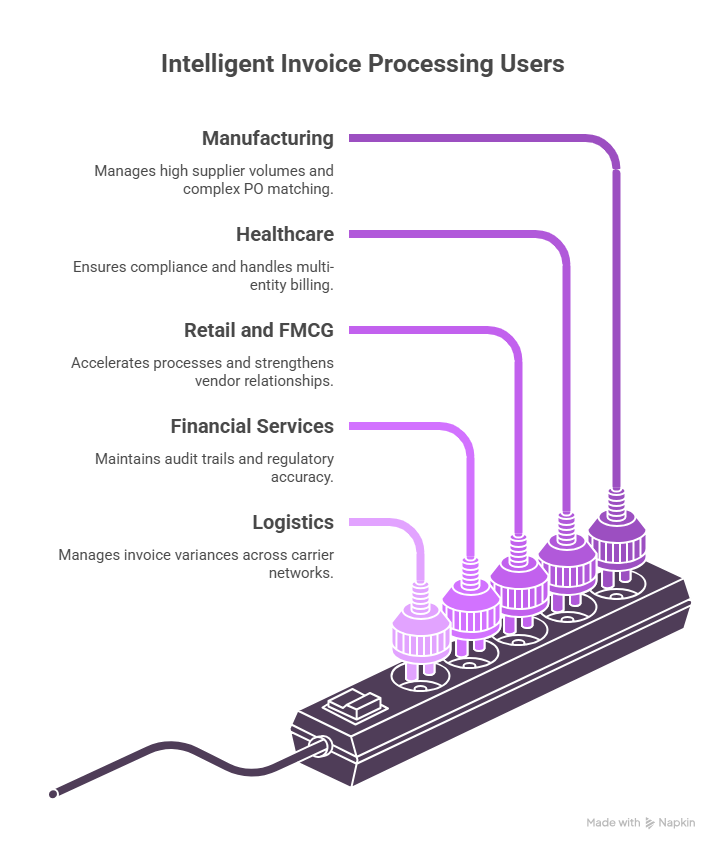
Intelligent invoice processing applies across industries and company sizes, though the use cases differ:
The common thread is volume and complexity. Any organization receiving structured invoices from multiple vendors at scale is a candidate for intelligent processing.
How Intelligent Invoice Processing Works?
The process moves from document intake to payment routing in a clear sequence, with validation checkpoints built in at every stage. The following shows how invoice processing works:
Step 1: Document Capture and Ingestion
Invoices arrive through multiple channels: email attachments, scanned paper documents, EDI feeds, supplier portals, and PDF uploads. The system ingests all of them into a single processing pipeline. Optical character recognition (OCR) converts image-based documents into machine-readable text, and from there, the automated workflow takes over.
Step 2: AI-Powered Data Extraction
Once digitized, AI models extract the key data fields: invoice number, date, vendor name, line items, amounts, tax, and payment terms. Unlike rule-based OCR, trained AI models handle layout variation across different vendor formats without needing a custom template for each supplier. This matters at scale, where supplier invoices rarely follow a single consistent format.
Step 3: Validation and PO Matching
Extracted data is validated against existing records, including purchase orders, contracts, and approved vendor lists. The system checks for a two-way or three-way match: invoice against PO, and PO against goods receipt. Discrepancies are flagged automatically and routed for human review, so one problem invoice does not hold up the rest of the batch.
Step 4: Coding and Approval Routing
Validated invoices are automatically coded to the correct general ledger accounts and cost centers, based on learned patterns and configured business rules. Approval workflows then route each invoice to the right approver based on amount thresholds, department, or expense category, without anyone needing to manually assign it.
Step 5: Payment Processing and Archiving
Approved invoices move to the payment queue and are archived with a full audit trail. Every action taken on every invoice is logged, timestamped, and accessible for review at any point.
The Core Technologies Behind Intelligent Invoice Processing
Understanding how intelligent invoice processing works at the step level is one thing. Understanding what is actually running underneath those steps is another, and it matters when evaluating platforms or planning an implementation. It is a combination of distinct capabilities that each solves a different problem.
OCR vs IDP vs AI vs Workflow Automation
These four terms often get used interchangeably in vendor materials, but they are not the same thing, and they do not do the same work.
Most enterprise platforms combine all four. The question worth asking is how tightly they are integrated and whether the AI layer actually informs the workflow layer in real time.
Machine Learning for Field Recognition
Early invoice processing tools relied on fixed templates. The system expected the invoice number to appear in a specific position on the page, and if a supplier formatted their invoice differently, the extraction failed or required manual correction.
Machine learning solves this by training models on large volumes of labeled invoice data. The model learns what an invoice number looks like across thousands of different layouts, not just one. Over time, it also learns supplier-specific patterns. After processing several invoices from the same vendor, a well-trained model can recognize that vendor's format with high accuracy, even if it differs significantly from other suppliers in the system.
This is why the quality and diversity of training data matter when selecting a platform. A model trained predominantly on a narrow set of invoice types will struggle with formats it has not seen before. Organizations with international supplier bases or diverse procurement categories should specifically ask vendors about training data breadth.
Rules, Confidence Scores, and Human Review Queues
Not every extraction decision is equally certain. A well-designed intelligent processing system does not treat all outputs the same way. It assigns a confidence score to each extracted field, reflecting how certain the model is that the value is correct.
Fields above a configured confidence threshold pass through automatically. Fields that fall below the threshold, where the model is less certain, are flagged and placed in a human review queue. A reviewer sees the extracted value alongside the original document, confirms or corrects it, and the invoice moves forward.
This is the mechanism that keeps error rates low without requiring a human to review every invoice. The system handles the high-confidence majority without intervention and surfaces only the cases where human judgment genuinely adds value. Organizations can configure the confidence thresholds based on their own risk tolerance: stricter thresholds mean more human review but fewer errors reaching downstream; looser thresholds mean less review but require stronger downstream validation to catch problems.
Rules add a separate layer on top of confidence scoring. Business rules can flag invoices regardless of extraction confidence: for example, any invoice above a certain amount always requires a second approver, or any invoice from a new vendor always enters a review queue for the first three submissions.
When Agentic AI Adds Value
Agentic AI refers to systems that can take sequences of actions autonomously, make decisions across multiple steps, and course-correct based on intermediate results, rather than simply executing a single extraction task and passing the output along.
In invoice processing, agentic AI becomes relevant in a few specific scenarios. When an invoice arrives with missing information, a standard system flags it and waits. An agentic system can look up the missing purchase order number in the ERP, cross-reference the vendor record, and attempt to resolve the gap before escalating to a human. When a discrepancy is detected, an agentic system can check whether a credit memo exists that explains the variance, rather than simply flagging it as an error.
The value is not universal. For straightforward, high-volume invoice processing where invoices are clean and well-structured, agentic AI adds complexity without proportional benefit. Where it earns its place is in environments with a high exception rate, complex approval hierarchies, or invoices that frequently require lookups across multiple systems before they can be validated. Organizations processing invoices from a large, diverse, or international supplier base tend to see the clearest return from agentic capabilities.
Where Manual Invoice Processing Breaks Down?
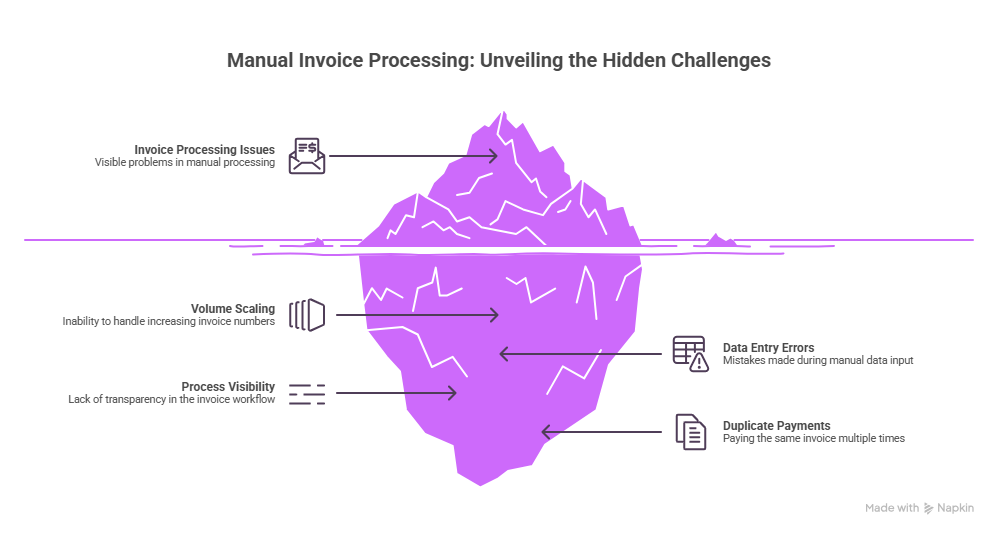
Manual processing has four consistent failure points that compound as invoice volume grows.
Volume Scaling
A manual AP team can only process so many invoices per day. When volume spikes, backlogs form quickly, cycle times stretch, and vendor relationships absorb the pressure. There is no easy way to scale a manual team fast enough to absorb seasonal or growth-related surges.
Data Entry Errors
Repetitive manual work produces errors. Wrong amounts, transposed digits, and missed fields are common in high-volume environments, and the downstream consequences are significant: incorrect payments, reconciliation failures, and audit findings that take time to untangle. The problem is not carelessness; it is the nature of doing the same task hundreds of times a day.
Process Visibility
In a manual workflow, finding out where a specific invoice sits in the approval chain usually means asking someone. There is no live dashboard, no timestamp log, and no audit trail until the invoice finally closes. Finance leaders are left managing by exception, reacting to problems instead of preventing them.
Duplicate Payments
Without automated matching, the same invoice can be processed twice if it arrives through two channels or is resubmitted by a vendor. Duplicate payments are common in manual environments and expensive to recover, often requiring vendor credits or reconciliation cycles that take weeks.
Benefits of Intelligent Invoice Processing
The operational case for intelligent processing covers five areas that matter directly to AP teams and finance leadership.
Speed
Automated extraction and routing removes the wait time that builds up between invoice receipt and final approval. Cycle times that once measured in days compress to hours, and in straightforward cases, to minutes.
Accuracy
AI models trained on invoice data catch errors that slip past human reviewers: mismatched line items, incorrect totals, and PO discrepancies that would otherwise reach the payment stage unchecked. Automated PO matching adds a second layer of verification that manual review cannot replicate at scale.
Cost
Intelligent processing cuts the cost per invoice substantially compared to manual handling. For teams processing high volumes, even modest per-invoice savings compound into material reductions in AP operating costs over a full year.
Visibility
Every invoice in the system has a real-time status. AP managers can see the full pipeline at a glance, spot bottlenecks before they escalate, and generate audit-ready reports without pulling data manually from multiple sources.
Vendor Relationships
Faster processing produces faster payments. Consistent on-time payment builds vendor trust and creates room to negotiate early payment discounts, which directly improve cash flow and working capital.
Common Challenges in Transitioning to Intelligent Invoice Processing
Moving from manual to automated processing takes preparation. Organizations typically run into four recurring obstacles.
Unstructured Data
Not all invoices arrive as clean, structured PDFs. Handwritten notes, low-quality scans, and non-standard supplier formats test the limits of less capable OCR tools. AI models trained on diverse invoice datasets handle this more reliably than template-based systems, but organizations should assess their invoice mix before selecting a platform.
ERP Integration
The value of intelligent processing depends on clean data flow into the ERP or accounting system. Integration complexity varies by ERP vendor and existing architecture, and underestimating it is a common cause of delayed go-lives. Teams that plan for integration time upfront avoid most of the friction.
Change Management
AP teams with established manual workflows often approach automation cautiously. Getting adoption right depends on clear, honest communication about what the system handles automatically and what still requires human review. Framing automation as a way to reduce tedious work rather than replace people tends to generate stronger buy-in.
Exception Handling
No system processes every invoice without issues. A good intelligent processing platform makes exception handling fast and clear: flagging the specific problem, routing it to the right reviewer, and resolving it without disrupting the rest of the queue. How a platform handles the 10% of hard cases is often a better evaluation criterion than how it handles the easy ones.
How Infrrd Automates Intelligent Invoice Processing?
Infrrd's document processing platform handles the full invoice processing lifecycle, from ingestion through payment routing.
AI Extraction Trained on Invoice Diversity
Infrrd's extraction models are trained on a wide range of invoice formats, including unstructured and semi-structured documents from suppliers who do not use standard templates. The platform handles PDF, scanned images, and digital invoices without requiring format-specific rules.
Straight Through Processing for Validated Invoices
For invoices that pass automated validation and PO matching, Infrrd enables straight-through processing with no human touchpoint required. Exceptions are flagged with context, routed to the right reviewer, and resolved without disrupting the main processing queue.
ERP and Downstream Integration
Infrrd connects with major ERP platforms and accounting systems, passing structured invoice data directly into existing workflows. AP teams do not need to adopt a new system of record. Infrrd feeds into the one they already use.
Audit-Ready Reporting
Every invoice processed through Infrrd carries a complete audit trail: extraction confidence scores, validation results, approval timestamps, and exception resolutions. Finance teams can generate audit documentation on demand.
Conclusion
Invoice processing is one of the most resource-intensive functions in finance, and one of the most automatable. The tools available in 2026 are mature enough to handle the volume, the format diversity, and the ERP integration complexity that made automation impractical for many organizations just a few years ago.
Teams that address this now gain real advantages: lower per-invoice costs, faster cycle times, cleaner data, and AP staff capacity redirected to work that actually requires human judgment. The organizations still processing invoices manually in 2026 are not just working harder. They are working at a structural disadvantage.
Frequently Asked Questions About Intelligent Invoice Processing
What is intelligent invoice processing?
Intelligent invoice processing uses AI and document automation to extract, validate, and route invoice data without manual data entry. It replaces the manual steps of reading, keying, and approving invoices with an automated workflow that handles most invoices end-to-end.
How does AI improve invoice processing accuracy?
AI extraction models trained on large volumes of invoice data catch errors that manual entry misses, such as transposed amounts, duplicate line items, and mismatched purchase order references. This is why platforms using AI for invoice handling report error rate reductions as high as 95% compared to manual processing.
What types of invoices can intelligent processing handle?
Modern intelligent processing platforms handle PDF invoices, scanned paper invoices, EDI feeds, and invoices from supplier portals. AI-based extraction models handle varied formats without requiring a separate template for each supplier.
How long does implementation typically take?
Implementation timelines vary depending on ERP complexity and invoice volume. Most enterprise deployments take between 6 and 12 weeks from integration to live processing. Pilot phases with a subset of suppliers can compress this further.
What is PO matching in invoice processing?
PO matching is the automated comparison of an incoming invoice against an existing purchase order to verify that the quantities, prices, and vendor details align. Two-way matching compares the invoice to the PO; three-way matching adds confirmation of goods receipt.
Can intelligent invoice processing handle invoices in multiple languages?
Most AI-based platforms can process invoices in multiple languages, though accuracy varies by language and training data. Organizations with significant international supplier bases should confirm multilingual capability during vendor evaluation.
What happens when an invoice fails automated validation?
Invoices that do not pass validation are flagged and routed to a human reviewer with the specific discrepancy noted. This exception handling process runs separately from the main queue, so it does not slow down invoices that clear validation.
What is the ROI on intelligent invoice processing?
ROI varies by invoice volume and current processing costs. Organizations typically see cost reductions of 60 to 70% per invoice processed, plus indirect savings from fewer errors, faster cycle times, and reduced late payment penalties.
How does intelligent invoice processing integrate with existing ERP systems?
Most platforms use API-based integration to pass structured data directly into the ERP. Integration complexity depends on the ERP vendor and existing data architecture. Pre-built connectors exist for major ERP platforms.