- Intelligent Data Extraction is the process of automatically reading, understanding, and pulling key information from any documents, using AI.
- As data volumes soar and accuracy expectations climb, intelligent extraction transforms how businesses operate.
- The future of document work looks not just efficient, but effortless.
Businesses today aren’t just collecting data; they’re using it to shape pipelines, predict customer needs, and stay compliant. However, the biggest challenge businesses face is that most of this data is trapped inside complex documents, including invoices, contracts, engineering drawings, insurance forms, and more. It’s valuable, but hidden in plain sight.
This blog explores how Intelligent Data Extraction addresses that challenge. You’ll find out what it is, why it matters now more than ever, and how forward-thinking companies are turning document chaos into clean, actionable insights. If you’ve ever wished your documents could read themselves, this is where that wish starts to come true.
What Is Intelligent Data Extraction
Intelligent Data Extraction is the process of automatically reading, understanding, and pulling key information from any documents, using Artificial Intelligence (AI) showcasing key intelligent document processing capabilities, which is a core function of modern intelligent document processing solutions. It’s the difference between typing data into a spreadsheet and letting an AI tool do it faster, cleaner, and without coffee breaks.
The goal is simple: get the right data, from the right document, into the right system which is exactly how IDP vendors handle data extraction at scale, which is essential when understanding how to evaluate IDP solutions. It turns piles of digital paperwork into structured, usable insights that power decisions.
Difference Between Data Extraction and Intelligent Data Extraction
Basic data extraction reads what’s visible. Intelligent Data Extraction reads what’s meant. Traditional extraction tools copy words and numbers. Intelligent extraction tools interpret context, relationships, and meaning.
For example, a legacy system might see “$5000” and store it as a value. An intelligent system knows whether it’s an invoice amount, a deductible, or a policy limit, and puts it where it belongs. It’s like the leap from a typewriter to a thinking assistant.
Role of Artificial Intelligence in Modern Data Extraction
AI powers this shift. Machine learning models learn from thousands of document samples. They recognize layouts, interpret handwriting, detect context, and flag anomalies.
Instead of rigid templates, modern extraction adapts. Feed it a new format, and it learns on the fly. That means fewer rules to maintain, less manual cleanup, and much faster deployment. In short, AI has turned document work from a rule-following exercise into an intelligent, reasoning process, one that keeps improving with every file it reads.
Why Intelligent Data Extraction Matters Now
In today’s data-driven world, speed and accuracy aren’t optional, they’re survival skills. Businesses handle more documents than ever before, from digital invoices to scanned contracts, and every delay in extracting that information costs time, money, and opportunities. Intelligent Data Extraction matters now because it bridges that gap, turning static documents into instant, reliable data that fuels smarter decisions and faster operations.
Growing Volume of Unstructured Business Data
Every year, businesses drown in more data than they can process. Emails, PDFs, invoices, contracts, forms, the list keeps growing. Studies show over 80% of enterprise data is unstructured, meaning it can’t be processed by standard systems.
By 2025, the AIIM/Deep Analysis survey found that 65% of large U.S. and European firms are either implementing or considering new IDP initiatives. That’s because the data explosion is no longer a “someday” issue; it’s a daily operational challenge.
Without intelligent automation, much of that data stays locked in documents, untapped and unused.
Cost and Time Inefficiencies of Manual Extraction
Manual data entry has always been the bottleneck. Even the best-trained staff can only process so fast, and fatigue creeps in. A single typo can derail a report, delay a payment, or cause compliance headaches.
Automated extraction eliminates repetitive clicks. It frees teams from data drudgery, slashes processing times, and cuts operational costs. Think of it as hiring an assistant that never sleeps, never complains, and charges less than your coffee budget.
Compliance and Accuracy Demands in Regulated Industries
Industries like finance, mortgage, and insurance live under strict audit rules. A missing decimal or a mismatched policy ID can trigger costly errors. Intelligent extraction doesn’t just read; it validates data against set rules, helping auditors review information and make critical decisions with confidence.
Every extracted field, correction, or approval is logged automatically. That means clean, traceable data trails that keep auditors happy and regulators satisfied.
How Intelligent Data Extraction Works
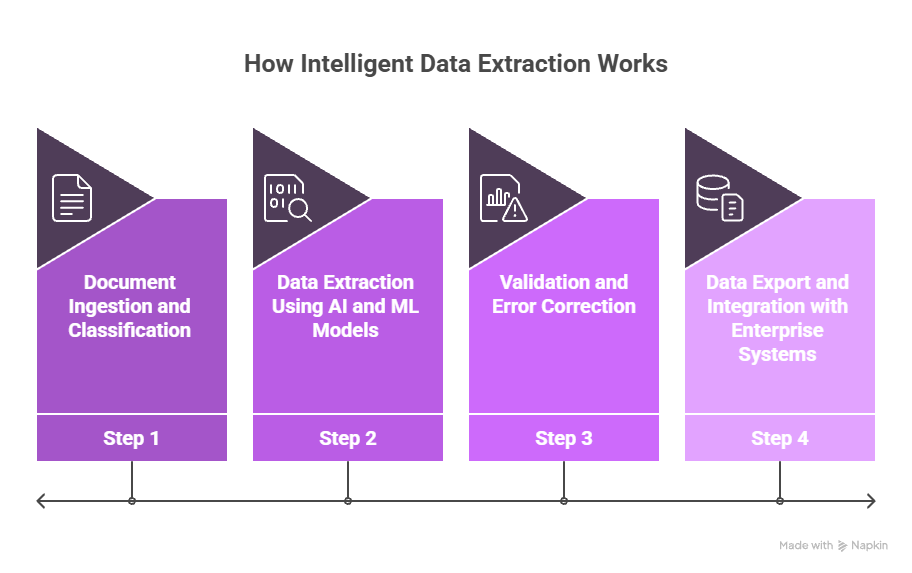
Behind every “instant” data insight is a well-orchestrated process. Intelligent Data Extraction may look effortless from the outside, but under the hood, it’s a mix of AI models, machine learning, and automation working together. This section walks through each step, from reading and classifying documents to validating and integrating data, showing how raw files are transformed into ready-to-use information in just seconds.
Step 1: Document Ingestion and Classification
Everything starts with getting documents into the system: PDFs, scanned forms, images, or emails. AI classifies them automatically, recognizing whether it’s a contract, invoice, or drawing. The system learns from each upload. If a new template appears, it adapts. It’s like teaching your assistant once and letting them handle it forever.
Step 2: Data Extraction Using AI and ML Models
Once classified, AI models go to work. They locate and read key data fields: names, numbers, dates, codes, tables, and handwritten text. Machine learning models detect context to avoid mistakes, such as confusing an invoice number with a purchase order ID. The result? Clean, context-rich data, ready for business use in seconds.
Step 3: Validation and Error Correction
The extracted data is validated against internal or industry rules through an IDP data validation feedback loop. If something doesn’t match (say, a date out of range or a missing signature), the system flags it instantly. Users can review, correct, and retrain the model with one click through an IDP data validation feedback loop, so it gets smarter every time. This self-learning loop turns human feedback into accuracy gains.
Step 4: Data Export and Integration with Enterprise Systems
Finally, structured data flows directly into CRMs, ERPs, LOS systems, or analytics dashboards. No manual exports. No messy reformatting. Just clean, ready-to-use information that connects with existing workflows. That’s how intelligent extraction fits seamlessly into business ecosystems, quietly, but powerfully.
Key Technologies Behind Intelligent Data Extraction
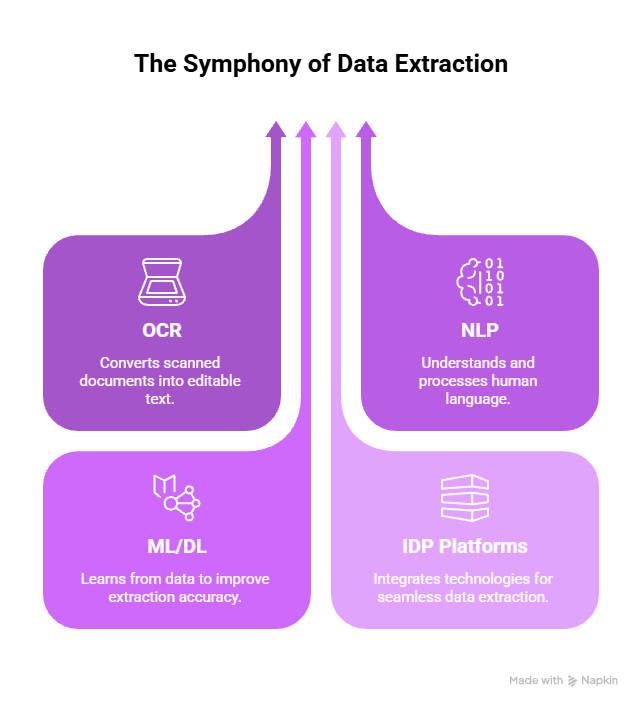
Intelligent data extraction combines advanced AI, computer vision, and natural language processing to turn complex documents into reliable, structured data. Instead of relying on templates or manual entry, these technologies learn how documents vary and automatically capture the information your logistics workflows depend on. Let’s look at them in detail.
Optical Character Recognition (OCR)
OCR converts printed or handwritten text into machine-readable data. It’s been around for decades, but today’s OCR is turbocharged by AI. Modern systems read multiple languages, fonts, and even blurred text, a big leap from early template-based scanners. OCR acts as the first pair of eyes in the process, setting the foundation for what AI interprets next.
Natural Language Processing (NLP)
NLP allows systems to understand language instead of just reading it. It identifies entities like names, amounts, and dates — and understands their relationships.For instance, if a sentence says, “Payment due within 30 days of invoice date,” NLP links “30 days” to “invoice date” to compute the due date automatically. That’s human-level comprehension, powered by algorithms.
Machine Learning and Deep Learning Models
Machine learning helps extraction models adapt. Feed them thousands of invoices or claim forms, and they’ll start predicting field positions and meanings with growing accuracy. Deep learning models take it further, interpreting images, handwriting, and irregular layouts. This means the system doesn’t crumble when faced with new formats or non-standard layouts; it adjusts and keeps performing.
Intelligent Document Processing (IDP) Platforms
IDP combines OCR, NLP, and machine learning under one roof. It’s the engine that automates document intake, understanding, and validation at scale. According to Grand View Research, the global IDP market will grow from $2.3 billion in 2024 to about $12.35 billion by 2030, with a 33% CAGR. That’s because IDP isn’t just a tech upgrade, it’s a productivity revolution.
Challenges in Traditional Data Extraction
Traditional data extraction has its limits. It struggles with unstructured formats, relies heavily on human input, and often leads to errors and delays. Before understanding the power of intelligent extraction, it’s important to see where older methods fall short.
Handling Complex or Unstructured Documents
Not all documents play nice. Some have tables within tables, signatures in random corners, or handwritten notes squeezed between margins. Traditional systems break down under this chaos. Intelligent extraction thrives on it. Where older tools see clutter, AI sees patterns. It recognizes structures even in messy, scanned documents, like finding order in a digital junk drawer.
Human Error and Data Loss Risks
Manual data entry equals human error. Even small mistakes can cascade, from billing errors to compliance breaches. Intelligent extraction reduces that risk dramatically. Once trained, AI models repeat tasks flawlessly, every single time. It’s like switching from manual driving to cruise control, smoother, safer, and less stressful.
Limited Scalability and High Processing Costs
As document volumes grow, manual teams can’t simply multiply overnight. Hiring more staff doesn’t fix the bottleneck; it just shifts it. AI scales effortlessly. Whether it’s 100 invoices or 10 million, processing speed stays consistent. That’s scalability without the overtime.
Benefits of Intelligent Data Extraction
Intelligent Data Extraction doesn’t just make workflows faster; it makes them smarter. By automating how information is read, verified, and shared across systems, it delivers accuracy, transparency, and speed all at once. The benefits go far beyond efficiency; they redefine how teams work with data, freeing people from manual effort and giving businesses a real competitive edge.
Here are some of the top benefits you can expect.
Faster Data Processing and Higher Accuracy
Speed and accuracy used to be trade-offs. With intelligent extraction, you get both. AI can read and process documents in seconds, achieving accuracy rates often exceeding 95%. What took hours or days can now be finished before your next coffee refill.
Improved Compliance and Data Governance
Every extracted field is tracked, verified, and logged. That means easy audits, cleaner records, and zero “who changed this?” mysteries. It’s automated transparency, built right into the workflow.
Seamless Integration with Business Workflows
The best systems don’t disrupt your tools; they enhance them. Intelligent extraction integrates smoothly with CRMs, ERPs, and business platforms. No massive IT overhauls, no coding marathons, just plug, sync, and go.
Reduction in Manual Effort and Operational Costs
Automation doesn’t replace people; it replaces repetitive tasks. Teams can focus on higher-value work, analysis, customer interaction, and innovation, while AI handles the copy-paste grind. The result? Happier teams and healthier margins.
Use Cases of Intelligent Data Extraction
Mortgage Document Automation
Mortgage files can exceed 2,000 pages. Manual review takes days. Intelligent extraction identifies loan numbers, borrower details, and income data automatically. That means faster loan approvals, fewer compliance errors, and smoother audits.
Insurance Claims and Policy Data Extraction
Insurers process thousands of claims daily. Extracting fields from ACORD forms, medical reports, or claim summaries manually is a nightmare. AI reads those documents instantly, cross-verifies policy data, and flags inconsistencies. It keeps claims moving fast, and customers satisfied.
Invoice and Financial Document Processing
Accounts payable teams love intelligent extraction. AI captures vendor names, invoice numbers, amounts, and line items without templates. That means faster payments, better cash flow tracking, and fewer late fees. It’s like giving your finance team a second pair of eyes that never blinks.
Engineering Drawings and Blueprint Data Capture
Engineers often work with complex diagrams filled with dimensions and annotations. AI-based extraction reads symbols, tolerances, and part details from CAD files or blueprints, no ruler required. It shortens quote generation, improves accuracy, and cuts manual drafting time. Even the most detailed mechanical drawings don’t intimidate a well-trained AI.
Implementation Checklist for Intelligent Data Extraction
Implementing Intelligent Data Extraction isn’t just about choosing the right technology; it’s about setting it up for success. A clear plan helps avoid delays, manage expectations, and prove ROI early. From assessing your document types to scaling automation across teams, here’s a quick checklist to guide a smooth and effective rollout.
Assessing Document Types and Data Complexity
Start by listing the document types you handle: invoices, contracts, claims, or drawings. Rank them by volume and difficulty. This helps you prioritize which processes to automate first.
Selecting the Right AI-Powered Platform
Look for platforms that can handle both structured and unstructured documents. The system should learn continuously, adapt to new formats, and integrate easily with your tools. Accuracy, scalability, and user control matter most; shiny dashboards alone won’t cut it.
Running Pilot Projects and Measuring ROI
Start small. Pick one process, measure turnaround time, error rates, and cost savings before and after automation. Use these numbers to make a business case. Once proven, scaling becomes an easy sell.
Scaling Across Departments and Regions
After a successful pilot, extend automation across other teams, finance, operations, HR, and compliance. Cloud deployment allows global rollouts with minimal friction. Every team that touches documents benefits from faster, cleaner data.
How Infrrd’s Intelligent Data Extraction Solution Works
AI-Driven Contextual Understanding
Infrrd’s platform goes beyond reading text. It understands context, identifying not just “what” a value is but “why” it’s there. That’s how it interprets complex layouts and multi-page documents without missing critical fields.
No-Touch Automation for Complex Document Types
Infrrd’s automation handles intricate document types: from mortgage loan files to engineering diagrams — with minimal human setup. Once trained, it works hands-free, freeing teams to focus on insights instead of inputs.
Accuracy and Validation Through Agentic AI
Powered by Agentic AI, Infrrd validates extracted data in real-time, applies business rules, and learns from every correction. It keeps improving accuracy automatically — like a colleague who never forgets a lesson.
Integrations Across Mortgage, Insurance, and Engineering Domains
Infrrd integrates easily with LOS, ERP, and CRM systems across multiple industries. It brings one consistent experience across departments, one AI engine powering every workflow, from loan audits to blueprint extraction.
Conclusion
Data extraction isn’t a back-office chore anymore; it’s the new competitive edge, and it plays a foundational role in any AI data sorting process. As data volumes soar and accuracy expectations climb, intelligent extraction transforms how businesses operate. It’s faster, smarter, and already reshaping workflows across industries. And with platforms like Infrrd leading the change, the future of document work looks not just efficient, but effortless.
FAQs About Intelligent Data Extraction
What makes data extraction “intelligent”?
It uses AI and machine learning to understand context, not just read text. Intelligent extraction identifies patterns, relationships, and meanings automatically, something traditional systems can’t do.
How is intelligent extraction different from OCR?
OCR reads characters. Intelligent extraction interprets data. It connects text to meaning, validates it, and exports it into structured formats for business use.
What industries benefit the most from intelligent data extraction?
Finance, mortgage, insurance, construction, healthcare, and logistics all benefit — basically, any sector drowning in documents.
Can intelligent extraction handle handwritten or complex layouts?
Yes. Modern AI models read handwriting, stamps, and even diagrams with remarkable precision. They adapt to variations in fonts, formats, and layouts automatically.
How does automation ensure data security and compliance?
Data is processed in secure environments with role-based access and full audit trails. No sensitive information leaves your system without encryption. It’s automation built for trust.

Priyanka Joy is a product writer at Infrrd who approaches automation tech like a curious detective. With a love for research and storytelling, she turns technical depth into clarity. When not writing, she’s immersed in dance, theatre, or crafting her next narrative.