- Invoice parsing is the process of extracting structured data from invoice documents and making it usable in downstream systems.
- Most finance teams use the terms OCR and invoice parsing interchangeably but they are not the same thing
- Invoice parsing looks routine from the outside but from inside AP teams, it is one of the most labor-intensive workflows in finance.
Every finance team is familiar with the routine. An invoice comes in, someone enters the data into a system, chases down an approver, resolves any mismatches, and finalizes everything days later. When you repeat this process for hundreds of invoices each month, the costs quickly add up.
For most accounts payable teams, this manual approach is still the norm.
In this blog, we’ll explain how invoice parsing (extraction) works, where things tend to go wrong, and how automation is transforming the process in 2026.
What Is Invoice Parsing?
Invoice parsing is the process of extracting structured data from invoice documents and making it usable in downstream systems, such as ERP platforms, accounting software, and payment workflows.
On the surface, it sounds simple. Pull the vendor name, invoice number, line items, amounts, and due date. Feed them into a system. Done.
In practice, it is a layered, time-heavy workflow. Invoice parsing is not just data extraction; it is a multi-step process that moves through capture, validation, matching, and approval before a single payment can be released. Each step introduces room for delay, error, or manual intervention.
Why Invoice Parsing Matters More Than Teams Realize?
Invoice data sits at the center of financial operations. Get it right, and cash flow stays predictable, vendor relationships stay intact, and audit trails stay clean. Get it wrong, and the downstream damage (duplicate payments, late fees, compliance gaps) compounds fast.
The accounts payable automation market reflects exactly how seriously enterprises are starting to take this. Valued at $3.8 billion in 2026, the market is projected to reach $10 billion by 2036, growing at a CAGR of 10.3%, according to Future Market Insights. That growth is not driven by trend-chasing. It is driven by the very real cost of doing this work manually.
How Invoice Parsing Works: The Full Workflow
Understanding where automation can help requires understanding what the process actually looks like end-to-end. Each step in the workflow is dependent on the one before it, which means delays and errors do not stay contained. They carry forward.
Step 1: Document Capture
Invoices arrive through multiple channels: email attachments, scanned PDFs, EDI feeds, supplier portals, and sometimes still by fax. The first job is getting all of these into a single processing environment, regardless of where they came from or what format they arrived in. Without reliable capture, nothing downstream works consistently.
Step 2: Data Extraction
This is what most people picture when they hear "invoice parsing": OCR engines and AI models read the document and pull out structured fields: vendor details, invoice number, PO references, line items, tax amounts, totals, and payment terms. The challenge is that no two invoices look the same. Layouts shift by vendor, country, and document version, which means extraction tools have to handle significant variation to stay accurate.
Step 3: Validation
Extracted data gets checked against business rules and reference data. Does the invoice total match the sum of line items? Is the vendor on the approved supplier list? Are the tax codes correct for the jurisdiction? This is where errors and mismatches surface. Someone has to investigate each one, and that investigation takes time that compounds across a full invoice queue.
Step 4: Three-Way Matching
Most enterprise AP workflows require matching the invoice against a purchase order and a goods receipt before payment can proceed. If quantities and prices align across all three documents, the invoice moves forward. If they do not, it enters an exception queue. Resolving that exception means tracing back through procurement, the supplier, or both, which is rarely a quick fix.
Step 5: Approval Routing
Validated invoices are sent for approval based on amount thresholds, cost center ownership, or project codes. This step is often where invoices sit the longest. They wait in someone's queue while payment terms continue to run, and without automated reminders or escalation paths, approvals stall without any visibility into how long they have been waiting.
Step 6: ERP Entry and Payment
Once approved, invoice data is posted into the ERP or accounting system, and payment is scheduled based on the agreed terms. This step sounds straightforward, but manual entry here reintroduces the same keying errors that extraction was meant to prevent. Automating the handoff from approval to ERP is what closes the loop cleanly and makes the rest of the workflow worth building.
Invoice Parsing vs OCR: What Actually Changes?
Most finance teams use the terms OCR and invoice parsing interchangeably. They are not the same thing. Understanding the difference matters because choosing the wrong approach is one of the most common reasons automation projects fall short of expectations.
OCR Reads Text
OCR converts a scanned or image-based document into machine-readable text. It recognizes characters and outputs a string of words and numbers, but it does not know what any of them mean. An invoice processed through OCR alone produces a wall of text with no field labels, no structure, and no context about what belongs where. The output requires significant human effort to become usable.
Parsing Structures Meaning
Invoice parsing takes the raw text that OCR produces and maps it to specific fields: vendor name, invoice number, line item description, unit price, tax, and total. It is the layer that converts unstructured content into structured, usable data. Without parsing, OCR output cannot flow into an ERP or accounting system without manual cleanup, which defeats the purpose of automating the step at all.
IDP Adds Validation, Routing, and Learning
Intelligent Document Processing goes further than parsing alone. It combines extraction with downstream logic: validating extracted values against business rules, flagging mismatches, routing invoices for approval, and improving accuracy as the model encounters more document variations. IDP treats invoice processing as a complete workflow rather than a single read operation. Teams using IDP see fewer exceptions and less manual intervention per invoice over time.
When Rule-Based Extraction Still Works?
If your supplier base is small and invoices arrive in consistent, predictable formats, rule-based extraction with configured templates can be sufficient. Templates work well when the documents they cover do not change. Teams processing invoices from a stable set of vendors with standardized layouts may not need AI-based approaches, and a well-maintained template library can handle volume without issues.
When You Need Template-Free Extraction?
When invoice formats vary across vendors, when new suppliers are onboarded regularly, or when documents arrive in mixed formats and languages, template-based systems break down. Every new format requires a new template to be built and maintained, and exceptions accumulate faster than configuration can keep pace. Template-free AI extraction is designed to handle this variability without a growing backlog of unmapped vendor layouts.
Where Manual Invoice Parsing Breaks Down?
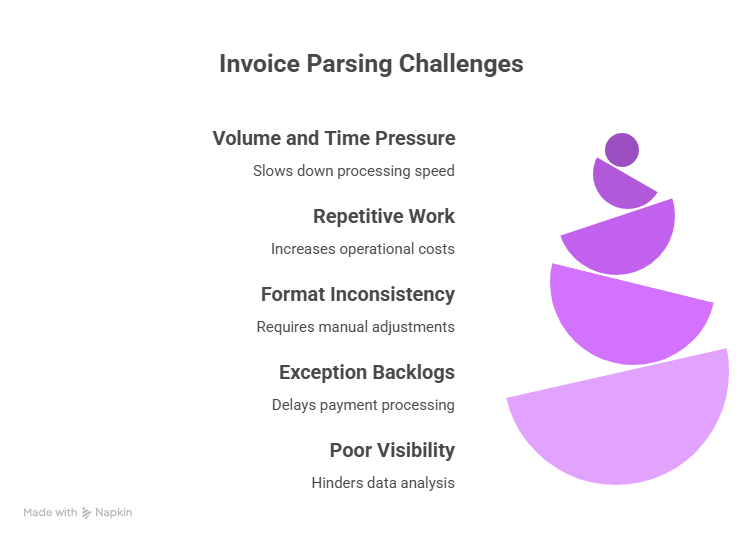
Manual invoice processing does not just slow teams down; it introduces compounding costs that are difficult to track until they become impossible to ignore. The problems are predictable, but they scale with volume in ways that catch finance leaders off guard.
Volume and Time Pressure
Manual processing of a single invoice takes around 25 minutes on average, according to research on AI-powered invoice automation in ERP systems. That is a significant time cost per document, and it does not account for the follow-ups, corrections, and reprocessing that come with exceptions.
The Hidden Cost of Repetitive Work
AP teams can spend 60 to 70% of their working time on manual data entry and follow-up tasks, according to Clear. That is the majority of a team's capacity absorbed by work that automation could handle. The cost shows up in payroll, in delayed payments, and in the strategic work that never gets done because the team is buried in transactions.
Format Inconsistency
Every supplier has a different invoice template. Some send structured PDFs with consistent field positions. Others send scanned images with skewed layouts, handwritten corrections, or missing fields. No two are identical, and manual processors have to interpret each one from scratch. When a new vendor is onboarded, there is no guarantee their format resembles anything the team has seen before.
Exception Backlogs
When a mismatch surfaces during validation or matching, the invoice enters an exception queue. Without automation, exceptions sit until someone investigates, contacts the vendor, receives a correction, and restarts the process. Meanwhile, payment terms continue running. These queues grow faster than teams can clear them, and the backlog directly affects supplier relationships and early payment discount eligibility.
Poor Visibility
Manual workflows are opaque. Finance leaders often cannot tell, at any given moment, how many invoices are in process, where they are stuck, or how long they have been sitting in an approval queue. Reporting on AP cycle times requires manual data pulls. Forecasting payment timelines becomes guesswork, and cash flow planning suffers as a result.
What Makes Invoice Parsing Difficult to Automate?
Not all automation works the same way on invoice data. The characteristics that make invoices useful for business, such as vendor-specific formats, flexible layouts, and variable line item structures, are exactly the characteristics that make them hard to parse reliably at scale.
The gap between what early automation tools promised and what AP teams actually experienced comes down to one word: variability. Invoices do not follow a universal standard, and building systems that handle diversity without constant manual maintenance is harder than it first appears.
The Limits of Rule-Based OCR
Traditional rule-based OCR tools were the first attempt at automating invoice data capture. They performed adequately on structured, templated invoices from a known set of vendors. Outside of those narrow conditions, accuracy dropped, and exception rates climbed. Every new vendor format required a new rule set, and maintaining those rules became a job in itself.
The Core Problem: Unstructured Format Variability
A vendor in Germany, a supplier in Singapore, and a contractor in Texas will all format their invoices differently. Tax line placements shift. Column orders vary. Totals appear in unexpected locations. No two suppliers follow the same convention, and invoice layouts change over time without notice to the AP team receiving them.
Why Template Libraries Break at Scale?
Each new vendor added to a template-based system requires configuration work before a single invoice can be processed accurately. When supplier counts grow or onboarding happens fast, the template backlog becomes a bottleneck. Teams spend more time managing templates than processing invoices, which is the opposite of what automation is supposed to accomplish.
How AI-Based Approaches Change the Equation?
Models trained on large volumes of diverse invoice data learn to identify fields by meaning, not position. They generalize across formats without requiring a ruleset built for each vendor. As they encounter edge cases and corrected exceptions, they improve, rather than requiring reconfiguration each time a new format appears.
How AI Changes Invoice Parsing?
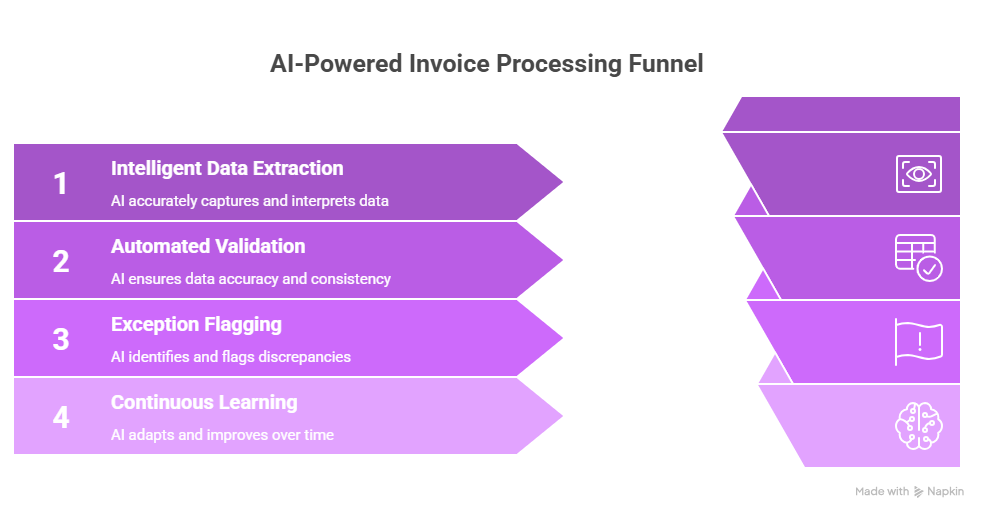
Modern AI-based invoice parsing does not just speed up what OCR tools already do. It changes what is possible at the extraction layer, the validation layer, and over the lifetime of the system as it processes more documents.
The shift from rule-based to AI-driven extraction is less about technology preference and more about operational reality. When supplier diversity is high, and invoice volume grows, AI-based systems hold up in ways that template-driven tools simply cannot.
Intelligent Data Extraction
AI models read invoices the way a trained human would: by understanding context, not just layout. A field labeled "Invoice No." and one labeled "Bill Reference" both map correctly to the same data point. Line items spread across multiple pages get captured completely. The model identifies what a field means regardless of where it appears on the page, which is the core advantage over position-dependent rules.
Automated Validation and Exception Flagging
Rather than checking data against a fixed rule list, AI flags anomalies that fall outside learned patterns. An unusually high line item, a duplicate invoice number, a vendor not seen before: these surface automatically without a reviewer needing to inspect every document. The system narrows human attention to the cases that genuinely need it, rather than spreading review effort across the full volume.
Continuous Learning
Each invoice processed adds a signal to the model. Accuracy improves as the system encounters more vendor formats, more edge cases, and more corrected exceptions. Over time, the rate of manual intervention per invoice decreases rather than holding steady. Teams working with a well-trained model find that the system requires less management as volume grows, not more.
Benefits of Automating Invoice Parsing
Beyond simple efficiency, automating your invoice parsing creates a foundation for a more resilient and data-driven finance department. By shifting from manual entry to intelligent extraction, organizations can unlock these six transformative advantages:
Faster Processing
Automation collapses the time between receiving an invoice and issuing payment. By digitizing capture and streamlining workflows, invoices move from arrival to final approval in hours rather than days. This speed prevents bottlenecks, ensures vendors are paid on time, and allows teams to capture early payment discounts consistently.
Reduced Manual Effort
Automated parsing liberates your finance team from the "data entry treadmill." Instead of manually keying in line items, staff shift their focus to high-value tasks like resolving complex exceptions, improving vendor relations, and analyzing spend patterns. This transition transforms accounts payable from a cost center into a strategic function.
Higher Accuracy
Human error is an inevitable byproduct of manual entry. AI-driven extraction significantly reduces typos, transposed numbers, and duplicated data. By ensuring high precision at the point of capture, you eliminate the downstream "domino effect" of mismatches that usually require hours of investigation and correction.
Better Visibility
Automation provides a real-time window into your liabilities. Finance leaders gain immediate access to invoice statuses, allowing for more accurate cash flow forecasting. With clear dashboards, you can identify exactly where a document is stalled in the approval chain, removing the guesswork from financial reporting.
Scalability
As your business grows, your invoice volume shouldn't dictate your headcount. Automated systems absorb sudden spikes in document volume, such as seasonal surges or rapid company expansion without requiring additional staff. This allows your department to scale its processing capacity efficiently while maintaining a lean operational footprint.
Audit Readiness
Manual systems often leave a fragmented paper trail. Automated parsing creates a digital "gold standard" for compliance, where every extraction, validation, and approval is automatically logged with a timestamp. This comprehensive audit trail ensures that your records are always organized, transparent, and ready for internal or external review.
How Infrrd Automates Invoice Parsing
Infrrd's intelligent document processing platform is built to handle the variability that makes invoice parsing difficult at scale. It extracts structured data from invoices regardless of layout, language, or origin, without needing templates configured for each vendor.
Zero-Template Extraction
Infrrd's AI models are trained to understand invoice semantics rather than match fields by position. New vendor formats get processed accurately without manual template setup. Teams are not managing a library of templates that grows with every supplier added.
High-Accuracy Extraction Across Document Types
Whether an invoice arrives as a native PDF, a scanned image, an email attachment, or a multi-page document with complex line items, Infrrd extracts the right data with high accuracy. The platform is designed to work with messy, real-world documents, not clean test cases.
Exception Management Built In
When extracted data does not meet validation thresholds, Infrrd surfaces the exception with the specific field or mismatch flagged. Reviewers see exactly what needs attention rather than reviewing an entire document from scratch. Resolution time drops significantly.
ERP and System Integration
Extracted invoice data flows directly into ERP and accounting systems without manual re-entry. The integration layer handles the formatting and mapping required for each system, so AP teams do not have to manage data transfer manually.
Conclusion
Invoice parsing looks routine from the outside. Inside AP teams, it is one of the most labor-intensive workflows in finance, and the accumulated cost of doing it manually adds up faster than most organizations track. As invoice volumes grow and finance teams are expected to do more with the same resources, the manual approach runs out of runway.
Automation does not replace judgment in invoice processing. It removes the low-value work so that judgment can be applied where it actually matters: on exceptions, on vendor disputes, on the decisions that cannot be automated. That shift is what the accounts payable automation market is really growing around.
Frequently Asked Questions About Invoice Parsing
What is invoice parsing?
Invoice parsing is the process of extracting structured data fields from invoice documents, such as vendor name, invoice number, line items, and totals, and converting them into a format that can be used by accounting or ERP systems.
How long does it take to process an invoice manually?
Manual invoice processing takes around 25 minutes per invoice on average, covering data entry, validation, matching, and approval routing. High volumes make this time a significant operational burden for AP teams.
What is the difference between OCR and AI-based invoice parsing?
OCR converts scanned images into text, but does not understand document structure or context. AI-based invoice parsing goes further, identifying fields semantically, handling variable layouts, and improving accuracy over time as the model processes more invoices.
Why do invoices cause so many AP errors?
Invoices vary significantly in format across vendors. Manual entry introduces keying errors, and mismatches between invoices, purchase orders, and goods receipts create exceptions that require investigation before payment can proceed.
Can invoice parsing automation handle multiple invoice formats?
AI-based invoice parsing platforms are designed to handle format variability across vendors without requiring manual template configuration for each supplier. Models generalize across layouts, languages, and document types.
How does invoice parsing fit into the broader AP workflow?
Invoice parsing is the first stage of the accounts payable process. Accurate data extraction feeds into validation, matching, approval routing, and ERP entry. Errors at the parsing stage propagate through every step that follows.
What happens when an invoice fails validation?
Failed validation triggers an exception. The invoice is flagged with the specific mismatch or missing field, and a reviewer is assigned to investigate. Depending on the issue, resolution may involve contacting the vendor, correcting a PO, or updating a supplier record.