- Batch invoice processing means processing multiple invoices together instead of handling each individually.
- Invoice automation uses AI to read invoices, extract data, validate totals, verify vendor details, and route for approval, without manual input.
- Automating batch invoice processing lowers costs, boosts accuracy, and creates a scalable, audit-ready AP operation.
Invoices rarely arrive one at a time. Vendors send multiple invoices at once, contractors bundle monthly billing into a single email, and end-of-month accounting floods the inbox overnight. At this volume, manual one-by-one processing cannot keep up.
Batch invoice processing solves this. Instead of handling each invoice individually, teams collect and process them together in structured runs. For companies managing thousands of invoices every month, batch processing is not just a convenience; it is a core function within Accounts Payable operations.
Research shows that 60% of companies process more than 1,000 invoices per month, and 23% process more than 10,000. Handling this scale requires structure. Batch workflows provide that structure.
This guide explains how batch invoice processing works, where problems appear, and how automation improves the process.
What is Batch Invoice Processing?
Batch invoice processing means processing multiple invoices together instead of handling each individually.
Finance teams collect invoices over time. Once enough invoices accumulate, the system processes them into a batch. This method helps accounting teams manage high document volumes.
Invoices work the same way.
Batch invoice processing is a workflow in which invoices are grouped and processed simultaneously during scheduled accounting cycles.
These cycles may occur:
- Daily
- Weekly
- Monthly
During the cycle, automated invoice software helps systems extract invoice data, validate information, apply duplicate invoice detection at scale, and prepare invoices for payment. Grouping invoices reduces repetitive work and simplifies approval workflows.
How Batch Invoice Processing Works in Accounts Payable
Accounts payable teams follow a consistent cycle with batch invoice processing. Invoices are collected throughout the day or week from email attachments, vendor portals, scanned paper documents, and electronic invoice systems. When the processing window begins, the full batch moves through extraction, validation, purchase order matching, approval routing, and accounting system posting in one structured run.
Once approvals are complete, payments are scheduled, and the cycle starts again. This approach keeps high invoice volumes organized and prevents individual invoices from creating constant interruptions to the AP workflow.
Difference between Batch Processing and Real-Time Invoice Processing
Both methods serve different operational needs. The right choice depends on invoice volume, payment urgency, and how your accounting systems are structured.
Most finance teams rely on batch workflows because their accounting systems and approval cycles are built around scheduled runs rather than continuous processing. Real-time processing complements batch operations for exceptions and urgent cases, but rarely replaces them at scale
Invoice Processing Methods
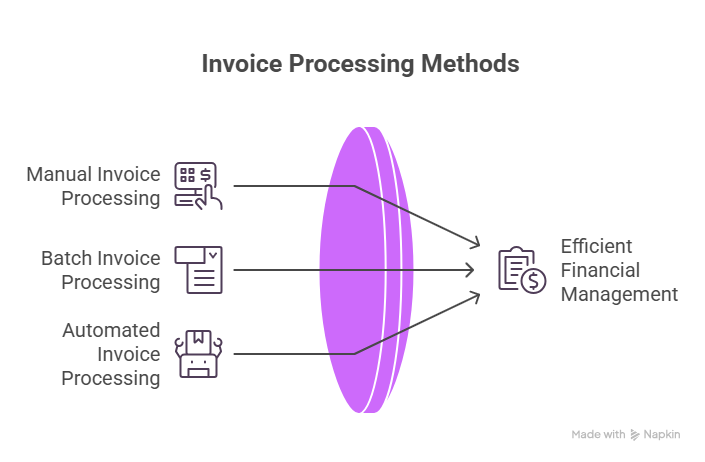
Companies generally process invoices in three ways. Each method reflects the maturity of financial operations.
Manual Invoice Processing
Manual invoice processing relies on human data entry. An employee reads the invoices and types the information into the accounting system. They check totals, vendor information, and purchase orders. This approach consumes a lot of time and is prone to errors.
Research shows that a manual accounts payable employee processes about 6,082 invoices per year.
Invoice processing studies show manual processes have roughly a 2% error rate. Automated workflows reduce that number to about 0.8%. Small error rates quickly grow when companies process thousands of invoices.
Batch Invoice Processing
Batch processing organizes invoices into groups and processes them together rather than one at a time. This structure gives finance teams control over when and how invoice volume is handled, instead of reacting to each invoice as it arrives.
This approach is particularly effective when invoice volume fluctuates. Large organizations may receive a handful of invoices on some days and hundreds on others. Batch processing absorbs these spikes without disrupting the wider AP workflow, keeping the team's workload predictable regardless of daily volume.
Automated Invoice Processing with IDP and AI
Invoice document automation transforms how batch invoice processing works in practice. Instead of staff manually keying in data, AI-powered tools read each invoice, identify the relevant fields, extract the information, validate totals, check vendor details, and route the invoice for approval, all without manual intervention.
The productivity difference is measurable. An employee working in an automated environment can process around 23,333 invoices per year, compared to 6,082 manually. The batch workflow structure remains the same — automation simply performs most of the work within it, freeing staff to focus on exceptions and payment decisions.
How Batch Invoice Processing Works?
Batch invoice processing follows a structured sequence where each step prepares invoices for the next stage.
Step 1: Collecting Invoices in Batches
Invoices arrive throughout the day from multiple channels and are collected into a shared folder or system queue. The batch begins once the collection period closes. Processing frequency varies by organization; some run batches every evening, while others process once a week based on their accounting cycle.
Step 2: Data Extraction from Invoices
The system reads invoice documents and extracts key information.
Typical fields include:
- Vendor name
- Invoice number
- Invoice Date
- Invoice Amount
- Tax Values
Manual extraction at this stage slows teams down significantly. Automated extraction reads and processes the entire batch instantly, eliminating the data entry workload from the finance team entirely.
Step 3: Validation and Cross-Checks
Extracted data is validated against purchase orders and vendor records before moving forward. If invoice values do not match expected amounts or vendor details, the system flags the invoice for review. This step prevents overpayments, duplicate invoices, and data mismatches from reaching the accounting system.
Step 4: Posting Data into ERP or Accounting Systems
Validated invoices are posted directly into the accounting system and recorded as payable transactions. Direct integration between invoice processing and ERP platforms eliminates manual retyping at this stage, reducing the risk of entry errors and keeping the audit trail clean.
Step 5: Approval Workflows and Payment Scheduling
Most invoices require manager approval before payment is authorized. Once approvals are complete, the accounting system schedules payment according to vendor terms. This final step closes the batch cycle and prepares the system for the next collection period.
Common Challenges in Batch Invoice Processing
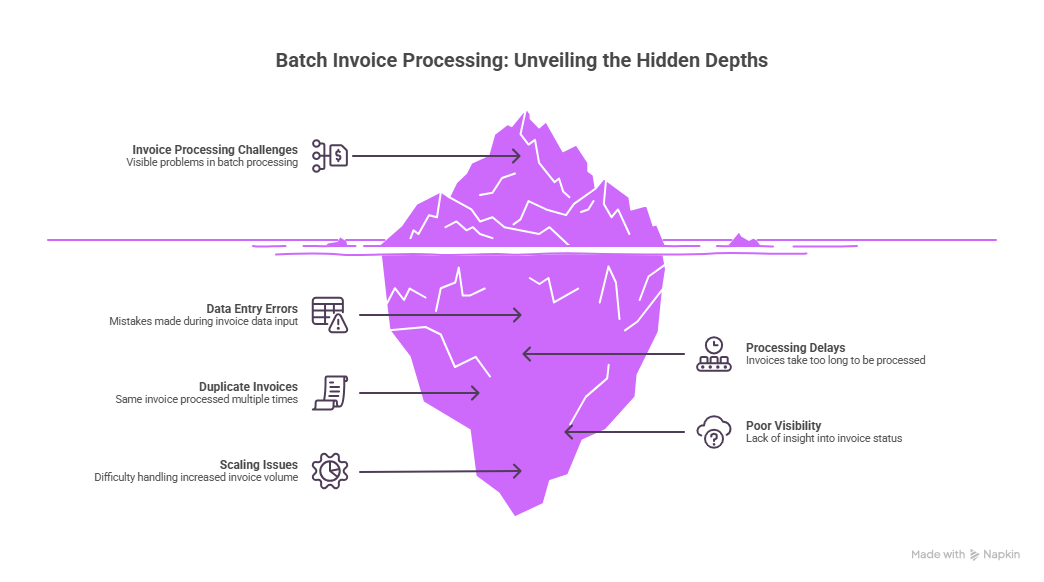
Batch invoice processing sounds efficient in theory—process hundreds or thousands of invoices together instead of one at a time. But in practice, many finance teams still face operational challenges that slow things down and create risks.
Invoice Data Entry Errors
Manual data entry remains one of the most common sources of error in invoice processing. A single missing digit or incorrect total can delay payment, trigger a vendor dispute, or create reconciliation issues in the accounting system. At high invoice volumes, even a small error rate produces a significant number of problematic invoices that require time-consuming correction.
Processing Delays Due to Batch Cycles
Batch workflows process invoices at scheduled intervals, which means an urgent invoice arriving after the batch closes must wait for the next cycle. These delays can frustrate vendors, strain supplier relationships, and in some cases trigger late payment penalties. Finance teams with rigid batch schedules have limited flexibility to handle time-sensitive exceptions.
Duplicate Invoices and Fraud Risk
Duplicate invoices are more common than most finance teams expect. Vendors occasionally resend invoices that appear unpaid, and employees may upload the same document twice through different channels. Without automated validation checks, these duplicates can move through the approval workflow undetected, resulting in double payments that are difficult and time-consuming to recover.
Poor Visibility into Invoice Status
Once invoices enter the batch queue, finance teams often lose clear visibility into where each one stands. When a vendor or manager asks whether a specific invoice has been approved, staff must search through emails, shared folders, or spreadsheets to find the answer. Automation addresses this directly by providing real-time invoice status at every stage of the batch workflow.
Scaling Batch Processing During Peak Invoice Volumes
Month-end and quarter-end periods create significant invoice spikes that manual workflows struggle to absorb. Finance teams suddenly face thousands of invoices within a compressed timeframe, leading to overtime, approval backlogs, and delayed payments. Automated batch processing scales to handle these volume increases without requiring additional staff or extending processing windows.
Why Many Companies Still Use Batch Invoice Processing
Despite its limitations, batch processing remains common. Even with the rise of real-time automation and AI-driven finance workflows, many organizations still rely on batch invoice processing. The approach remains practical for companies that process large invoice volumes and operate within established accounting cycles. Several factors explain this.
Legacy ERP System Compatibility
Many ERP platforms were designed decades ago, so these systems rely on batch transaction processing. Finance teams follow the same workflow because the accounting system expects it in the usual format.
Cost Concerns with Real-Time Automation
Some organizations hesitate to adopt automation as manual workflows appear inexpensive at first. However, research shows the opposite. Manual invoice processing costs between $15 to $16 per invoice. Automated workflows reduce costs to approximately $3 per invoice, which represents savings of up to 80%. At large invoice volumes, the savings become significant.
Standard Accounting Cycles and Financial Controls
The batch invoice workflow aligns with companies that close their financial records weekly or monthly. Invoices move through accounting processes together.
Compliance and Approval Requirements
Certain industries require invoices to pass through multiple levels of approval before payment is authorized. Batch invoice processing supports this by moving invoices through consistent, documented review steps in a structured sequence. Every invoice follows the same approval path, which reduces the risk of payments being authorized without proper oversight and makes compliance reporting straightforward.
How to Automate Batch Invoice Processing
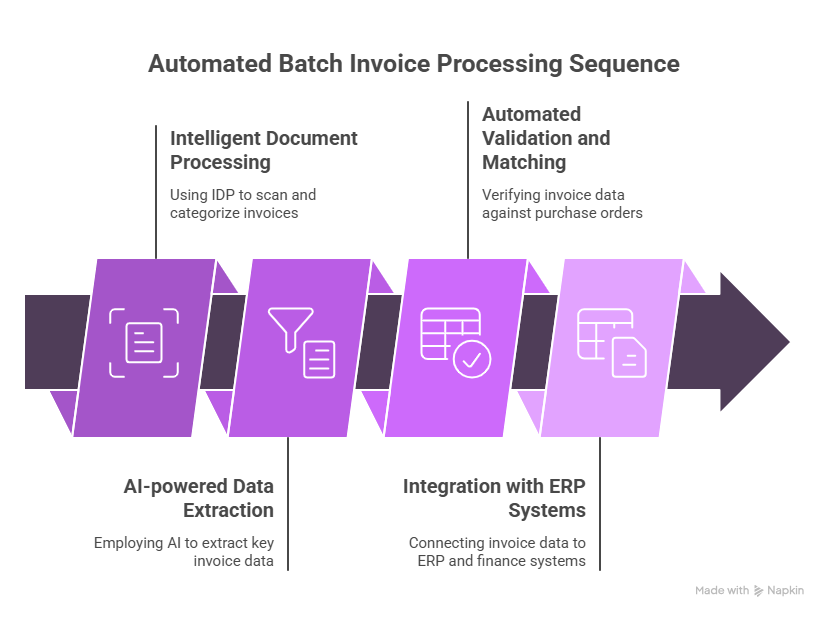
Automation improves batch workflows by removing repetitive tasks. Finance teams spend less time entering data and more time reviewing exceptions.
Step 1: Using Intelligent Document Processing (IDP)
IDP systems use AI models to read incoming invoice documents and extract key fields automatically. In batch invoice processing, this means vendor names, invoice numbers, dates, amounts, and tax values are all captured without manual typing — eliminating the data entry workload from the finance team at the point of intake.
Step 2: AI-powered Invoice Data Extraction
AI models recognize invoice formats from different vendors regardless of layout or structure. Once the format is identified, the system locates and captures the relevant fields instantly. Across large batch invoice processing runs, the entire extraction process completes within seconds.
For a deeper understanding of this work, read: Invoice Line Extraction.
Step 3: Automated Invoice Validation and Matching
Once data is extracted, the system automatically checks invoice details against purchase orders and vendor records. Any inconsistency: a mismatched total, an unrecognized vendor, or a duplicate invoice number, is flagged immediately. Employees review only these exceptions, keeping manual workload minimal even when batch invoice processing volumes spike at month-end or quarter-end.
Step 4: Integration with ERP and Finance Systems
Automation tools connect directly with accounting and ERP platforms, allowing validated invoice data from each batch invoice processing cycle to move into the system without manual re-entry. This integration eliminates duplicate data entry, keeps the audit trail clean, and ensures invoice records remain accurate at every stage of the workflow.
Benefits of Automating Batch Invoice Processing
Automation changes how finance teams handle invoice workloads by removing manual steps that slow down processing and introduce errors.
Faster Invoice Processing Cycles
Automation eliminates the manual steps that create delays in batch invoice processing. Extracted data is fed directly into accounting systems after validation, which means finance teams can process significantly larger invoice volumes without extending processing windows or increasing headcount.
Higher Data Accuracy and Fewer Errors
Manual data entry in invoice processing creates errors that ripple through financial records; incorrect payments, duplicate invoices, and reconciliation problems that take time to resolve.
Automated batch invoice processing addresses this by applying intelligent data capture and validation rules that identify incorrect totals, detect duplicate invoices, and verify vendor information before any data reaches the accounting system. The result is more reliable financial records and reduced exposure to payment errors.
To read more about how IDP detects duplicate invoices, take a look at: How to save your business from double-paying vendors.
Lower Operational Costs in Accounts Payable
Automation reduces the cost per invoice significantly. Organizations that previously spent $15 per invoice manually processed can bring that cost down to approximately $3 through automation. These savings come from reducing labor-intensive data entry, minimizing correction and rework, and preventing duplicate payments — improvements that compound quickly at high invoice volumes.
Better Visibility into Financial Workflows
Manual batch invoice processing makes it difficult to track where any individual invoice stands at a given moment. Automation platforms solve this with real-time dashboards and audit trails that show which invoices have been processed successfully, which require review, and where approval bottlenecks are occurring. Finance managers gain immediate visibility into the entire AP workflow without searching through emails or shared folders.
Improved Compliance and Audit Readiness
Automation maintains a detailed record of every action performed on an invoice, including data extraction logs, approval workflows, and change histories. These records simplify financial audits by giving organizations a complete and traceable processing history that meets regulatory requirements without requiring manual documentation.
Use Cases of Batch Invoice Processing Across Industries
Batch invoice processing supports high-volume financial workflows across a range of industries, each with its own operational requirements.
Financial Services Invoice Operations
Banks and financial institutions process vendor invoices at scale. Batch invoice processing helps manage recurring vendor payments efficiently within scheduled accounting cycles.
Insurance Premium and Claims Invoices
Insurance companies handle invoices related to claims services and vendor contracts across multiple departments. Batch workflows maintain consistent approval processes and keep payment cycles on schedule.
Mortgage and Loan Document Billing Workflows
Mortgage providers manage invoices from appraisers, legal service firms, and document vendors simultaneously. Batch invoice processing organizes these payments into structured cycles, reducing the administrative burden on finance teams.
Engineering and Construction Vendor Invoices
Construction projects involve multiple contractors and suppliers billing at different stages. Batch workflow gives finance teams a structured method to handle these varied invoice streams efficiently without losing visibility into payment status.
Implementation Checklist for Batch Invoice Automation
A structured implementation plan reduces deployment risk and accelerates time-to-value for batch invoice automation.
How Infrrd Automates Batch Invoice Processing
Infrrd provides one of the leading IDP solutions, which is integrated with advanced OCR software and the smartest invoice data capturing features, ensuring high accuracy. Refined data is automatically pushed into your ERP (e.g., SAP, Oracle, NetSuite, or Microsoft Dynamics) via API or RPA.
The IDP offers integrated processes for monitoring service level agreements, ensuring data accuracy, and maintaining records of all actions. An automated system identifies and escalates only unusual cases for human review, minimizing manual intervention.
To know more about how this works at Infrrd, go through: Invoice Automation 2026
Conclusion
Batch invoice processing keeps high-volume accounts payable operations running on schedule. But manual workflows introduce errors, delays, and visibility gaps that compound quickly at scale.
Automation removes those friction points. Invoice data is extracted, validated, and routed without manual intervention. Finance teams focus on exceptions and payment decisions rather than data entry. Organizations that automate batch invoice processing reduce cost per invoice, improve accuracy, and build an audit-ready AP operation that scales with business growth.
FAQs About Batch Invoice Processing
What is batch invoice processing in accounts payable?
Batch invoice processing groups multiple invoices together and processes them during scheduled accounting cycles.
How does batch processing improve invoice management?
It helps finance teams handle large invoice volumes efficiently by organizing processing into predictable cycles.
What are the risks of manual batch invoice processing?
Manual workflows increase the risk of errors, duplicate invoices, and delayed approvals.
What is the difference between batch and automated invoice processing?
Batch processing groups invoices together, while automation removes manual work within that workflow.
How does AI improve batch invoice processing?
AI reads invoice documents, extracts data automatically, and validates information against purchase orders.
What types of invoices can be processed in batches?
Vendor invoices, service invoices, contractor invoices, and recurring billing invoices can all be processed in batch workflows.
How long does batch invoice processing take?
Processing time depends on invoice volume and approval workflows. Automation significantly reduces processing time.
Can batch invoice processing be integrated with ERP systems?
Yes. Automation platforms connect with ERP systems to transfer invoice data directly into accounting records.
What industries use batch invoice processing the most?
Finance, insurance, manufacturing, and construction industries often rely on batch invoice workflows.
What is the future of batch invoice automation?
Automation platforms will increasingly process invoices automatically while employees focus on exception handling and financial analysis.