- Order entry automation replaces manual data entry with software that reads, captures, validates, and posts order data
- When order entry is automated, teams move from typing and checking data to coordinating, deciding, and solving problems.
- Tracking the right indicators for order entry automation helps leaders see where automation is truly working.
Order entry looks straightforward on paper but evaluating real workflows is key when evaluating document automation systems.
An order comes in.
Someone enters it into a system.
Work moves ahead.
In reality, it rarely flows that smoothly.
More than 50% of finance teams spend over 10 hours every week manually entering order and invoice data. Sales operations teams double-check line items. Operations teams chase missing or incorrect fields. While this happens, orders sit idle, and revenue does too. Not because demand is low, but because data moves slowly.
Accuracy adds another layer of friction. Only 5% of purchase orders match correctly on the first attempt, and 39% of invoices contain errors. Each mistake triggers follow-ups, corrections, and rework that stretch order cycles even further.
At the same time, customer expectations keep rising. Nearly 90% of U.S. shoppers expect delivery within 2–3 days. Slow order entry pushes fulfillment timelines beyond what customers now consider acceptable.
This widening gap between customer expectations and internal processing speed is why order entry automation is no longer optional in 2026. It has become a basic operating requirement.
In this blog, you’ll learn everything you need to know about order entry automation in 2026—from what it actually means in day-to-day operations to why manual processes still exist, how automation works step by step, and how leading companies measure success. We’ll also look at where order entry automation fits within modern finance and operations teams, and what to expect as volumes, speed, and accuracy demands continue to rise.
What Is Order Entry Automation
Order entry automation replaces manual data entry with software that reads, captures, validates, and posts order data automatically, which becomes critical when evaluating automation capabilities in IDP platforms.
Instead of staff copying details from emails, PDFs, scans, or portals into ERP systems, automation software handles the work. Humans step in only when something needs review.
The goal is simple.
Move orders faster.
Reduce mistakes.
Free people from repetitive typing.
Order entry automation usually relies on AI-based document processing. These systems read both structured and unstructured documents. They understand tables, line items, headers, totals, and references.
Automation does not remove oversight. It removes busywork.
Examples of Order Entry Processes
Order entry looks different across industries, but the underlying process follows a familiar pattern. Whether an order comes from a retail buyer, a distributor, a healthcare provider, or a manufacturing partner, the same basic steps apply. Order details arrive in various formats, data must be captured accurately, checks need to happen, and the information has to move into internal systems without delay. What changes from industry to industry are the volume, the document format, the level of detail, and the tolerance for errors. Understanding these variations helps explain why order entry can become such a heavy operational burden, and why automation plays a growing role across sectors.
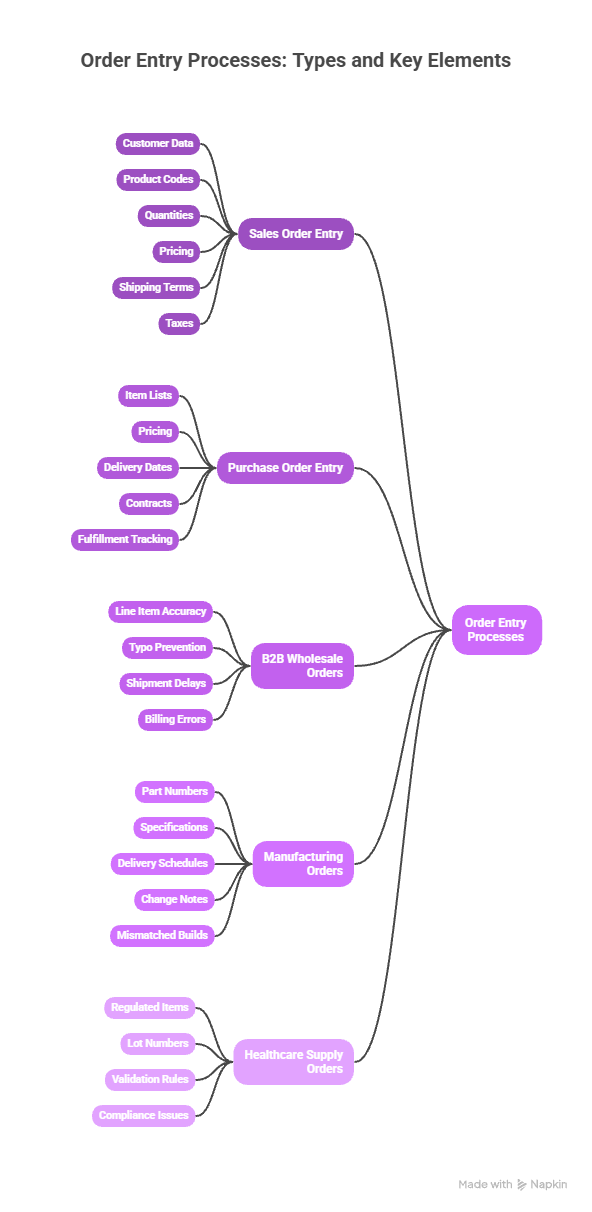
Sales Order Entry: Orders arrive by email, PDF, EDI, or web form. Staff extract customer data, product codes, quantities, pricing, shipping terms, and taxes. The data goes into ERP or CRM systems.
Purchase Order Entry: Vendors send purchase orders with item lists, pricing, and delivery dates. Teams record these details, match them to contracts, and track fulfillment.
B2B Wholesale Orders: Large orders arrive with dozens or hundreds of line items. Each line needs accuracy. One typo can delay shipment or billing.
Manufacturing Orders: Orders include part numbers, specs, delivery schedules, and change notes. Manual entry often leads to mismatched builds.
Healthcare Supply Orders: Orders involve regulated items, lot numbers, and strict validation rules. Errors can cause compliance issues.

Types of Order Entry Workflows
Not all order entry workflows follow the same path. The structure depends on order volume, data quality, document formats, and how much risk a business is willing to carry at each stage. Some teams aim for full automation. Others prefer a controlled review. Most fall somewhere in between.
Straight-Through Processing (STP)
Straight-through processing is the goal for most automation programs. In this model, orders that meet all predefined rules move forward without any human involvement . Automation captures the order data, validates it against business rules, and posts it directly into ERP or order systems. No one types. No one reviews. No one waits.
STP works best when:
- Order formats are consistent
- Data confidence is high
- Validation rules are clear
As STP rates increase, teams see faster cycle times and lower processing costs.
Human-in-the-Loop Processing
Human-in-the-loop workflows balance automation with oversight. Automation handles the initial data capture and validation. Humans step in only when something looks off.
Instead of reviewing every order, staff review exceptions. These may include missing fields, mismatched prices, or low-confidence line items.
This approach:
- Reduces manual workload
- Keeps control where it matters
- Builds trust in automation over time
Hybrid Workflows
Hybrid workflows mix automated posting with selective approvals. Some fields move straight into systems, while others wait for sign-off.
For example, quantities and product codes may post automatically, while pricing or discounts require approval. This model fits organizations with strict controls or complex pricing rules. Hybrid workflows offer flexibility without reverting to full manual entry.
Batch Processing
Batch processing handles large volumes at set times. Orders collected over hours or days are processed together.
This model suits:
- High-volume B2B operations
- Back-office teams with fixed schedules
- Environments where real-time posting is not critical
Batch processing improves efficiency, but it may slow visibility.
Real-Time Processing
Real-time workflows process orders as soon as they arrive. Data flows into systems instantly, supporting faster fulfillment and customer response.
This model works well for:
- E-commerce
- Time-sensitive orders
- High customer expectations
Real-time processing places higher demands on data accuracy and system stability.
Automation Maturity and STP Rates
As automation matures, straight-through processing rates rise. Teams refine rules, improve confidence thresholds, and reduce exception volumes. Higher maturity does not remove human oversight. It simply applies it where it adds value. The result is a workflow that moves fast, stays accurate, and scales without strain.
Challenges of Manual Order Entry
Manual order entry does not collapse overnight. It weakens gradually as volume increases. What works at low scale begins to strain under pressure. Teams respond by adding more people instead of improving the process. Costs climb. Mistakes become more frequent. This pattern repeats across industries. As order volumes rise, manual systems struggle to keep up. The work slows, quality slips, and downstream teams feel the impact.
Common Challenges in Manual Order Entry
Time Drain: Manual order entry absorbs hours every week across finance, sales operations, and fulfillment teams. These hours are spent typing, copying, and checking data. None of this work improves pricing, customer experience, or growth. It simply keeps the system running.
High Error Rates: Manual entry invites mistakes. Typos, missing fields, incorrect quantities, and pricing errors are common. Studies show that close to 40% of invoices contain some form of error. Each mistake creates extra work and erodes confidence in the data.
Rework Loops: When errors slip through, teams must fix them later. Corrections lead to credit notes, revised orders, follow-up emails, and system adjustments. What should have been a single step turns into a loop of back-and-forth activity.
Delayed Revenue: Orders waiting in entry queues cannot move to fulfillment or billing. This delay pushes revenue recognition further out, even when demand is strong. Slow entry becomes a hidden drag on cash flow.
Employee Fatigue: Repeating the same data entry tasks day after day takes a toll. Employees disengage. Burnout increases. Turnover follows, creating training gaps and knowledge loss.
Poor Visibility: Manual processes make it difficult to track order status in real time. Data sits in inboxes, spreadsheets, or local files. Managers lack a clear view of what is processed, pending, or blocked.
Customer Frustration: Customers feel the impact quickly. Slow order confirmation, delayed shipping, and billing issues reduce trust. Today’s buyers expect fast and accurate processing, not excuses.
Why Companies Still Use Manual Order Entry
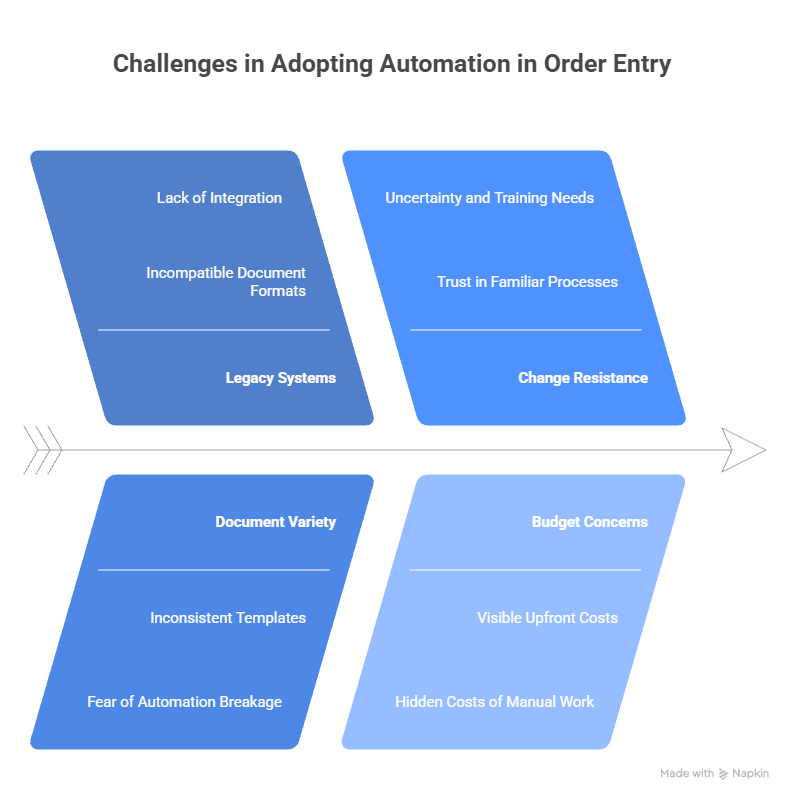
If manual order entry creates so many delays, errors, and costs, it’s fair to ask why so many companies still rely on it. The answer is not reluctance to improve or a lack of awareness. In most cases, the reasons are practical and rooted in experience.
Legacy Systems
Many organizations run on older ERP systems that were never designed to handle today’s document formats. These systems expect clean, structured inputs, not PDFs, email attachments, or scanned forms. Teams adapt by filling the gaps manually because it feels safer than forcing new tools into outdated infrastructure.
Document Variety
Orders do not arrive in one standard layout. Vendors, customers, and partners all use different templates, tables, and formats. Teams worry that automation will break when a document looks different from the last one. Manual entry feels like the only reliable option when formats vary widely.
Change Resistance
Teams trust processes they know. Manual order entry may be slow, but it is familiar. New systems introduce uncertainty, training requirements, and short-term disruption. Many organizations hesitate to change workflows that appear to be “working,” even if they are inefficient.
Short-Term Thinking
Hiring additional staff often feels like the fastest solution. It solves today’s backlog without forcing a process redesign. Automation requires upfront planning, testing, and alignment across teams. Under pressure, leaders choose the quick fix over the long-term solution.
Past Automation Failures
Earlier automation tools relied heavily on rigid rules and templates. When documents changed, systems failed. Many teams remember these experiences and assume automation still works the same way. That history creates skepticism, even as technology has moved forward.
Budget Concerns
Automation can look expensive at first glance. Licensing, implementation, and integration costs are visible. The cost of manual work—lost time, rework, delays, and turnover, often stays hidden. Until those costs are measured, automation feels harder to justify.
Most teams do not reject automation outright.
They fear disruption more than inefficiency.
Modern AI changes this equation by handling document variety, reducing setup effort, and allowing teams to automate without tearing apart existing systems.

How to Automate Order Entry
Order entry automation works best when it is introduced gradually. It is not a switch you turn on overnight. It is a system that improves with use, feedback, and refinement. Teams that succeed start small, build confidence, and expand automation as accuracy and trust grow.
A structured rollout helps avoid disruption while delivering value early.
Step-by-Step Order Entry Automation Process
Step 1: Document Intake
Orders enter the organization through many channels. These may include email attachments, customer portals, APIs, EDI feeds, or scanned documents. Automation tools collect these inputs in one place, creating a single entry point instead of scattered inboxes and folders.
Step 2: Document Classification
Once an order is received, AI identifies what type of document it is. The system distinguishes sales orders from purchase orders, change requests, or confirmations. It also recognizes layout patterns, even when formats vary between customers or vendors.
Step 3: Data Extraction
After classification, the system extracts key information. This includes customer details, order numbers, product codes, quantities, pricing, shipping terms, and full line-item tables. The goal is to capture the same data a human would, only faster and without fatigue.
Step 4: Validation Checks
Extracted data is checked against predefined rules. These may include price validation, quantity limits, contract terms, customer master data, or product catalogs. Validation catches issues early, before incorrect data enters core systems.
Step 5: Exception Handling
Only orders or fields that fail validation are flagged for review. Human-in-the-loop focuses on resolving exceptions instead of reviewing every order. This targeted review model reduces workload while keeping control where it matters.
Step 6: System Posting
Once data passes validation, it is posted directly into ERP or order management systems. The information arrives structured, complete, and ready for downstream processes like fulfillment and billing.
Step 7: Audit Logging
Every action is logged automatically. The system records what was extracted, what was validated, what was changed, and who reviewed exceptions. This creates a clear audit trail for compliance and reporting.
Advantages of Automated Order Entry
Automation changes more than processing speed. It changes how teams operate day to day.
When order entry is automated, work stops revolving around typing and checking data. Teams shift their attention to coordination, decision-making, and problem-solving. The impact shows up across operations, finance, and customer-facing teams.
Faster Processing
Orders move through the system in minutes instead of days. What once sat in inboxes or queues now flows directly into core systems. This speed reduces backlogs and keeps work moving, even during peak volume periods.
Higher Accuracy
AI captures data consistently across headers, fields, and line-item tables. Fewer errors enter the system, which reduces downstream corrections, disputes, and rework. Clean data builds trust across teams.
Lower Labor Costs
Automation allows teams to handle higher volumes without adding headcount. Growth no longer requires proportional increases in staff. This creates a more stable cost structure as the business scales.
Improved Cash Flow
Faster order entry leads to faster fulfillment and invoicing. When orders move quickly and accurately, billing cycles shorten, and revenue is recognized sooner.
Happier Staff
People spend less time on repetitive data work and more time on meaningful tasks. Morale improves when employees are not stuck doing manual entry all day, and turnover becomes easier to manage.
Better Customer Experience
Customers receive quicker order confirmations, fewer corrections, and more reliable delivery timelines. Consistent processing builds confidence and strengthens relationships.
Order Entry Automation vs Invoice & AP Automation
Order entry automation and invoice automation often use similar technology, but they solve different problems and sit at different points in the business workflow. Treating them as the same can lead to gaps in efficiency.
Order Entry Automation
Order entry automation focuses on capturing incoming orders and moving that data into internal systems accurately and quickly. The goal is to translate customer or partner requests into system-ready data so fulfillment, production, and billing can begin without delay.
This step sits at the very start of the revenue cycle. Any error here, wrong quantity, incorrect pricing, missing item codes, travels downstream and multiplies in cost and effort.
Invoice & AP Automation
Invoice and accounts payable automation handles vendor invoices after goods or services are delivered. These systems focus on matching invoices to purchase orders, managing approvals, and releasing payments. The emphasis is on control, compliance, and payment accuracy.
While invoice automation reduces late payments and manual checks, it operates after commitments have already been made.
Shared Technology, Different Impact
Both order entry and invoice automation rely on document AI to read forms, extract data, and apply validation rules. Both reduce manual effort and improve accuracy.
The key difference is timing.
Order entry happens earlier in the revenue cycle, when data first enters the system. Errors at this stage affect fulfillment, inventory, billing, and customer experience. Invoice automation corrects issues later, when options are more limited, and fixes cost more.
Fixing data early is cheaper, faster, and less disruptive than correcting it after orders have moved forward. That is why many organizations now prioritize order entry automation alongside, or even before, invoice and AP automation.
Key Metrics to Measure Order Entry Automation Success

Automation success needs measurement because speed and scale alone do not tell the full story. Without clear metrics, teams cannot tell whether automation is actually reducing effort, improving accuracy, or removing bottlenecks. Tracking the right indicators helps leaders see where automation is working, where exceptions still pile up, and how close the process is to true straight-through processing. These metrics turn automation from a technical project into a measurable business improvement.
FAQs About Order Entry Automation
What is order entry automation?
Order entry automation uses AI-driven software to capture order information from documents and digital inputs, validate the data, and post it into internal systems without manual typing. Instead of staff copying details from PDFs, emails, or portals, automation handles the data capture and routing, allowing orders to move forward faster and with fewer errors.
What are the risks of manual order entry?
Manual order entry increases the risk of data errors, processing delays, and rising operational costs. Typos, missing fields, and incorrect quantities often lead to rework and follow-ups. Over time, repetitive data entry also contributes to employee fatigue and turnover, which further disrupts operations.
How does automated order entry improve accuracy?
Automated order entry improves accuracy by extracting data consistently across documents and applying validation rules before posting. AI checks fields against pricing rules, reference data, and business logic, reducing the chance that incorrect information enters core systems.
What documents are used in order entry?
Order entry typically involves sales orders, purchase orders, contracts, order confirmations, and change requests. These documents may arrive as PDFs, scanned files, emails, or system exports, often with varying layouts and detailed line-item tables.
How long does it take to implement order entry automation?
Implementation timelines vary based on order volume, document variety, and system integrations. Most modern order entry automation projects take weeks rather than months, especially when rolled out in phases that allow teams to build confidence and refine rules over time.
Can order entry automation handle line-item tables?
Yes. Modern AI-based systems are designed to read complex line-item tables, including multi-page and nested structures. They can capture quantities, prices, and item codes accurately, even when table layouts change.
How does order entry automation integrate with ERP systems?
Order entry automation integrates with ERP and order management systems through APIs, file-based exports, or direct connectors. This allows clean, validated data to flow into core systems without manual intervention.
Is order entry automation suitable for regulated industries?
Yes. Order entry automation supports regulated industries by maintaining audit trails, validation checks, and clear documentation of changes. These features help meet compliance and reporting requirements without slowing down processing.
How is exception handling managed in automated order entry?
Exception handling focuses only on low-confidence or rule-breaking data. The system routes flagged fields or orders to human reviewers while allowing the rest to process automatically. This targeted review model keeps control where it matters without slowing overall throughput.
What is the difference between order entry automation and order management systems?
Order management systems handle orders after they are entered, such as tracking fulfillment, inventory, and shipping. Order entry automation focuses on the earlier step of capturing and validating order data so it can enter those systems correctly in the first place.

Priyanka Joy is a product writer at Infrrd who approaches automation tech like a curious detective. With a love for research and storytelling, she turns technical depth into clarity. When not writing, she’s immersed in dance, theatre, or crafting her next narrative.