- Tolerance data extraction is the process of collecting the exact requirements that define how a part should be built.
- Automating tolerance data extraction helps teams move faster, reduce errors, and work with greater confidence.
- Instead of manually reviewing complex drawings, AI can quickly capture precise measurements and specifications at scale.
Tolerance data hidden in engineering and construction drawings plays a critical role in accurate estimates, material planning, and risk reduction. When this data is missed or misread, construction bids become unreliable, and projects face costly delays. As the industry moves toward AI construction bidding, AI in engineering drawing, and AI in construction drawing, the ability to automatically read and interpret tolerance data is becoming essential. This guide explores how tolerance data extraction is evolving in 2026 and why it is now a foundational capability for modern construction workflows.
What is Tolerance Data Extraction?
Tolerance data extraction is the process of collecting the exact requirements that define how a part should be built. These requirements include both limits and geometric limits. They appear on engineering drawings, CAD exports, and scanned PDFs. The goal is simple: capture every detail that tells a machine, inspector, or vendor how precise a feature must be. If the drawing says a hole can vary by ±0.02 mm, or a surface must meet a flatness level, tolerance extraction gathers that detail and turns it into structured data.
In most companies, this happens by hand. Someone opens a drawing, highlights symbols, and types values into a spreadsheet. If you think this sounds slow, you’re right. A 2024 survey of U.S. manufacturers reported that 70% still collect drawing data manually. Another study noted that about 75% of organizations still “balloon” and extract GD&T by hand, using pencils and spreadsheets. And for complex parts, the same report said pulling tolerances can take “multiple days.”
So yes, tolerance extraction matters, and it’s more important than ever.
Where tolerance extraction fits in engineering workflows
Tolerance data sits at the center of many engineering steps. It guides machining, inspection, sourcing, quoting, and quality checks. Think of it as the rulebook for how a part should behave. Without it, every department guesses. Some examples:
- A machinist uses tolerance details to pick tools.
- A quality engineer compares measurements against the tolerance limits.
- A sourcing manager checks if a vendor can hit the required precision.
- A quoting team uses tolerances to estimate cost and cycle time.
Tolerance extraction feeds many systems. It touches PLM, MES, ERP, QMS, and even RFQ workflows. A single drawing may move through five departments, and each one needs clean, clear tolerance data.
Examples of tolerance data (GD&T, limits, notes, PMI)
Tolerance data appears in many forms. Even seasoned engineers joke that drawings are like treasure maps, except the treasure is a long night on the shop floor if you overlook a symbol. Common items include:
- GD&T symbols — straightness, flatness, profile, runout, true position
- Dimensional limits — ± tolerances, lower/upper limits, fit classes
- Surface finish indicators — roughness marks, machining symbols
- Notes — heat treatment notes, special processes, weld symbols
- PMI extracted from CAD — embedded tolerance definitions tied to faces
- Title block tolerances — default rules for untoleranced dimensions
- Feature control frames — composite or multi-segment structures
Each item plays a role in how the part fits, moves, or performs. Missing just one can send production down the wrong path.
Why the Right Tolerance Data Extraction Matters in 2026
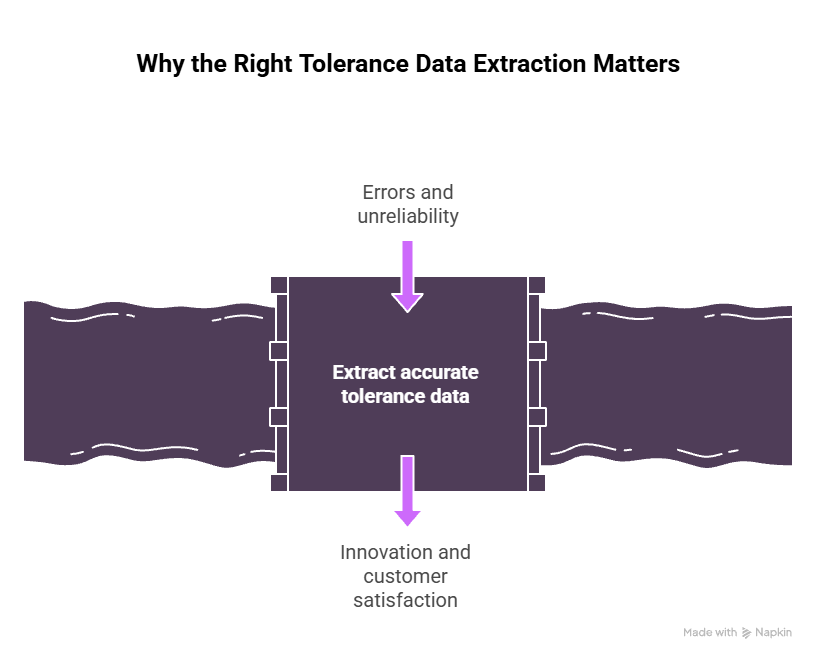
Time, cost, and accuracy impact of manual tolerance reading
Manual extraction has been the default for decades, but it slows teams down. Engineers copy details from drawings into spreadsheets, and errors slip in, missed values, mistyped limits, and mismatched notes. One drawing may take an hour. Fifty drawings can take a week. Complex aerospace or automotive parts can take even longer, sometimes stretching into several days of extraction.
This adds cost. Each review cycle, correction, and handoff creates more overhead. Missed tolerances lead to rework and delays. Accuracy suffers, too. Drawings often contain hundreds of small symbols and notes, and even experienced engineers can overlook a detail that affects machining or inspection.
Wrong Readings of Tolerance Values Using OCR Tools
Traditional OCR tools struggle with the structure of tolerance values. They often fail to separate upper and lower limits, even when the drawing shows them clearly. Instead of capturing each limit as its own value, the software collapses everything into one long text string. This forces someone to review the extraction manually and fix the data. The result is wasted time, extra effort, and unnecessary back-and-forth.
How missed tolerances cause scrap, rework & quality failures
A missing tolerance can send an entire batch of parts into scrap. It only takes one overlooked symbol for a part to fail inspection. Manufacturers spend millions fixing errors caused by missing or misunderstood specifications.
Some common scenarios include:
- A vendor machine has a hole too loose because a positional tolerance wasn’t captured.
- A surface finish requirement is overlooked, leading to friction problems.
- A profile tolerance is misread, causing a design mismatch.
- Default tolerances from the title block get ignored.
Scrap hits budgets hard. Rework delays shipping. And in industries like aerospace or medical devices, a single incorrect tolerance can be a serious risk. That’s why accurate extraction matters more in 2026 than ever before.
How Tolerance Data Extraction Works
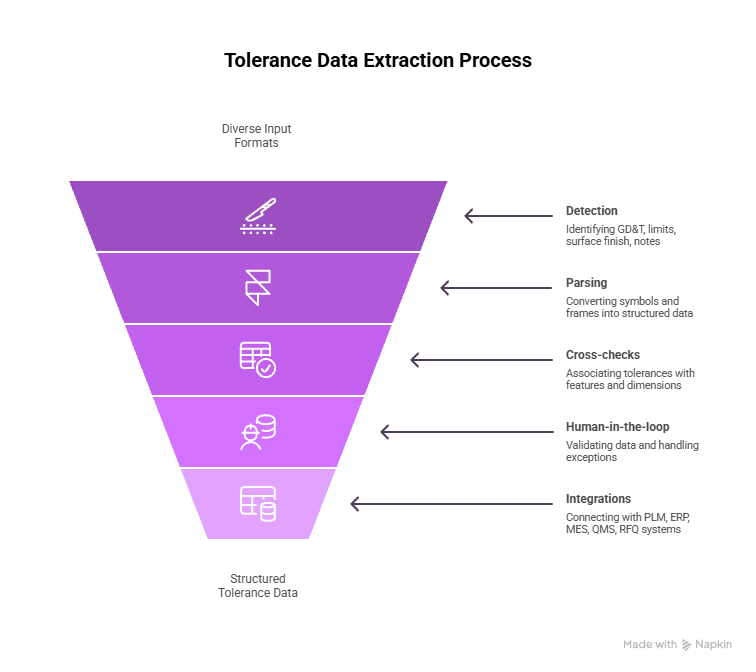
Intake: CAD models, 2D drawings, PDFs, scans
The automated tolerance data extraction process always begins with intake. Drawings come in many forms. Some arrive as PDFs. Others are scanned from old archives. Some come from CAD systems with embedded PMI. A few arrive as photos taken at job sites. The system must handle all these formats without breaking the flow.
Common intake sources include:
- Native CAD files
- 2D engineering drawings
- Multi-page PDFs
- Vendor drawings
- Shop-floor redlines
- Legacy printouts
A clean pipeline handles them all and prepares them for detection.
Detection: identifying GD&T, limits/fit, surface finish, notes
Detection is the stage where symbols, values, and notes are spotted. Modern AI does this visually. Vision models look at the drawing and spot symbols much like a human does. They detect:
- Feature control frames
- Limit tolerances
- Fit classes
- Surface roughness symbols
- Weld notes
- PMI annotations
- Leader lines and arrows
This step needs precision. A 2025 hybrid deep-learning paper showed 94.8% precision for GD&T symbol detection with a 97.3% F1 score. Another 2024 study on scanned drawings achieved 96.73% correct extraction for tolerance blocks. These numbers show how automation continues to improve.
Parsing: converting symbols & frames into structured data
Once symbols are detected, they must be converted into structured fields. Parsing breaks down the visual elements. It reads the symbol. It reads the values. It captures relationships like primary/secondary/tertiary datums. It also reads special modifiers like MMC, LMC, or project requirements.
Parsing outputs consistent fields such as:
- Type of tolerance
- Datum references
- Numeric limits
- Material condition
- Feature associations
- Symbols and modifiers
This is where AI replaces spreadsheets. Instead of engineers copying values, the system generates structured fields ready for downstream systems.
Cross-checks: associating tolerances with features & dimensions
A tolerance means nothing without its link to a feature. Cross-checking connects extracted tolerances to the correct lines, holes, faces, or dimensions. This pairing is crucial for machining and inspection. Otherwise, instructions end up unclear.
AI uses visual and contextual clues to pair tolerances with the correct entities. It follows leader lines, annotation groups, and spatial cues. Some systems use geometric data from CAD models to strengthen the pairing.
Human-in-the-loop: validation and exceptions
No automated system runs without human judgment, especially in engineering. A human-in-the-loop model gives engineers a simple way to confirm or fix items. They don’t extract everything by hand; they solve only the tricky parts.
Typical actions include:
- Confirming unusual tolerances
- Fixing symbols with noise or distortion
- Marking non-standard annotations
- Resolving ambiguous leader lines
This model blends speed and control. Engineers move fast, but they still maintain authority over final data.
Integrations: PLM, ERP, MES, QMS, RFQ
Once extracted, tolerance data must reach other systems. Integrations take the structured output and send it where it’s needed. Examples include:
- PLM for design management
- MES for operations planning
- ERP for cost estimation
- QMS for FAI and inspection planning
- RFQ systems for faster quoting
These connections cut manual steps and speed up the engineering flow.
Challenges of Manual Tolerance Extraction
Manually extracting tolerance data from engineering and construction drawings is slow, repetitive, and highly error-prone. Teams must scan complex diagrams, interpret symbols, and re-enter critical measurements by hand, which increases the risk of missed details and costly mistakes. As drawing volumes grow and timelines shrink, these manual processes quickly become a major bottleneck for project planning and execution.
Low-quality scans & legacy drawings
Legacy drawings often look rough. Some come from microfilm archives. Others were photocopied so many times that the symbols blurred. Low-quality scans make manual work harder. Engineers zoom in and guess what symbols might be. This slows down extraction and increases the odds of errors.
Inconsistent symbols, shorthand & vendor variations
Different companies use different styles. Some symbols get drawn slightly differently. Some vendors use shorthand. Others use older drafting styles. Engineers must interpret all of these each time. The lack of consistency delays extraction and increases mistakes.
Missing tolerances, version drift, and incomplete notes
Drawings change. Version control is often sloppy. Teams sometimes work from PDFs downloaded months ago. Title blocks get updated. Notes get added. Tolerances appear in one version and disappear in another. When version drift occurs, extraction becomes unreliable.
High labor hours & risk of misinterpretation
Manual work burns time. And even skilled engineers misread symbols after long hours of extraction. A single mistake can alter how a part is produced. That alone is enough reason for many companies to now explore automation.
Why Many Companies Still Extract Tolerances Manually
Despite the rise of AI tools, many companies still rely on manual tolerance extraction. Old habits, mixed file formats, and concerns about accuracy keep teams tied to traditional methods. Let’s break them down in detail.
Fragmented drawing sources (PDF, TIFF, CAD, paper)
Most engineering teams don’t get drawings in one clean format. They receive a mix. Some vendors send PDFs. Others still send TIFF files. A few send paper drawings that look like they survived three factory moves. Some OEMs send native CAD with PMI. Others export messy hybrids with missing symbols.
This fragmentation slows automation adoption. A system built only for clean PDFs can’t deal with scanned paper prints. A system built for CAD may struggle with raster images. Teams fall back to manual extraction because they can open any file and get to work right away, even if the work is slow.
Fear of accuracy gaps in automation
Many engineers worry about missing even one critical value. They trust their eyes more than any software tool.
Engineering culture rewards caution. Missing a tolerance can ruin production. So the fear of relying on automation is real. Teams wait. They test. They hesitate. And until they trust automated extraction fully, they keep doing things the old way.
Heavy reliance on tribal knowledge
In many shops, one engineer carries years of drawing experience in their head. They know how a specific vendor writes notes. They know old symbols. They know strange drafting habits. They’ve seen variants from ten different suppliers. This internal familiarity acts like glue that holds processes together.
Automation tools don’t have that history. They need training. They need feedback loops. They must learn patterns. Until that happens, companies continue using people who “just know” the drawings.
How Modern AI Automates Tolerance Data Extraction
Vision + language models that detect GD&T & general tolerances
Modern AI can inspect drawings the same way a human would. Vision models scan drawings. They spot symbols, arrows, frames, and text. Language models interpret relationships and meanings. Together, they read drawings with impressive accuracy.
Vision models detect:
- Feature control frames
- Surface finish marks
- Dimensional limits
- Datums
- Fit classes
- All GD&T symbols
Language models then interpret meaning. They read notes. They infer context. They resolve odd patterns. They can even handle symbols that differ slightly across vendors.
This dual-model approach pushes extraction closer to human-level performance.
Reading PMI from CAD & text from drawings
CAD data carries structured PMI. These annotations link directly to faces and features. AI reads PMI and extracts tolerances with high precision. This avoids many errors since CAD models carry fewer distortions.
Raster drawings require a different process. AI performs OCR for text. It analyzes symbols visually. It deals with smudges, lines, and noise. AI models trained on millions of patches can read even questionable scans with strong reliability.
This shows how far raster extraction has come.
Agentic AI for validation, conflict checks & suggestions
Agentic AI doesn’t stop at extraction. It evaluates what it captures. It checks for conflicts. It identifies suspicious cases. It suggests the next steps. It spots missing datums. It flags unusual modifiers. It helps engineers move faster by eliminating silent errors.
Examples include:
- Confirming if a tolerance contradicts a note
- Comparing the extracted value against the title block defaults
- Checking if a feature control frame is missing a datum
- Highlighting text that appears too light or distorted
- Marking unclear surface finish symbols
The AI behaves like a second set of eyes. It reviews work and keeps engineers from chasing mistakes.
Scaling tolerance extraction without scaling headcount
Manual extraction grows with volume. AI extraction grows with compute. This is the difference between linear growth and scalable growth. A small team can now process hundreds of drawings per week. Large teams can process thousands.
AI handles:
- High-volume RFQs
- Multi-vendor batches
- Archive extraction
- Design-to-inspection workflows
- Version upgrades across old drawings
Companies can scale extraction without adding headcount at the same pace. That shift changes how engineering teams plan workloads.
Advantages of Automated Tolerance Data Extraction
Automating tolerance data extraction helps teams move faster, reduce errors, and work with greater confidence. Instead of manually reviewing complex drawings, AI can quickly capture precise measurements and specifications at scale. This not only saves time but also improves accuracy and ensures that critical tolerance information flows smoothly into planning, bidding, and production workflows.
Higher accuracy & consistency
Automated extraction stays consistent. It does not get tired. It does not misread a symbol at 6 p.m. on a Friday. It reads drawings the same way every time. It also enforces standardization. Every symbol gets categorized the same way. Every feature control frame follows the same structure. This consistency supports downstream systems.
Faster RFQs & quoting workflows
RFQ cycles vary dramatically depending on how fast teams extract tolerance data. Vendors cannot quote without clear precision requirements. Automated extraction changes this. It shortens RFQ timelines by removing hours of manual copying.
Faster extraction leads to:
- Quicker vendor responses
- Faster internal approvals
- More competitive bids
- Better forecast planning
When tolerance data flows faster, quoting cycles improve.
Better audit readiness (FAI, PPAP, inspections)
Audit processes require clean data. Automated extraction produces a traceable record for each tolerance. It tracks each symbol and value. It logs relationships. It stores the source coordinates. This gives QA teams a clear chain for audits.
During FAI or PPAP, teams can show:
- Exactly where each tolerance came from
- How it was interpreted
- How it links to inspection plans
- What changes were made during the review
This reduces stress during audits. Teams can respond to questions quickly and confidently.
Reduced scrap, rework & warranty claims
Missing tolerances cause scrap. Wrong tolerances cause rework. Both cost money. Both hurt supplier relationships. Automated extraction reduces these problems by capturing more details accurately.
Lower scrap leads to:
- Shorter production cycles
- Fewer inspection delays
- Better customer trust
- Higher supplier scores
Everything improves when tolerances are correct the first time.
Top Tolerance Data Extraction Approaches & Tools
There’s more than one way to extract tolerance data, and each approach comes with its own strengths. Some methods rely on CAD, others depend on OCR, and newer hybrid systems blend vision and language models to interpret drawings with higher accuracy. Knowing how these approaches work helps teams choose the right path for their workflows and drawing formats.
CAD-based PMI extraction
PMI extraction reads dimension and tolerance data directly from CAD files. This approach is reliable because PMI attaches to geometry. No OCR is required. No symbol noise exists. CAD extraction works well for companies that design in modern CAD systems.
PMI extraction helps with:
- Automated inspection planning
- Model-based definition workflows
- High-precision machining setups
- Design-to-manufacturing transitions
The biggest challenge is vendor compatibility. Not all CAD exports carry clean PMI. Some legacy models do not include these details.
2D drawing OCR + GD&T interpretation
OCR-based extraction handles PDFs, prints, and scans. This method uses vision models to detect symbols and read text. It can process a wide range of drawing types, including messy ones.
This approach supports:
- Mixed vendor drawings
- Historical archives
- Paper-based engineering workflows
- Multi-format image pipelines
Its main strength is flexibility. It accepts nearly any input.
Hybrid VLM-based extraction (vision + LLM)
This approach combines vision and language models in one flow. The vision model spots symbols. The language model interprets them. Together, they understand context better. This hybrid system works well for complex drawings with notes, modifiers, and mixed formats.
This method suits:
- Aerospace assemblies
- Automotive GD&T-heavy parts
- Precision machining shops
- Construction fabrication drawings
As multi-modal models improve, hybrid extraction becomes the future standard.
How Infrrd Automates Tolerance Data Extraction
Infrrd applies AI-driven document understanding to engineering drawings, making tolerance extraction faster and more reliable. Instead of relying on templates or manual review, the system reads symbols, notes, and dimensions much like an engineer would. This allows teams to process large volumes of drawings with greater accuracy and far less effort.
IDP + Engineering Diagram Understanding
Infrrd applies Intelligent Document Processing to engineering drawings. It treats drawings like documents with graphics and text. This allows the system to read notes, symbols, tables, and frames in one pass. It handles CAD-like precision while dealing with PDF-level noise.
The system learns patterns from millions of engineering elements. It adapts to drawing styles from many industries.
AI that reads drawings like documents
Infrrd’s model analyzes drawings by understanding structure. It detects symbols, numeric values, notes, and relationships. It makes sense of the leader lines. It interprets feature frames. It extracts tolerances at scale without requiring templates.
This removes the need to set rules for each vendor file. Instead, the AI generalizes across drawing formats.
Agentic workflows for pre-checks, validations & audit support
Infrrd’s agentic AI performs checks after extraction. It verifies values. It flags suspicious patterns. It reviews for missing data. It checks for conflicting notes. It consolidates information. Engineers review exceptions rather than entire drawings.
This improves audit readiness. Teams get clear change histories and explanations.
Applicable across manufacturing, aerospace, automotive, construction
Infrrd’s approach suits many industries because tolerance data appears everywhere. Whether it’s a bracket, turbine part, chassis plate, or plumbing layout, every sector uses tolerance details.
Industries supported include:
- Industrial manufacturing
- Aerospace
- Automotive
- Medical devices
- Oil and gas
- Construction fabrication
- Electronics and semiconductors
This broad coverage helps teams unify extraction workflows.
FAQs About Tolerance Data Extraction
What is tolerance data extraction?
It is the process of collecting limits, symbols, and notes from engineering drawings or CAD models. This information defines how precise each feature must be in production.
Can AI extract GD&T from 2D drawings?
Yes. Modern tools detect GD&T symbols using vision models. Research shows 94.8% precision for GD&T detection. These tools handle PDFs, scans, and raster formats.
What tolerances can be extracted automatically?
Most tools can extract:
- GD&T
- Dimensional limits
- Surface finish values
- Fit classes
- Default tolerances
- Title block details
- PMI from CAD
Some systems also read custom vendor notes.
Which file types are supported for tolerance data extraction from engineering drawings?
Most modern systems support:
- PDFs
- TIFF images
- PNG/JPG scans
- Native CAD with PMI
- Multi-page documents
- Legacy archives
How does tolerance data extraction support RFQ workflows?
Vendors quote faster when they know the exact precision levels. Automated extraction speeds up this step. It removes manual copying and delivers clear tolerance sets for cost estimation.
What standards matter, such as ASME Y14.5 and ISO 1101?
ASME Y14.5 and ISO 1101 define the core GD&T practices used worldwide, and AI models trained on these standards can interpret symbols accurately across many drawing formats.
Which industries benefit the most from automated tolerance extraction?
Industries that depend on high precision, strict regulations, or large drawing volumes—such as aerospace, automotive, medical, and industrial manufacturing—gain the most value from automation.
How does a company start tolerance extraction automation?
The best starting point is a small drawing set; run extraction, review the exceptions, measure accuracy, and expand the scope once the workflow proves stable.

Priyanka Joy is a product writer at Infrrd who approaches automation tech like a curious detective. With a love for research and storytelling, she turns technical depth into clarity. When not writing, she’s immersed in dance, theatre, or crafting her next narrative.