- This guide explains what Intelligent Document Processing in Healthcare is, where it is used, and how it is being integrated with preexisting healthcare systems.
- Administrative tasks take up more healthcare time than many realize, with staff spending hours on manual data entry across intake, billing, and records.
- Organizations that adopt healthcare document automation today build the operational foundation for scalable, efficient care delivery tomorrow.
Healthcare relies on documentation. Every patient visit creates paperwork. Multiply that by thousands of visits each week, and healthcare operations quickly become document-heavy. Staff spend hours entering data into systems, and one misplaced number can delay billing or slow patient care.
This is why many healthcare organizations are turning to Intelligent Document Processing (IDP). IDP in Healthcare would help by reading documents, extracting data, and moving information into systems automatically, while staff review only the exceptions.
Healthcare providers who have adopted document automation report major efficiency gains. Some organizations reduced patient record processing time by as much as 50% after automation adoption.
At the same time, artificial intelligence adoption across healthcare continues to expand. The AI healthcare market was valued at $36.67 billion in 2025 and is expected to reach $505.59 billion by 2033. Document processing automation is one of the fastest areas of adoption.
Key Takeaway
This guide explains what Intelligent Document Processing in Healthcare is, where it is used, and how it is being integrated with preexisting healthcare systems. We discuss everything from how it works, its benefits, to its challenges.
What is Intelligent Document Processing in Healthcare?
Intelligent Document Processing uses artificial intelligence to read, classify, and extract data from medical documents. It converts all the scattered paperwork into structured data. Staff no longer need to enter information from scanned documents and faxes.
Instead, software performs the first pass while humans step in only when the system needs confirmation. Healthcare documents often arrive in many formats:
- Fax
- Email attachments
- PDF uploads
- Mobile scans
- Paper forms
IDP can process all of them. It reads the content, identifies document types, extracts fields, and sends the data to the correct system. The result is faster processing and fewer manual errors.
Think of IDP as a digital assistant that reads paperwork.
Instead of a staff member opening each document and typing the information into a system, IDP performs that task automatically. The system finds the data fields and transfers them to databases or healthcare platforms. Staff members review only the cases where the system has low confidence.
Why Intelligent Document Processing Matters in Healthcare
Administrative tasks consume more healthcare time than most operations teams realize. Across intake, billing, and medical records, staff spend hours manually entering data.
Hospitals processing thousands of documents weekly cannot afford the delays that manual data entry creates. IDP in healthcare addresses this directly. Automation handles document capture and data extraction, so clinical and administrative staff can redirect their time toward patient care rather than paperwork.
Healthcare organizations using AI document automation reported documentation turnaround improvements of about 50% and accuracy reaching 99.5% in administrative workflows.
These improvements directly affect operational efficiency.
Administrative Workload and Document Overload
Every department in a healthcare organization handles documents as part of its daily operations, from front desk staff processing patient intake forms, the medical records team working through large document packets, and the billing teams managing insurance paperwork from submission to reimbursement. No department is exempt from the document load.
When each of these steps relies on manual entry, the workload compounds quickly. Delays in one department create bottlenecks in the next. A billing team waiting on incomplete intake data cannot process claims on time. IDP in healthcare shifts repetitive entry work to software, keeping each department's workflow moving without the lag that manual processing creates.
Accuracy, Compliance, and Patient Data Management
Accuracy is non-negotiable in healthcare data management. A single incorrect policy number can delay reimbursement. A missing diagnosis code can trigger a claim rejection. A misfiled patient record can create compliance exposure. When staff are manually entering data from high volumes of documents, these errors are not exceptions; they are inevitable.
Automation addresses this by applying trained extraction models that read documents consistently and identify the correct fields every time. Rather than typing data manually, staff are presented only with uncertain cases that require confirmation. The result is a significant reduction in data entry errors across billing, records, and compliance workflows.
Faster Turnaround Times for Patient and Operational Workflows
Speed at the document processing stage determines how quickly every downstream workflow can move. Intake forms processed automatically mean patients are registered without delay. Referrals that reach scheduling teams sooner translate directly into faster appointment booking. Claims submitted to billing systems immediately after processing shorten the reimbursement cycle.
Automation removes the manual handoff that slows each of the steps. Documents no longer sit in an inbox waiting to be opened and typed. IDP captures the data and delivers it to the correct system in seconds, keeping every department’s workflow running at full speed.
Common Healthcare Documents Processed Using IDP
Healthcare organizations process many document types. Some arrive individually while others arrive in large packets. IDP works across both of these types.
Patient Intake Forms and Registration Documents
Patient registration forms collect:
- Demographics
- Insurance details
- Contact information
- Consent signatures
These forms often arrive before appointments. Automation extracts the data and updates the patient record.
Referrals and Prior Authorization Forms
Referral forms contain physician instructions and diagnosis details with prior authorization documents, including treatment requests and clinical notes. These documents must move quickly to avoid treatment delays.
IDP here extracts the necessary data and sends it to the scheduling or authorization systems for further review.
Insurance Claims and Explanation of Benefits (EOBs)
Billing teams process claims documents and EOB statements daily. Each document contains key fields such as:
- Patient information
- Procedure codes
- Payment details
- Denial reasons
Automation extracts these fields and sends them into revenue cycle systems.
Medical Records, Discharge Summaries, and Lab Reports
Clinical documents often arrive in big bundles, which include notes, lab results, imaging summaries, and physician reports. IDP separates these documents into specific segments and extracts structured data so the medical record teams do not spend time indexing files.
Mixed Document Packets from Faxes, Emails, and Uploads
Despite the rise of digital communication, fax remains widely used in healthcare. A single transmission often bundles several document types together, turning sorting into a time-consuming manual task. IDP handles this automatically, splitting mixed packets into individual files and routing each one to the correct processing pipeline.
How Intelligent Document Processing Works in Healthcare
IDP in healthcare follows a structured workflow. Each stage prepares the data for the next step, and automation optimizes the workflow to eliminate maximum manual processing.
Document Intake from Fax, Email, Portals, and EHR Exports
Documents enter the system through several channels:
- Fax servers
- Email attachments
- Upload portals
- Scanning systems
- EHR exports
The IDP system captures these files automatically.
Image Preprocessing and Document Quality Checks
Scanned documents frequently arrive with quality issues; pages may be skewed, images blurred, or resolution too low for accurate extraction. Image processing corrects these problems before extraction begins by straightening page alignment, sharpening unclear text, and improving overall document clarity. This step ensures that the extraction models work from the cleanest possible version of each document, directly improving accuracy across the entire batch.
Document Classification and Separation
Healthcare documents rarely arrive as single, clearly labeled files. The system identifies each document type within an incoming packet, separates mixed files into individual documents, and routes each one to the correct processing pipeline automatically. A referral form, a lab report, and an insurance card arriving together as one fax are recognized, split, and directed to their respective workflows without any manual sorting
Data Extraction using AI models
Extraction models identify key fields.
Examples include:
- Patient name
- Policy number
- Diagnosis code
- Provider information
The system converts this information into structured data for downstream use.
If you want to know in detail how this happens, do read: Intelligent Data Extraction.
Validation Using Business Rules and Cross-Document Checks
Extracted data is validated against business rules before moving forward. Patient IDs must match existing records. Policy numbers must follow expected formats. Validation checks confirm these conditions and flag discrepancies for review.
Human-in-the-loop Review for Exception
Automation handles the majority of documents. Low-confidence fields are flagged and presented to staff for confirmation or correction. This review step also feeds back into the model, improving accuracy over time.
To know how this works, read: How Human in the Loop works?
Integration with EHR, RCM, ECM, and Workflow Systems
Once data is extracted and validated, it moves directly into the operational systems that healthcare teams rely on daily. This includes Electronic Health Records, Revenue Cycle platforms, document management systems, and scheduling tools. Direct integration between IDP and these platforms eliminates manual re-entry, keeps downstream workflows moving without interruption, and ensures that every department receives accurate, up-to-date information at every stage of the process.
Top Use Cases of Intelligent Document Processing in Healthcare
IDP in healthcare supports workflows from the moment a patient registers to the final step of billing and records archival.
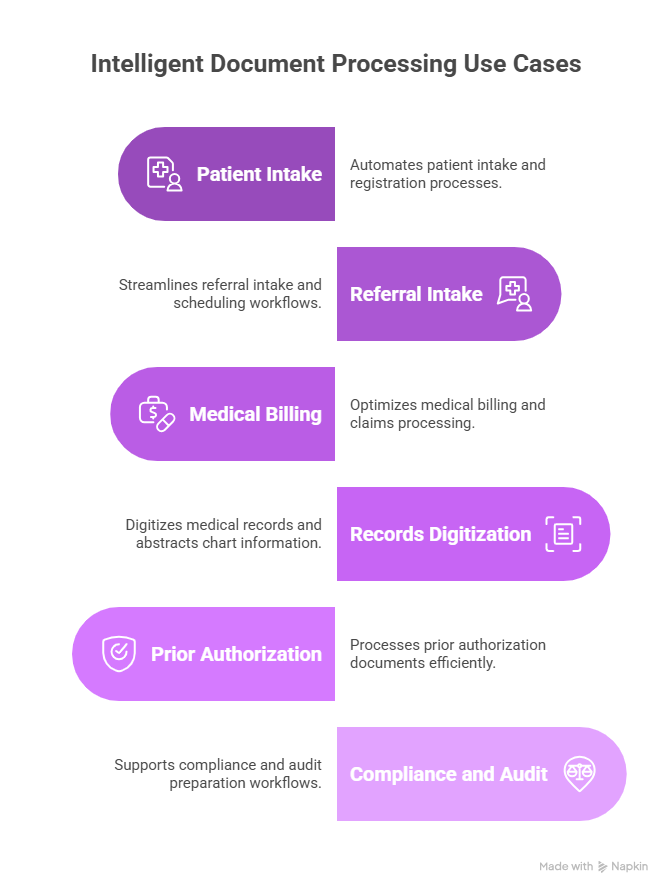
Patient Intake and Registration Automation
Automation reads registration forms and updates patient records. This helps Front desk staff avoid repetitive typing, and Patients move through intake faster.
Referral Intake and Scheduling Workflows
Referral documents arrive from physicians. IDP extracts key details such as diagnosis and requested services while scheduling teams receive structured data. This helps to arrange appointments quickly and efficiently.
Medical Billing and Claims Processing
Billing teams handle thousands of claims documents. Automation extracts claim details and sends them to billing systems directly.
CAQH’s summary also says automating claim status inquiries can save medical providers and staff up to 18 minutes per patient visit on average, largely by reducing manual calls and follow-up work with speedier claim submission.
Medical Records Digitization and Chart Abstraction
Medical records departments often digitize large archives for future review. IDP helps index these files, which makes them easily accessible.
Prior Authorization Document Processing
Authorization requests require supporting documentation. Automation extracts the necessary details on few clicks; this way, the request moves faster through the approval workflow.
Compliance and Audit Preparation Workflows
Healthcare organizations need to maintain document trails for audit generation. Automation here organizes documents and tracks processing steps for referencing.
Benefits of Intelligent Document Processing for Healthcare Organizations
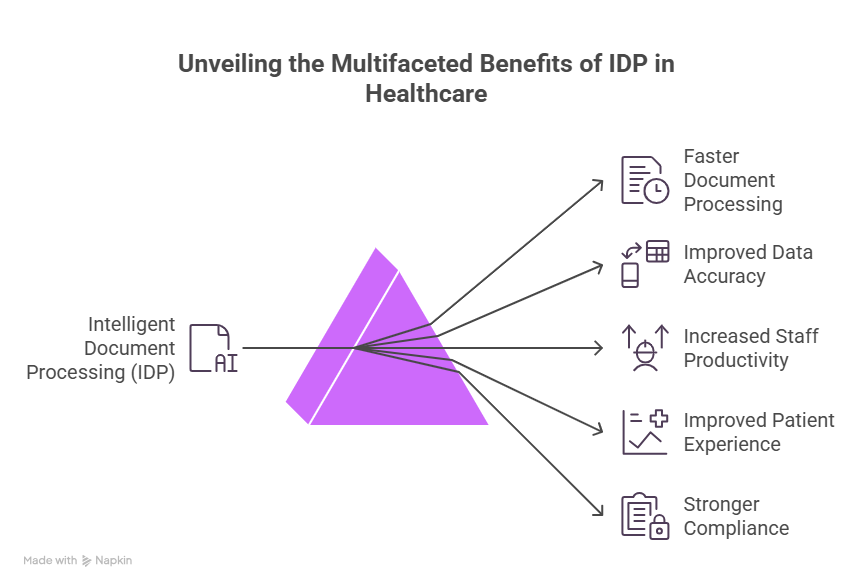
Every department in a healthcare organization handles documents daily. Data entry is slow, repetitive, and prone to mistakes that ripple through billing, scheduling, and patient care.
IDP in healthcare automates that process. Documents are read, extracted, and fed into the correct systems without manual intervention. Exceptions are flagged. The following benefits explain why healthcare teams are adopting document automation at scale.
Faster Document Processing and Reduced Turnaround Times
Manual document handling slows healthcare workflows. A referral may sit in an inbox waiting for someone to review it. A claim may remain unprocessed until a staff member enters the data. These delays affect scheduling, billing, and patient care.
IDP processes documents within seconds. The system reads the document, extracts the fields, and routes the data to the correct system. Staff do not need to open every file as they focus only on exceptions. Automation removes manual entry delays, and documents move through workflows quickly.
Improved Data Accuracy and Reduced Manual Errors
Manual typing creates mistakes. Staff may enter incorrect numbers. They may misread handwriting or skip fields when processing large document batches.
Even small mistakes cause problems. A wrong policy number can delay insurance reimbursement, or a missing field can trigger claim rejection. IDP reduces these risks. Extraction models read documents consistently, and human error drops significantly.
Increased Staff Productivity and Operational Efficiency
Healthcare teams spend many hours entering information from documents. Like front desk staff type patient details from intake forms, billing teams enter claim data from scanned paperwork, and medical records teams sort and index documents. These tasks consume valuable time. IDP removes much of that repetitive work. Staff shift from repetitive typing to exception handling while teams process more documents without increasing headcount.
Improved Patient Experience Through Faster Service
Patients feel the impact of slow document processing as delayed referrals can postpone treatment. Slow registration increases waiting time at clinics, and insurance delays may cause disagreements.
Automation speeds these processes. Patient information appears in systems faster, and scheduling teams receive referral data sooner. Billing systems process claims more quickly. They wait less for scheduling, referrals, and approvals. Operational speed improves patient satisfaction significantly.
Stronger Compliance and Audit Readiness
Healthcare organizations operate under strict documentation standards, where accurate records, secure data storage, and traceable workflows are regulatory requirements, not optional practices. Manual document handling makes meeting these standards difficult. Files get misfiled, data entry mistakes create incomplete records, and processing steps go unlogged.
IDP improves document governance by automating the audit trail. Every extraction, validation, and review step is recorded, giving organizations the clear data trails they need for regulatory inspections and compliance reporting.
Key Challenges in Healthcare Document Processing
Healthcare documents present several processing challenges.
Poor Scan Quality, Handwriting, and Document Noise
Handwritten notes and rescanned faxes are common in healthcare, and low-quality scans make extraction difficult. IDP addresses this through image processing and model training that removes background noise and straightens skewed pages, making handwritten records more accessible for classification than traditional OCR allows.
Mixed Document Packets and Missing Pages
Fax transmissions frequently bundle multiple document types into a single file, making manual splitting time-consuming. IDP uses document classification to identify where one document ends and another begins, automatically splitting the packet into individual files so a lab report never gets buried inside a patient registration file.
Cross-Document Data Mismatches
Data integrity breaks down when the same patient's name is spelled differently across an insurance card and a referral form. IDP acts as a cross-check layer, applying validation rules to flag these discrepancies immediately and preventing dirty data from entering the EHR, where it would otherwise cause billing denials or record duplication.
Compliance and Security Requirements
Data security in healthcare is a legal requirement. IDP in healthcare must comply with HIPAA standards, featuring end-to-end encryption and strict audit logs. Every extraction and human review is recorded with a full who, what, and when trail to support regulatory inspections.
Handling Exceptions and Model Drift Over Time.
Document formats change as insurers update templates and hospitals revise reporting layouts. IDP models require continuous retraining to keep pace. When a discrepancy is flagged and corrected by a reviewer, the system learns from that input and applies it to similar cases going forward.
Healthcare Interoperability and System Integration
Automation becomes valuable when it connects to healthcare systems. Automation that operates in isolation from existing platforms creates manual handoff points that undermine the efficiency gains the technology is designed to produce.
Integration with Electronic Health Records (EHR)
EHR systems are the central repository for patient data in any healthcare organization. IDP extracts information from incoming documents and updates the patient record automatically, ensuring that clinical teams always have accurate and current information without waiting for manual data entry to catch up.
Integration with Revenue Cycle Management systems
Billing teams depend on revenue cycle software to manage claims from submission to reimbursement. Automation feeds extracted claim data directly into these systems, reducing the gap between document arrival and billing action and keeping the revenue cycle moving without manual intervention.
HL7 and FHIR Standards for Data Exchange
Healthcare systems exchange data using structured standards including HL7 and FHIR. IDP platforms that support these standards ensure extracted data moves between systems accurately and securely, maintaining compatibility across EHR platforms, billing systems, and third-party applications.
Designing Document Workflows that Support Healthcare Systems
Successful IDP deployment in healthcare depends as much on workflow design as it does on extraction accuracy. Automation must align with how each department receives, processes, and routes documents. Organizations that map their existing workflows before deployment consistently achieve faster adoption and stronger operational results.
How to Evaluate an Intelligent Document Processing Solution for Healthcare
Selecting the right IDP solution requires evaluating performance, security, and operational fit before deployment.
Accuracy Measurement by Document Type
Accuracy varies across forms, faxes, and scanned records. Evaluation should measure extraction performance by document type, not just overall averages, since a solution may perform well on structured forms but poorly on handwritten notes.
Straight-through Processing Versus Exception Handling
High straight-through processing rates indicate strong automation performance. However, exception workflows must also be efficient. A solution that automates 90% of documents but creates a slow review queue for the remaining 10% still creates operational bottlenecks.
Validation Workflows and Reviewer Interfaces
Review screens should be clean and intuitive. Staff confirming flagged fields should be able to approve or correct data quickly without navigating complex interfaces, as a poor reviewer experience slows exception handling and reduces overall throughput.
Security, HIPAA controls, and Deployment Models
Any IDP solution handling patient data must meet HIPAA requirements. Evaluate access controls, encryption standards, audit logging, and whether the deployment model — cloud, on-premise, or hybrid — aligns with your organization's data governance policies.
Time-to-value and Operational Scalability
The solution should deliver measurable results within the first deployment phase. It must also scale as document volumes grow, without requiring significant re-configuration or additional infrastructure investment.
Implementation Checklist for Healthcare Document Automation
A structured rollout reduces deployment risk and accelerates time-to-value across healthcare document workflows.
Readiness Assessment for Healthcare Workflows
Identify departments with the highest document volumes and most repetitive data entry tasks. These are the workflows where automation delivers the fastest and most measurable impact.
Selecting the Right Pilot Use Case
Start with one well-defined workflow, such as patient intake or referral processing. A contained pilot produces clear performance data and builds internal confidence before broader rollout.
Defining Automation Success Metrics
Establish baseline metrics before deployment.
Track metrics such as:
- Processing time
- Accuracy
- Exception rates
Consistency across these metrics will help to know whether the performance improvements are measurable from day one.
Training Models and Feedback Loops
Human review does more than catch errors — it improves the model. Every correction made during exception review should feed back into the system, continuously improving extraction accuracy across all document types.
Scaling Automation Across Departments
After a successful pilot, expand automation to adjacent workflows using the same performance benchmarks. Scaling is faster when the first deployment is well-documented, and the review process is already established.
ROI and Business Case for Healthcare IDP
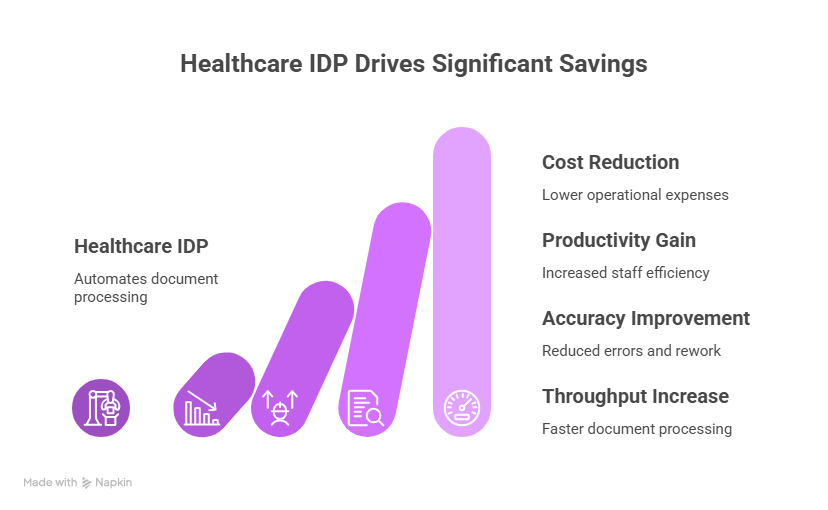
IDP in healthcare delivers measurable operational and financial improvements across administrative workflows.
Where Healthcare Organizations See the Biggest Savings
Labor savings are most visible in high-volume administrative workflows. Teams process significantly more documents without increasing headcount, reducing per-document processing costs across billing, intake, and records departments.
Measuring Accuracy, Throughput, and Operational Efficiency
Organizations should track processing speed, extraction accuracy, and review workload consistently. These three metrics together give a complete picture of automation performance and highlight where further optimization is needed.
Calculating Cost Reductions and Productivity Gains
Reduced manual entry lowers operational costs directly. Healthcare teams that handle larger document volumes without adding staff see measurable productivity gains that strengthen the financial case for continued automation investment.
Conclusion
Healthcare document workflows will only grow more complex. The volume of paperwork increases as patient numbers rise and compliance requirements expand. Manual processing cannot keep pace.
IDP in healthcare gives operations teams a practical path forward. Documents are captured, extracted, and routed automatically. Staff focuses on judgment calls, not data entry. Accuracy improves. Turnaround times drop. Organizations that adopt healthcare document automation today build the operational foundation for scalable, efficient care delivery tomorrow.
FAQs about Intelligent Document Processing in Healthcare
What is intelligent document processing in healthcare?
It is AI technology that reads healthcare documents and extracts data automatically.
How does IDP differ from OCR?
OCR reads text. IDP understands the document structure and extracts specific data fields.
What healthcare documents can be automated using IDP?
Examples include patient forms, referrals, claims documents, lab reports, and medical records.
Can IDP process handwritten medical forms?
Yes. Systems can process handwriting, though accuracy depends on document quality.
Is intelligent document processing HIPAA compliant?
Compliance depends on system architecture and security controls.
How does IDP integrate with EHR or EMR systems?
Extracted data flows into healthcare systems through APIs and workflow integrations.
How does IDP improve claims processing workflows?
Automation extracts claim fields and sends them directly into billing systems.
What KPIs should healthcare teams track when implementing IDP?
Common metrics include processing speed, accuracy rate, and exception workload.
What is a good first use case for healthcare document automation?
Patient intake or referral processing often provides fast results.
How much human review is required in IDP workflows?
Automation handles most documents. Humans review only uncertain cases.