- Enterprises use no-code automation to process unstructured documents like insurance claims, significantly reducing manual data entry and improving accuracy.
- Business analysts can now build sophisticated document processing pipelines using no-code automation, removing heavy dependence on busy IT departments.
- Implementing no-code automation streamlines high-volume document routing and validation, allowing teams to focus on business-critical tasks instead of paperwork.
Most document-heavy teams lose time because their tools don’t work well together. Teams often spend hours cross-checking invoice data, validating forms, routing approvals, and entering information into downstream systems or ERP platforms. By the time these tasks are done, very little time is left for work that actually drives business outcomes.
No-code document automation solves this problem. It allows underwriters, operations teams, finance departments, and business analysts to build automation workflows without writing any code. There is no need to depend on IT teams or wait for development cycles. Teams can move faster and process documents more efficiently.
This blog explains what no-code document automation is, why it matters in 2026, how to evaluate the right tool for your enterprise, and the best tools available today to help you get started.
What Is No-Code Document Automation?
No-code document automation refers to the use of platforms that allow non-technical users to automate document-heavy workflows through visual interfaces, drag-and-drop builders, and pre-built connectors. Like a claims processor building a workflow that automatically extracts data from a PDF, validates it against a database, and routes it for approval, all without involving a developer.
These platforms typically combine optical character recognition (OCR), AI-based data extraction, and workflow automation into a single interface. The result is that teams that once depended on developers to build every integration can now configure, test, and deploy automations themselves.
Significance Of No-Code Document Automation
Document automation is not a new idea; what is new is the accessibility.
According to a survey cited by Mendix, 84% of respondents say low-code empowers more people to be involved in the application development process. This involvement has a direct business impact. When the people who understand document workflows best (the ones actually processing claims, onboarding vendors, or handling loan applications) can build their own automations, accuracy improves and cycle times shrink.
The market reflects that momentum. The no-code AI platforms market was valued at USD 4.28 billion in 2024 and is projected to reach USD 44.15 billion by 2033, growing at a CAGR of 30.2% from 2025 to 2033, according to Grand View Research.
And on the developer side, the impact is just as significant. 80% of companies agree that low-code solutions help developers focus more on business-critical projects instead of spending time on simple tasks. Automation frees skilled technical teams to do harder work, while giving business teams the tools to handle their own processes.
Common Document Workflows That Benefit From No-Code Automation
Not every document process is a good candidate for automation, but most are. Here are the workflows where no-code tools deliver the most value.
Loan and mortgage applications
Financial services teams handle large volumes of documents under strict compliance requirements. Automating data extraction and validation helps reduce turnaround time and improve consistency across files.
Insurance claims intake
Insurance documents come in many formats and layouts. No-code automation tools extract relevant data automatically, allowing adjusters to focus on claim decisions rather than on manual data entry.
Invoice and purchase order processing
Finance teams often spend hours extracting vendor details, invoice amounts, line items, and due dates. Automating this process reduces repetitive work and improves processing speed.
Healthcare records and prior authorizations
Patient forms, referrals, and prior authorization documents require accurate extraction and fast routing. No-code tools reduce manual touchpoints without requiring EHR integrations to be rebuilt from scratch.
Contract and compliance review
Legal and compliance teams can automate the extraction of key clauses, dates, and parties for faster review cycles.
How To Evaluate A No-Code Document Automation Platform?
Picking the right platform is not just about features. It is about whether the tool actually fits the documents you process, the team using it, and the systems it needs to connect with. Here are the criteria that matter most before you commit.
Document Complexity And Layout Variability
Not all platforms are built to handle the same range of documents. If your team processes fixed-template invoices with consistent layouts, most tools will do the job. If you deal with insurance forms, medical records, or multi-page contracts where unstructured data is common across senders, you need a platform whose AI can adapt without requiring manual retraining every time a new layout appears.
Accuracy Benchmarks And Confidence Scoring
A document automation platform should show both extracted data and its confidence level. Field-level confidence scores help assess accuracy. Set thresholds to trigger human review when confidence is low. Platforms that provide clear accuracy metrics are easier to manage and audit than systems that operate as black boxes.
Integration With Your Existing Tech Stack
Extracted data must flow into systems where it can be used. Map your target systems, such as ERP, CRM, or claims platforms, before choosing a tool. Prefer platforms with pre-built integrations. Heavy reliance on tools can add complexity and reduce control.
Ease Of Use For Non-Technical Teams
The whole point of a no-code platform is that business users can operate it independently. Evaluate how much technical knowledge is actually required to set up a new document type, modify an existing workflow, or troubleshoot a failed extraction. If every configuration change requires a call to the vendor or an internal IT resource, the platform is not truly no-code in practice.
Security, Compliance, And Data Handling
Documents processed through automation platforms often contain sensitive data, patient records, financial information, and personally identifiable details. Before signing a contract, confirm the platform's data residency policies, encryption standards, and compliance certifications relevant to your industry, whether that is HIPAA for healthcare, SOC 2 for general enterprise use, or regional data protection regulations.
Scalability And Pricing Model At Volume
A platform that works well at 500 documents a month may behave very differently at 50,000. Understand how the pricing model scales with volume, whether costs are per page, per document, per user, or based on API calls, and model out what the cost looks like at your projected scale. Also, ask how model performance holds as volume grows, since some platforms degrade in accuracy when processing loads increase significantly.
Vendor Support And Onboarding Experience
Onboarding quality is critical in document automation because setup requires domain-specific configuration. Check implementation timelines, availability of dedicated onboarding support, and post-launch issue handling. Strong vendor support reduces risk and ensures smooth operations. A vendor that offers limited support after deployment can create problems for ongoing production workflows.
Best No-Code Document Automation Tools In 2026
Here is a look at the strongest platforms available today.
1. Infrrd

Infrrd is an AI-powered Intelligent Document Processing platform built specifically for enterprises that process large volumes of complex documents. It is not a general automation tool with document features bolted on. Document understanding is its core function.
Infrrd handles structured, semi-structured, and unstructured documents with high accuracy, including forms, invoices, engineering drawings, and insurance documents. Its AI models are trained on document-specific data, which means they perform well out of the box and improve over time as they process more of a team's specific document types.
Key features:
- AI-based extraction that handles tables, handwritten fields, and multi-layout documents
- No-code workflow builder for routing, validation, and exception handling
- Pre-built connectors for ERP, CRM, and claims management systems
- Human-in-the-loop review for low-confidence extractions, keeping accuracy high without removing human judgment
- SLA-backed accuracy with measurable performance guarantees
Where Infrrd stands out: Most document automation platforms require significant setup and ongoing model tuning. Infrrd's platform is built to reach production accuracy faster, and its human-in-the-loop layer handles edge cases without breaking the broader workflow. For high-volume, high-stakes document processing in insurance, mortgage, and financial services, that combination is hard to replicate.
Pros:
- Strong accuracy on complex, unstructured documents
- Designed for enterprise scale from the ground up
- Human review layer keeps accuracy accountable, beyond what algorithms alone can guarantee
- Domain expertise in insurance, mortgage, and financial services
Cons:
- Best suited for high-volume enterprise use cases; smaller teams may find the platform more than they need
Pricing: Custom pricing based on volume and use case.
2. ABBYY FlexiCapture
ABBYY FlexiCapture is a document capture and processing platform with a long track record in enterprise environments. It supports both structured and semi-structured document types and is used across finance, legal, and government sectors.
Key features:
- OCR and intelligent data extraction across document types
- Workflow automation for routing and validation
- Supports on-premise and cloud deployment
- Verification and exception handling tools for quality control
Pros:
- Mature platform with enterprise-grade reliability
- Strong OCR accuracy, particularly for high-quality scanned documents
- Flexible deployment options
Cons:
- Setup and configuration require technical expertise, less no-code friendly than some alternatives
- Older interface compared to newer platforms
- Higher cost and longer implementation timelines for complex setups
Pricing: Custom pricing. Typically positioned for enterprise-scale deployments.
3. Microsoft Power Automate
Microsoft Power Automate is a broad workflow automation platform that includes an AI Builder module for document processing. For organizations already using Microsoft 365, it is a natural entry point into no-code automation.
Key features:
- AI Builder for form processing, invoice extraction, and receipt scanning
- Deep integration with SharePoint, Outlook, Teams, and Dynamics 365
- Pre-built connectors for hundreds of third-party applications
- Low-code flow builder for end-to-end workflow automation
Pros:
- Strong fit for Microsoft-heavy environments
- Wide connector library across business applications
- AI Builder covers basic document extraction use cases
Cons:
- Document AI features can require additional AI Builder credits beyond base licensing
- For complex or unstructured documents, accuracy is more variable than purpose-built platforms
- Can get expensive at scale, depending on licensing structure
Pricing: Included with some Microsoft 365 plans. Power Automate standalone plans available as well. AI Builder credits are separate.
4. Parseur
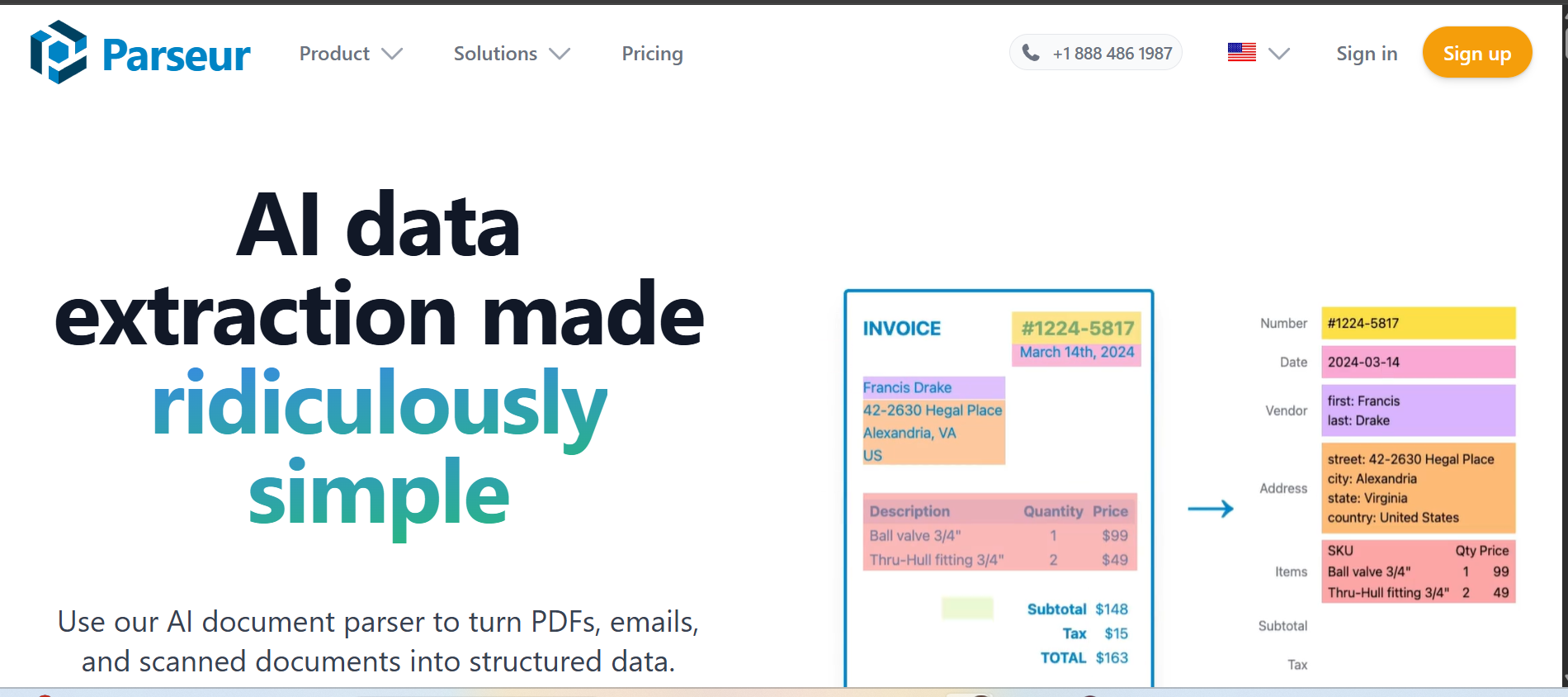
Parseur is a no-code data extraction tool focused on parsing structured data from emails and documents. It works particularly well for teams processing incoming emails with consistent attachment formats, such as order confirmations, booking notifications, or supplier invoices.
Key features:
- Email parsing with template-based extraction
- PDF and document parsing for structured layouts
- Zapier and Make integrations for workflow automation
- Point-and-click template builder, no coding required
Pros:
- Quick setup for email-heavy workflows
- An intuitive interface that non-technical users can learn fast
- Good integration library
Cons:
- Less effective on complex, unstructured, or handwritten documents
- Template-based approach requires manual setup for each new document layout
Pricing: Free tier available. Paid plans with higher tiers for larger volumes.
5. Docparser

Docparser is a document parsing platform that extracts data from PDFs and scanned documents using rule-based parsing rules. It is designed for teams with predictable document formats, like fixed-template invoices or standardized contracts.
Key features:
- Rule-based parsing for PDFs and images
- Zonal OCR and keyword-based extraction
- Integrations with Google Sheets, Salesforce, Zapier, and more
- Parsing rules can be configured without code
Pros:
- Reliable for consistent document formats
- Good integration options with common business tools
- Reasonable pricing for small to mid-size teams
Cons:
- A rule-based approach means new layouts require new rules
- Less adaptable to highly variable or unstructured documents
Pricing: Enterprise pricing available on request.
6. Amazon Textract
Amazon Textract is a machine learning service from AWS that extracts text, tables, and form data from documents. It is an API-first service designed for developers, though it can be connected to no-code tools via integrations.
Key features:
- Extracts printed and handwritten text from scanned documents
- Table and form extraction with structure preservation
- Integrates with other AWS services (S3, Lambda, Step Functions)
- Pay-per-use pricing model
Pros:
- Strong OCR and table extraction capabilities
- Scales easily on AWS infrastructure
- Flexible for teams with technical resources to build on top of it
Cons:
- Developer-oriented: not a no-code tool in the traditional sense
- Requires AWS setup and technical configuration
- Does not include built-in workflow automation or routing
Pricing: Pay-per-page pricing. Costs vary by document type and volume. Free tier available for limited usage.
Tool Comparison At A Glance
Implementation Checklist
Getting a no-code document automation platform live is not just a technical exercise. The teams that get it right treat implementation as a phased process with clear milestones at each stage.
Readiness Assessment
Before starting, review your current setup. List document types and group them by volume, variability, and destination. Identify high-impact workflows based on time spent and error rates. Ensure target systems have accessible APIs or connectors. Confirm user permissions. A clear starting point helps avoid scope creep during implementation.
Pilot Setup
Start with one document type and one workflow. Choose a high-volume, low-risk process. Configure extraction rules, set confidence thresholds, and define a human review path for low-confidence data. Test with real documents, measure accuracy, and review exceptions. Refine the setup before scaling. A focused pilot provides data and proof for broader rollout.
Rollout Strategy
Start with one document type and one workflow. Choose a high-volume, low-risk process. Configure extraction rules, set confidence thresholds, and define a human review path for low-confidence data. Test with real documents, measure accuracy, and review exceptions. Refine the setup before scaling. A focused pilot provides data and proof for broader rollout.
How Infrrd Handles No-Code Document Automation For Complex Enterprises
Most automation platforms are built for predictable documents. Infrrd is built for the ones that are not.
AI Models Trained On Document-Specific Data
Infrrd's extraction engine is not a generic OCR layer. Its AI models are trained on domain-specific document types, which means an insurance team processing ACORD forms or an FNOL document gets a model that already understands the structure, field variations, and edge cases common in those documents. That reduces setup time and improves day-one accuracy.
No-Code Workflow Configuration
Infrrd's workflow builder lets operations teams configure extraction rules, validation logic, routing conditions, and exception escalations without writing code. A claims team can set up a workflow where documents below a certain confidence threshold automatically go to a human reviewer, while high-confidence extractions route directly to the system of record.
Human-In-The-Loop For Accuracy That Holds At Scale
Infrrd includes a structured human review layer for extractions that fall below confidence thresholds. This is a built-in quality mechanism, not an afterthought. It keeps accuracy consistent even as document volumes grow and layouts change. Teams get the speed of automation without giving up accountability.
Purpose-Built For High-Stakes Verticals
Infrrd's platform is used across insurance, mortgage, financial services, and logistics sectors where document errors have real consequences. Its SLA-backed accuracy model ties performance to measurable outcomes, not just a software license.
Conclusion
No-code document automation has moved from a nice-to-have to a practical necessity for teams dealing with high document volumes. The tools available today are genuinely capable, and the gap between what a business analyst can configure and what previously required a developer has narrowed considerably.
The right platform depends on what your documents look like and how much variability you need to handle. For teams processing predictable formats, simpler tools like Parseur or Docparser get the job done. For enterprises dealing with complex, unstructured, or high-stakes documents at volume, a platform purpose-built for that challenge makes a measurable difference.
FAQs About No-Code Document Automation
What is no-code document automation?
No-code document automation is the use of AI and workflow platforms to extract, validate, and route data from documents without requiring technical development. Business teams configure and manage these workflows through visual interfaces.
Can no-code tools handle unstructured documents?
It depends on the platform. Rule-based tools struggle with variable layouts. AI-powered platforms like Infrrd are designed to handle unstructured and semi-structured documents accurately, including handwritten fields and complex tables.
What types of documents can be automated without code?
Invoices, purchase orders, insurance claims, loan applications, medical forms, contracts, and shipping documents are commonly automated. The right tool depends on how variable the document layouts are.
How accurate is no-code document extraction?
Accuracy varies by tool and document complexity. Enterprise platforms with AI-based extraction and human-in-the-loop review can reach well-defined document types. Accuracy on complex or highly variable documents depends heavily on the platform's AI capabilities.
Is no-code document automation suitable for regulated industries?
Yes, and it is increasingly common in insurance, healthcare, and financial services. Platforms built for these industries include audit trails, validation rules, and human review steps that meet compliance requirements.
How long does it take to set up a no-code document automation workflow?
Simple workflows with consistent document formats can be configured in hours. More complex setups involving multiple document types, routing logic, and system integrations typically take days to weeks, depending on the platform.
What is the difference between no-code and low-code document automation?
No-code tools require no programming and are designed for business users. Low-code tools offer more customization but require some technical knowledge. Many platforms sit on a spectrum, with visual builders for most tasks and code-level access for advanced configurations.
How does no-code document automation connect to other business systems?
Most platforms include pre-built connectors for common ERP, CRM, and workflow systems. Some rely on integration tools for broader connectivity.