- Logistics document processing refers to the collection, validation, extraction, and routing of documents that move alongside physical goods in a supply chain
- Every logistics operation functions on a foundation of critical documentation, making logistics document processing a central part of daily operations.
- The operational benefits of automation are consistent across company sizes and logistics types.
Every logistics operation functions on a foundation of complex paperwork, making logistics document processing a central part of daily operations. This includes bills of lading, customs declarations, freight invoices, certificates of origin, and packing lists. These are not just formal documents. They act as the legal and operational backbone of global trade. Despite their importance, manual processing remains slow, error-prone, and expensive for most logistics providers.
The primary challenge is not a lack of optimization but a reliance on legacy manual workflows that have persisted for decades. As global supply chains expand across more borders and involve more carriers, the volume of paperwork compounds. Consequently, companies that develop efficient processing systems gain a measurable competitive advantage, while those that fail to adapt incur high operational costs and an advancement gap.
This guide explores the core components of logistics document processing, identifies the common points of failure, and demonstrates how automation is transforming the industry.
What Is Logistics Document Processing?
Logistics document processing refers to the collection, validation, extraction, and routing of documents that move alongside physical goods in a supply chain. These documents confirm what is being shipped, by whom, to where, under what terms, and at what cost.
It is not a single isolated task; rather, it is a continuous cycle that spans the entire supply chain, from a driver securing a signed delivery receipt to a customs official clearing an import declaration. The specific documents required fluctuate significantly based on shipment type, trade lanes, carrier requirements, multi-modal transportation, and shifting regulatory jurisdictions.
This process functions as a paperwork layer that runs parallel to the physical movement of goods. While freight moves through warehouses, ports, and trucks, the corresponding documentation moves through email inboxes, digital portals, fax machines, and filing cabinets. Maintaining synchronicity between these two layers is critical: when data and cargo remain aligned, shipments clear on schedule. When they diverge, freight sits idle, leading to costly delays.
Key Documents in Logistics Operations
Understanding logistics document processing starts with knowing which documents are actually in play. Each has a distinct function and a distinct set of fields that need to be captured accurately.
Each document arrives in a different format. They arrive in PDFs, scanned images, and handwritten; some are generated by shipper systems that don't talk to carrier systems. The lack of standardization is one of the core reasons logistics document processing remains difficult to automate at scale.
Why Logistics Document Processing Is The Need Of The Hour For Logistics Operations?
The financial stakes are not abstract. Research shows that up to 20% of total transportation costs can be tied to document processing inefficiencies, including trade documentation and paperwork handling. At scale, that is a significant drag on margins that most logistics operators would prefer to direct elsewhere.
The opportunity is equally concrete. According to McKinsey, digitizing documents like bills of lading could unlock $6.5 billion in direct cost savings annually and release $30–40 billion in additional global trade value by enabling faster clearance, fewer disputes, and reduced working capital requirements.
The gap between where most companies are and where these numbers suggest they could be is the business case for taking document processing seriously.
What Is Logistics Document Processing Workflow?
In a manual environment, the process follows a predictable sequence. Understanding it is useful because automation does not eliminate these steps. It accelerates and error-proofs them.
Step 1: Document Receipt and Intake
Documents arrive through multiple channels at the same time, including email, carrier portals, EDI feeds, fax, and physical delivery. Operations teams must gather these documents, verify completeness, and route them to the appropriate stakeholders. In high-volume environments, this intake process can consume significant time and create early-stage bottlenecks.
Step 2: Classification and Sorting
Not all documents follow the same workflow. A proof of delivery is routed to finance, a customs declaration to compliance, and a freight invoice to accounts payable. Accurate and timely classification is essential. Misrouted documents can delay customs clearance, disrupt payment cycles, and impact overall operational efficiency.
Step 3: Data Extraction
This is the most labor-intensive step. Teams manually open documents, identify key fields, and enter data into systems such as TMS, ERP, or customs platforms. Common fields include shipment number, cargo weight, declared value, country of origin, and Harmonized System (HS) codes. Even minor errors can have serious consequences; an incorrect HS code may trigger a customs hold, while a wrong declared value can lead to compliance issues. Accuracy is essential.
Step 4: Validation and Cross-Checking
Extracted data must be verified against multiple documents. Teams check whether the bill of lading matches the packing list, whether the invoice aligns with agreed rates, and whether all required documents are present for the destination country.
This step requires reviewing multiple documents simultaneously and identifying inconsistencies, which is time-consuming and prone to error.
Step 5: Approval and Routing
After validation, documents move to the next stage: customs submission, payment approval, or internal processing.
Although this step appears straightforward, delays often occur due to multiple approval layers or coordination across different teams.
Step 6: Archival and Compliance Storage
Logistics documents carry legal retention requirements. Customs records, for example, often need to be retained for five to seven years, depending on jurisdiction. Documents need to be stored in a way that makes them retrievable on demand, whether for audits, disputes, or carrier claims.
Why Logistics Document Processing Breaks Down?
Manual processing at volume is where logistics operations feel the most pain. The challenges are not caused by any single failure. They accumulate.
High Document Volume and Variability
A mid-size freight forwarder might process thousands of shipment documents per week. Each carrier formats its BOL differently. Each country has different customs form requirements. There is no universal template, which means every document requires human interpretation.
Data Entry Errors Under Time Pressure
Logistics operations run on strict timelines. Clearance windows, vessel cut-off times, and delivery commitments leave little room for delays. When teams work under pressure, data entry errors increase. Common issues include transposed numbers, missing fields, and incorrect unit entries. These errors often go unnoticed until they disrupt downstream processes such as customs clearance, billing, or delivery.
Fragmented Systems and No Single Source of Truth
Logistics environments rely on multiple systems, including TMS, ERP platforms, customs software, and carrier portals. These systems often do not integrate seamlessly. As a result, teams manually re-enter data from one system into another. Each manual transfer increases the risk of errors and inconsistencies. Without a single source of truth, it becomes difficult to maintain accurate, synchronized data across workflows.
Compliance and Regulatory Complexity
Trade documentation is both operational and legal. It must follow rules related to customs declarations, trade sanctions screening, and tariff eligibility. These rules vary by country and change often. Manual processes cannot keep up with these updates. This increases the risk of compliance errors.
Dispute Resolution Delays
When a cargo claim or invoice dispute arises, resolving it requires pulling the original documents and tracing the chain of events. In manual environments, this is time-consuming and sometimes impossible if documents were filed inconsistently or are difficult to retrieve.
How Automation Transforms Logistics Document Processing?

Intelligent Document Processing (IDP) applies AI and machine learning to extract, classify, and validate document data without requiring a human to open each file. It is the core technology behind modern logistics document automation.
IDP does not rely on fixed templates. Unlike older OCR tools that required documents to follow a precise format, IDP models are trained on diverse document types and can handle variation in layout, handwriting, language, and structure.
Automated Document Classification
An IDP platform can receive a batch of incoming documents and classify each one correctly (bill of lading, customs invoice, proof of delivery) without manual sorting. This alone removes a significant upstream bottleneck.
AI-Powered Data Extraction
Once classified, the platform extracts the relevant fields from each document. For a BOL, that means shipment number, carrier details, port of loading, port of discharge, cargo description, and weight. For a commercial invoice, it means line items, currency, declared value, and HS codes.
Extraction happens in seconds. Accuracy rates for trained models typically exceed what manual teams achieve under volume and time pressure.
Automated Validation and Exception Flagging
Extracted data is automatically validated against predefined business rules. For example, weight mismatches between the bill of lading (BOL) and the packing list are flagged in real time. Missing required fields for customs submissions are identified before submission. Invoice amounts that fall outside agreed rate tolerances are automatically routed for review.
This approach ensures that errors are detected early, reducing the risk of delays, compliance issues, and rework across logistics workflows.
Human attention shifts from routine checking to exception handling, which is a more productive use of operational expertise.
System Integration and Straight-Through Processing
Validated data flows directly into the TMS, ERP, or customs platform via API or integration layer. No re-entry. No manual upload. Documents that clear validation move through the process without touching a human queue.
Benefits of Automating Logistics Document Processing
The operational benefits of automation are consistent across company sizes and logistics types.
Faster Clearance and Fewer Delays
Documents processed and submitted faster mean customs clearances happen closer to the earliest available window. When a BOL or customs declaration clears validation in seconds rather than hours, the shipment moves. Freight sits less often, and downstream delivery commitments become easier to keep.
Lower Error Rates
AI extraction and automated validation catch errors that manual review misses under time pressure. Transposed digits, missing HS codes, and mismatched weights get flagged before they reach customs or the carrier. This reduces holds, invoice disputes, and the operational drag that comes with correcting avoidable mistakes.
Reduced Cost Per Document
Automating high-volume, repetitive document tasks allows operations teams to handle more shipments without adding headcount at the same rate. The cost per document processed drops as volume scales, which improves unit economics across the entire logistics operation.
Audit-Ready Records
Documents stored systematically with consistent metadata are easier to retrieve for compliance audits, dispute resolution, and trade finance purposes. When a customs authority or client requests records from two years ago, the answer takes minutes, not days of searching through archived email threads.
Scalability Without Proportional Staffing Increases
Manual document processing teams have a natural capacity limit. As document volume increases, performance slows, and backlogs build. An automated platform scales with demand. It can handle volume spikes during peak seasons, new trade lanes, or expanded carrier networks without requiring additional staffing. This means organizations can grow shipment volumes without a proportional increase in document processing headcount, improving efficiency and reducing operational costs.
What To Check For While Implementing Logistics Document Processing In The Workflow?
Automation delivers results when it starts with a clear scope and measurable targets. Teams that attempt to automate everything at once often face delays due to complexity. A structured, phased approach delivers faster and more reliable outcomes.
Choose One Workflow, Not Every Document at Once
Start with a single, high-volume document type where errors are frequent, and the downstream cost is clear. Bills of lading or freight invoices are common starting points. Proving value on one workflow before expanding builds internal confidence and surfaces integration issues early, before they affect the entire operation.
Audit Volumes, Sources, Exception Types, and SLAs
Before selecting a platform or configuring automation, assess your current document environment.
Key questions to answer:
- How many documents arrive each day?
- Through which channels (email, EDI, portals)?
- What exception types cause the most delays?
- What SLA commitments apply to each document type?
This audit defines both platform requirements and success criteria.
Success Metrics: Throughput, Exception Rate, Touchless Rate, Turnaround Time
Set measurable goals before starting the pilot.
Key metrics for logistics document automation include:
- Throughput: Documents processed per hour
- Exception Rate: Percentage requiring human review
- Touchless Rate: Percentage processed end-to-end without intervention
- Turnaround Time: Time from document receipt to system entry
Clear metrics ensure objective evaluation and accountability.
Pilot, Measure, Refine, and Scale
Begin with a controlled pilot using real documents.
Measure performance against defined metrics.
Identify:
- Where accuracy drops
- Which document formats cause failures
- Where validation rules need adjustment
Refine the system before scaling. Skipping this step often results in automating inefficiencies instead of eliminating them.
ROI And Business Case For Logistics Document Processing
Logistics teams understand that document processing is costly, but quantifying the exact impact requires structured analysis. Automation delivers measurable returns across multiple cost areas, making it easier to build a strong business case.
Where Savings Actually Show Up
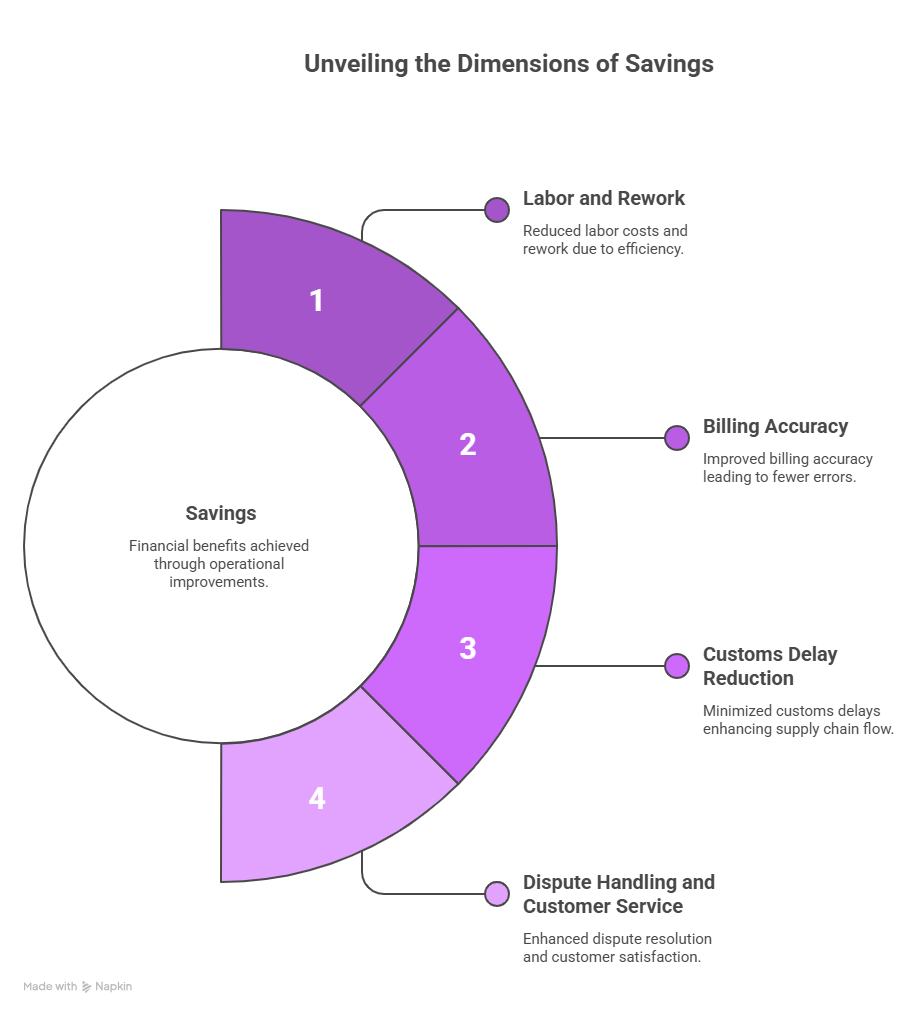
The financial return from logistics document automation is not speculative. It comes from specific, traceable cost reductions across several parts of the operation.
Labor and Rework
The most visible saving is in the hours spent manually opening, reading, entering, and re-checking documents. For a team processing thousands of shipments per week, this can represent a significant portion of operational headcount. Automation does not eliminate the team, but it shifts their time from data entry to exception handling and higher-value work. Rework costs drop when extraction accuracy is high, and validation catches errors at the source rather than downstream.
Billing Accuracy
Freight invoice errors are common and costly. These include incorrect rates, duplicate invoices, and wrong accessorial charges. Automated validation against contracted rates identifies discrepancies before payment. This reduces overbilling and minimizes time spent on post-payment disputes.
Customs Delay Reduction
Customs holds are expensive. Demurrage, storage charges, and expedited handling fees accumulate quickly when a shipment is held because of a missing field or incorrect declared value. Automation that validates customs documents before submission reduces the frequency of holds and the cost that comes with them.
Dispute Handling and Customer Service
When a consignee disputes a delivery or a carrier raises a claim, resolving it requires retrieving and reviewing the original documents quickly. Manual document environments make this slow and labor-intensive. Automated systems with consistent archival and searchable records reduce the time spent on dispute resolution and the customer service cost that goes with it.
How to Calculate Payback Without Inflated Assumptions
Build the business case using verifiable data, not optimistic projections.
Start with:
- The number of documents processed weekly
- The fully loaded cost of staff handling these documents
- Historical costs of errors, including delays, disputes, and rework
Compare these against platform and implementation cost, and use conservative assumptions for throughput, and exclude benefits that are difficult to quantify early. Teams that follow this approach typically meet or exceed expectations, while inflated projections often lead to missed targets and internal scrutiny.
How Infrrd Helps Automate Logistics Document Processing?
Infrrd brings intelligent document processing specifically to logistics workflows, handling the document types and data requirements that make this industry difficult to automate with generic tools.
Multi-Format Document Handling
Infrrd processes bills of lading, customs invoices, freight invoices, packing lists, and certificates of origin regardless of how they arrive. Scanned images, native PDFs, photographed documents, and mixed-format batches are all handled within the same workflow. This way, teams do not need to pre-sort or convert documents before processing.
High-Accuracy Extraction on Complex Layouts
Logistics documents are highly variable and often unstructured. Carrier bill of lading (BOL) formats differ across providers. Handwritten entries are common in delivery receipts and warehouse documents. Multi-page customs packets include nested tables and inconsistent field labels. Infrrd’s models are trained to handle this variability. They maintain high extraction accuracy even on complex layouts that typically fail with template-based OCR systems.
Validation Against Business Rules
Infrrd applies configurable validation rules at the extraction stage. Weight mismatches, missing HS codes, currency inconsistencies, and incomplete consignee details are caught automatically. Exceptions are routed for human review with context, so operators resolve issues rather than hunt for them.
Integration With Logistics Systems
Extracted and validated data flows directly to TMS, ERP, and customs platforms. Infrrd supports standard integration protocols and can work within existing tech stacks without requiring a full infrastructure replacement. This means logistics teams capture automation benefits without a multi-year implementation cycle.
Case Study
A global logistics company improved efficiency and visibility by adopting Infrrd’s Intelligent Document Processing (IDP).
Challenges
The company faced limited document access, diverse formats, manual errors, and poor visibility. Legacy workflows slowed operations, increased costs, and made scaling logistics processes complex across growing global supply chains.
Solution
They implemented Infrrd’s AI-powered IDP to automate document processing, enable real-time data access, ensure compliance through validation, and create scalable workflows that improved efficiency without increasing team size.
Results
- 60% reduction in operational costs
- 95% data accuracy in document processing
- Faster processing speed with near real-time data extraction
- Improved scalability without increasing headcount
- Enhanced compliance and reduced legal risks
- Better visibility and transparency across logistics operations
This transformation helped the company move from manual, error-prone workflows to a streamlined, AI-powered logistics operation—unlocking efficiency, accuracy, and scalability at scale.
To know more about how Infrrd did this, read the customer story: Logistics Document Processing Strategy.
Conclusion
Logistics document processing is one of the least glamorous parts of supply chain operations and one of the most consequential. The documents that accompany a shipment determine whether it clears customs, gets paid on time, and creates a clean audit trail. When that process runs manually at scale, errors compound and costs accumulate quietly.
Automation through intelligent document processing removes the bottlenecks without removing the oversight. Data gets extracted faster, validated more consistently, and routed to the right systems without a human touching every file. For logistics companies managing growing volumes and tightening margins, that is a concrete operational improvement worth pursuing.
FAQs About Logistics Document Processing
What is logistics document processing?
It refers to collecting, extracting data from, validating, and routing the documents that accompany shipments in a supply chain. These include bills of lading, customs declarations, freight invoices, and proof of delivery records.
Why is document processing in logistics so difficult to automate?
The main challenge is format variability. Each carrier, shipper, and country uses different document layouts, field names, and structures. Template-based tools require a fixed format to work. AI-based IDP systems handle the variation more effectively.
What is a bill of lading, and why does it matter?
A bill of lading is the legal contract between a shipper and a carrier. It documents what is being transported, from where, to where, and under what conditions. Errors on a BOL can delay clearance, create liability disputes, and complicate cargo claims.
How much does poor document processing cost logistics companies?
Up to 20% of total transportation costs can be tied to document processing inefficiencies, making it a significant but often overlooked cost center.
What is intelligent document processing (IDP) in logistics?
IDP uses AI and machine learning to classify documents, extract data from them, and validate that data against business rules, all automatically, without a fixed template. It handles the format variability that makes logistics documents difficult to process with older OCR tools.
How long does it take to automate logistics document processing?
It depends on document volume, system complexity, and the number of document types in scope. Platforms like Infrrd can integrate with existing logistics systems without a full infrastructure overhaul, which reduces implementation time.